
The first release of Simcenter STAR-CCM+ for this year, version 2602, has many new pre-processing features to explore. In this blog post you find CAD and mesh updates which we at Volupe hope you find handy in your daily work as a CFD engineer.
Summary of features mentioned in this blog post:
- Logo removal in 3D-CAD
- Assembly constraints for parameterized bodies
- Directed mesher updates – quality enhancement and automatic surface selection
- Tessellation selection for Boolean operations
- Prism layer quality improvements
- Virtual body updates
Logo removal in 3D-CAD
When importing geometries into Simcenter STAR-CCM+, we always recommend importing them directly into 3D-CAD. Preparing the computational domain can sometimes be a long process, with closing gaps and cleaning the geometry from unnecessary features. Logos are one of these features that are often unnecessary to resolve and therefore removed manually. To save time from these kinds of processes, automatic removal of embossed/debossed details (like logos) is now available.
“Remove logos” is a body operation in 3D-CAD, where filtering on logo height and size is possible to ensure that you can customize your removal. Preview modes for successful and unsuccessful removals will help you understand what the software has identified as logos. In the video below you can see how to use this new feature, and remove unwanted details easily – with very few clicks compared to manually removing the logos.
Assembly constraints for parameterized bodies
From version 2602 and onward you will be able to specify geometrical constraints for position and alignment of bodies relative to each other. The satisfactory animation below shows an assembly with constraints for your parameterized bodies. Meaning, even during dimension and/or feature changes, the constraints are maintained. You can combine newly created components in 3D-CAD with imported models and set your constraints within a new assembly. This results in the fact that we are now less dependent on external CAD tools since you can assemble your components within 3D-CAD instead.
Directed mesher updates
The directed mesher is a great tool to create high quality meshes by sweeping surface meshes. In version 2602 we have both quality improvements and automatic surface selection introduced.
Starting with the mesh quality enhancements, there is now an enable-button to “Enhance cell quality”. Since more complex shapes, like thin and curved narrow channels, are more commonly used together with directed meshing – the demand for higher quality and more robust meshing is needed. The quality enhancement minimizes misalignment of mesh vertices on guiding edges, resulting in less skewed cells. Enabling this setting also generates a mesh that is less prone to obtain negative volume cells.
Note that this setting is not enabled as default, to obtain identical mesh when loading in and remeshing in simulations from old versions. Therefore you must enabled this setting manually (for now).
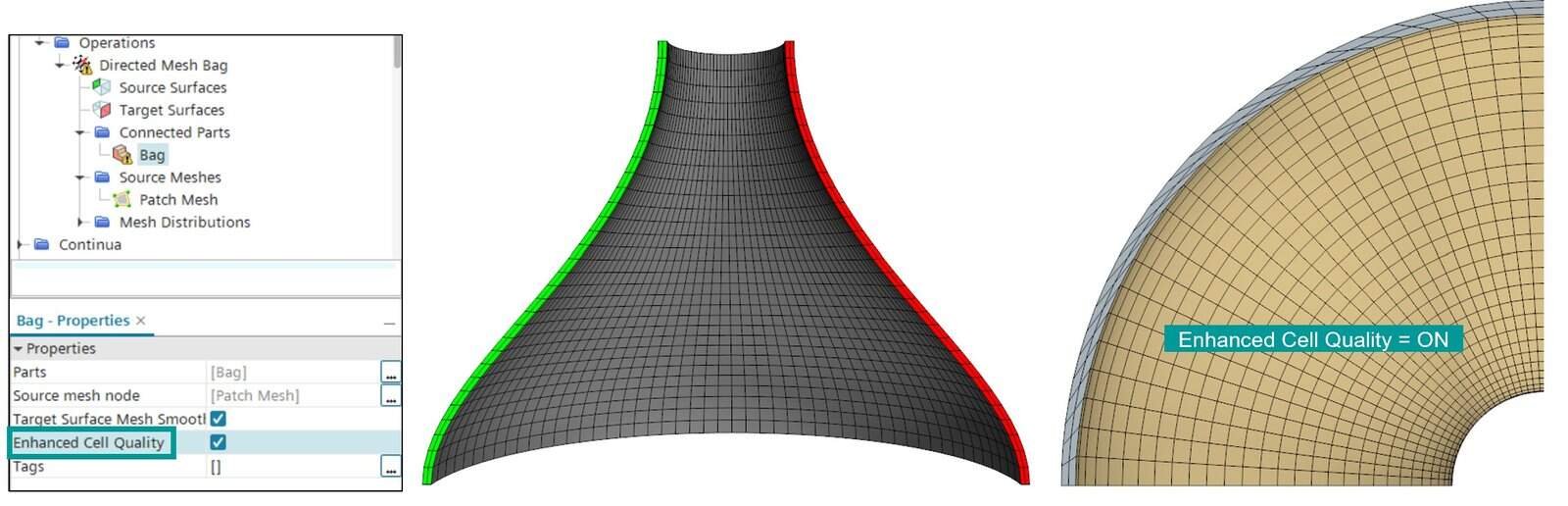
The other new feature for directed mesher in version 2602 will both save setup time and ease identifying your target and source surfaces. Automatic surface selection is fast and even helps you identify which surfaces you have the possibility to use as directed mesher input. By auto-populating the target and source surfaces you get an indication by color, showing which surface is target and which is source. In the video below you can see that even complex and unsymmetric geometries can utilize this automatic feature and save both time and number of clicks for you as a user. The only requirement for automatic selection is that these surfaces are split into different surfaces (with differnt names), but that would be needed either way.
Previous Volupe blog posts for directed meshing:
https://volupe.com/simcenter-star-ccm/directed-meshing-in-simcenter-star-ccm/
Honorable mentions
As always, we must include some honorable mentions as well.
Tessellation selection for Boolean operations: For Boolean operations (Unite, Subtract, Intersect, Imprint, Slice), the facet tessellation density (resolution) is now possible to specify in 3D-CAD.
Prism layer quality improvements: At the Prism layer mesher node in the Automated mesh operation you can now enable Enhanced quality prisms. This will give you less retraction and smoother prism-to-core transition, and it uses a built-in aspect ratio control.
Virtual body updates: The time scheme can now be set to 2nd order (you can enable this setting in the continua). For transient flow, the fidelity is increased. And when it comes to solver time for DFBI simulations, it is sped up as well.
Thank you for reading our blog and we hope that the features will be useful for you. Feel free to reach out to support@volupe.com if you have any questions.
Author
Christoffer Johansson, M.Sc.
support@volupe.com
+46764479945