
Both of this year’s Simcenter FLOEFD releases are now available. The newest release, 2512, has been available for download at Siemens Support center since last Friday. In this Volupe blog post we are summarizing the highlights from the new features of version 2506 and 2512 of Simcenter FLOEFD.
In this blog post the features described are:
- Sealing for internal flow simulations
- Henyey-Greenstein phase function for optic scattering
- Coupled fluid-thermal-structural simulations
Honorable mentions:
- Project parameters from components
- Faster calculations with two-resistor models
- FloThermXT projects compatible with FLOEFD for Catia
Sealing for internal flow simulations
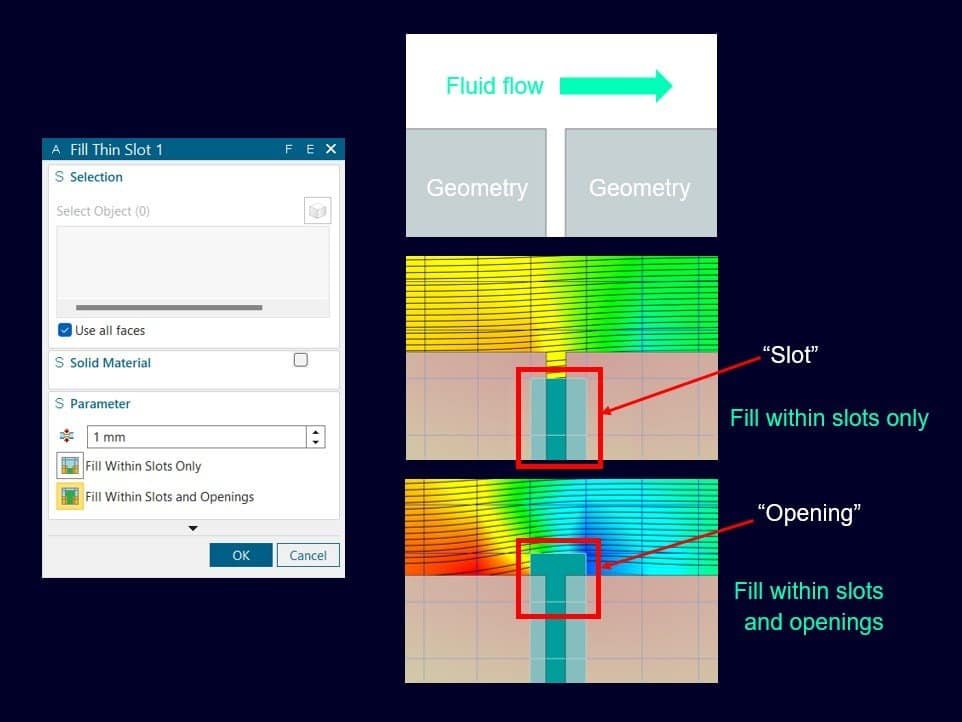
In version 2512 the Fill thin slots feature is extended with the additional option “Fill within slots and openings”. The Fill thin slots feature was added last year as described in the previous blog post:
https://volupe.com/simcenter-floefd/simcenter-floefd-news-from-release-2406-and-2412/
It allows for closing narrow channels that should be closed or where you don’t want to resolve the fluid flow. The addition of filling the openings as well will ease closing your geometry and prepare a water-tight fluid domain. In simulation for internal flow the requirement is to have a water-tight domain, and with this sealing you are guaranteed to get this requirement fulfilled.
In the picture below you see the new feature setup window along with the expected mesh for both “Fill thin slots” and “Fill within slots and openings”. The parameter value will limit for which maximum value you set/choose to use, to close slots and openings. The possibility to select which solid material should fill the slots and openings can be set manually – if customizing default values is desired. For visualization, you can show Closed thin slots cells in your mesh plot. Also worth mentioning is that this feature can be applied globally, but then your local settings have higher priority than these faces. The default thermal condition for closed cells is set to your default outer wall condition.
Henyey-Greenstein phase function for optic scattering
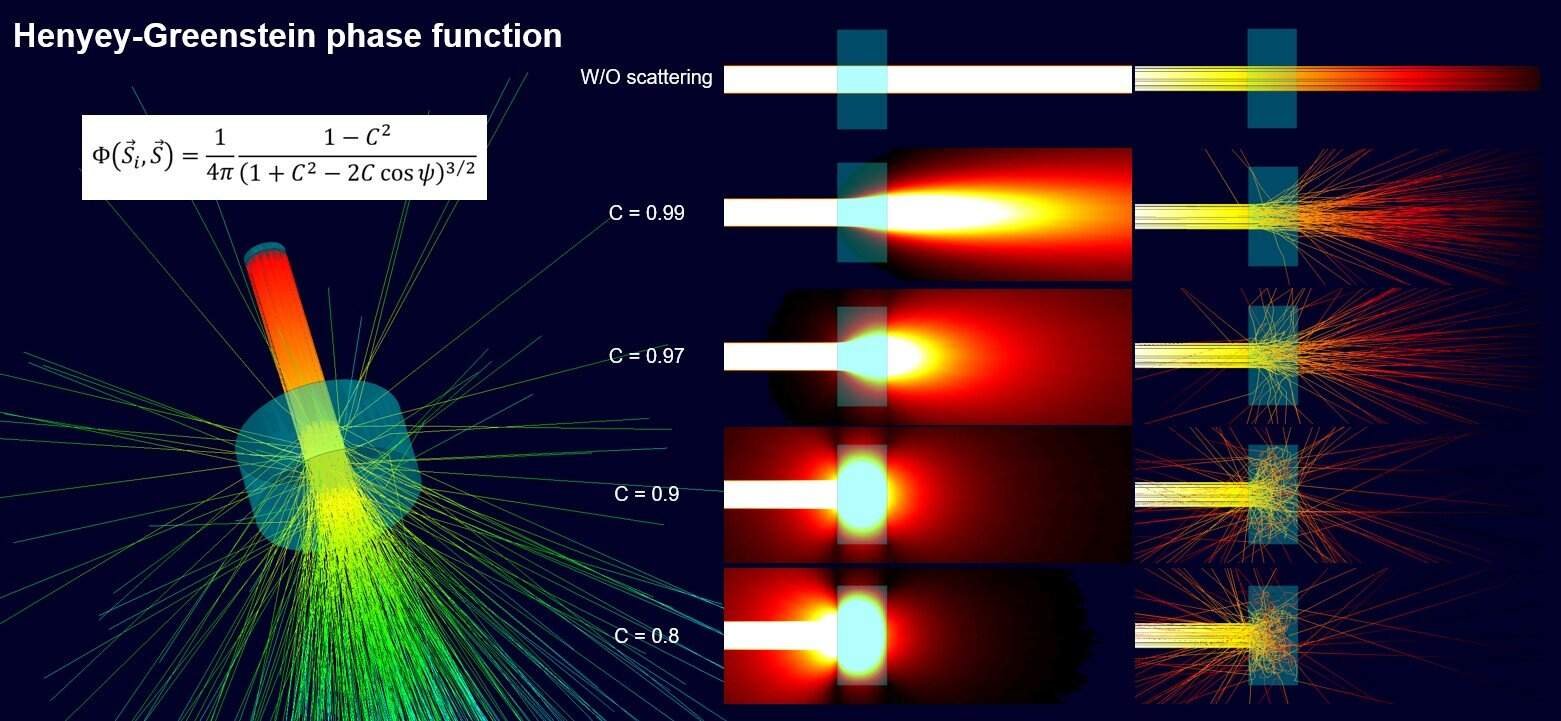
In version 2512 a new phase function for scattering of light was added. Previously, only a linear phase function was available, and that corresponds to radiation without scattering, as seen in the picture below. With the new implementation of the Henyey-Greenstein phase function you can simulate scattering of light through semi-transparent materials.
In the Engineering database you can create new materials and modify the radiation properties, and this is where to set which scattering phase function to use. Copying existing materials to the user-defined folder will save you time – by not needing to define a new material from scratch. Choosing the Henyey-Greenstein function instead of the linear function enables the possibility to define the scattering coefficient C, which is defined per millimeter. The coefficient can also be defined with anisotropic properties. Phosphor particles are enabled in the Engineering database as well.
Coupled fluid-thermal-structural simulations
In version 2506 you can run time-dependent (transient) simulations with coupled flow field together with structural analysis including thermo-mechanical properties. This can now be performed in one single project instead of setting up two projects and couple them together. For linear analysis the Simcenter FLOEFD solver can be used, and for non-linear co-simulations the Simcenter NASTRAN non-linear 401solver is possible to use (requires an additional license for this solver).
Note that this coupling is not a fluid-solid-interaction (FSI) simulations, and neither dynamic phenomenon is supported at this stage.
In the video below you see how the thermal expansion of a PCB is calculated in a coupled simulation where the fluid-thermal field is calculated in repeating sequences with the structural stresses. The current time step’s results for pressure and thermal loads are used as input for the structural calculation. For visualizing the results, the Transient explorer is used, which interpolates data in time.
Honorable mentions
- Project parameters from components: In version 2506 the possibility of using parameters from sub-models is implemented. The parameters will propagate upwards and can be used as simulation parameters and in parametric studies.
- Faster calculations with two-resistor models: In version 2512 the preparation time for setting up this type of analysis is optimized. What previously could take 1.5 hours with a memory peak load of 150GB will in this reference case now only take 6 minutes and with a peak load of 38GB. This makes two-resistor calculations both faster and less computationally heavy.
- FloThermXT projects compatible with FLOEFD for Catia: In version 2506 you can import XTXML format in Simcenter FLOEFD for Catia as well. For the rest of the FLOEFD plug-ins and the stand-alone version the compatibility was added already in version 2412 as also mentioned in this previous blog post: https://volupe.com/simcenter-floefd/simcenter-floefd-news-from-release-2406-and-2412/
And as a bonus, the compatibility now goes both ways from 2512, were XTXML formats are possible to export from Simcenter FLOEFD, but FLOEFD for Catia will first get this possibility in future versions. The export support transfer for geometry, solid material conditions, etc. but not general project settings.
We at Volupe hope that you enjoyed this blog post about new features in Simcenter FLOEFD. If you have any questions, you are welcome to reach out to support@volupe.com. Wishing you all a Merry Christmas and a happy New Year!
Author
Christoffer Johansson, M.Sc.
support@volupe.com
+46764479945