This time around we are looking a bit deeper at the Lagrangian track files. What is a track file, how can you use it, and also, what is new for Lagrangian track files in Simcenter STAR-CCM+ version 2602?
Using track files is done together with the Lagrangian solver, it represents a “track” that records the history of a parcel. The history is the position of the parcel and in the track files it is possible to store other parcel field functions as well, such as the particle diameter and temperature and other fields that can be of use for evaluation and visualization. During simulation a temporary track files is created where data is appended during simulation. You are required to save your simulation to get the temporary track files moved to a final file with the same name as the simulation. This is then the file that you can bring into Simcenter STAR-CCM+ for data analysis. The track file can be used in both steady state and transient simulations. When it comes to a steady state simulation it is the only “visual” tool to follow the path of the Lagrangian particles. While for a transient simulation you can store the Lagrangian phase in a simh-file that is played back using the screenplay tool, or store PNG-files into a mp4 during simulation.
There are a number of default fields stored in a track files, meaning that you do not need to select those manually as fields in the simulation. They are:
- Parcel centroid
- Parcel Index
- Time (unsteady) or Particle residence time (steady)
- Particle count (unsteady) or Particle Flow rate (steady)
Visualization
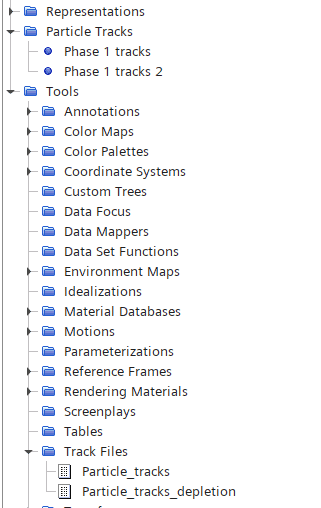
To visualize your track files, you need as mentioned earlier, save your simulation file to get access to the file. When you do, your track-file will appear as objects under Tools à Track files, that is the actual track file created. In the example you can see two track-files. Both track-files are created in the same simulation base file, saved with different names. The “Particle Track” is Simcenter STAR-CCM+ representation or use of these track files. The two different Phase 1 tracks (no suffix and “2”) refer to the two different Track files near the bottom.
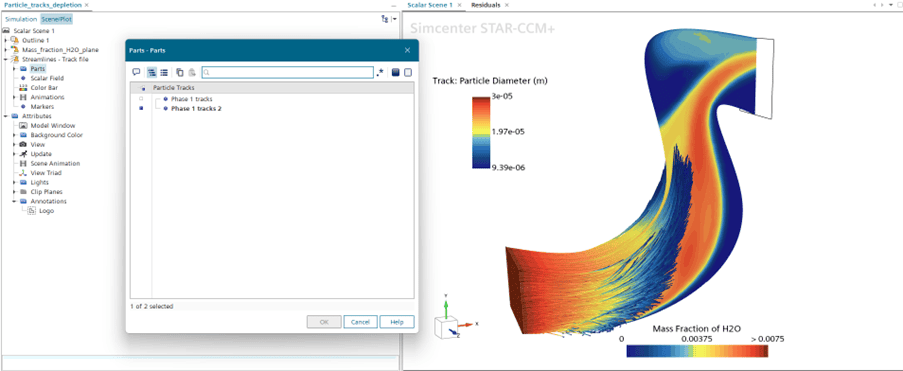
The track files can be shown in either displayer type, but they work well with the streamline displayer type. When displaying track files, you need to select the part that is the “Phase tracks” and then the scalar field from the track file that you wish to display. This last part is important, because the generic fields or the particle/parcel fields are not found in “phase track” part. The example here is a transient simulation where small water droplets are injected and then evaporates when following a hot air stream. Subsequently we see the particle tracks with the particle diameter and a clip plane with the fraction of water in the gas-stream.
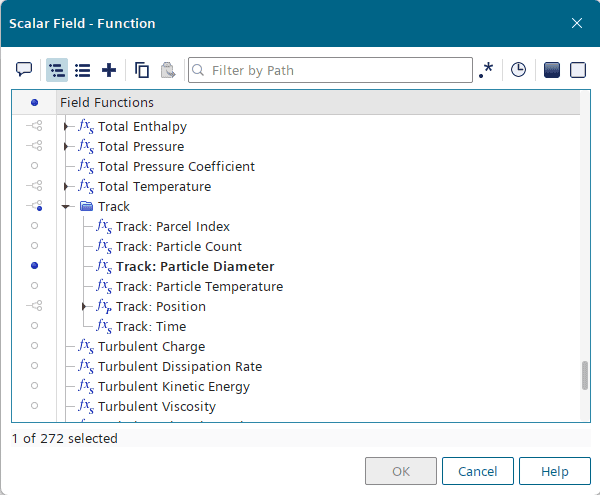
Another advantage of using the streamline displayer type for your particle tracks is that you can utilize the animation feature directly if you want to create something dynamic. Note that we are using the displayer animation option, found in the top toolbar. For that reason, only the track-files are animated, and the scalar field of the H2O mass fraction is shown from the last timestep. To include a transient result from that you would need a screenplay where simulation history is used.
New in Simcenter STAR-CCM+ 2602
The track file receives an entry at certain events in the simulation. These have traditionally been at injection, so when the Lagrangian phase interacts with the injector. When crossing an internal interphase and when the parcel interacts with a boundary, that can be escape, rebound, stick or any interaction relating to droplet impingement, such as Bai-Gossman and Bai-Onera.
What is new for Simcenter STAR-CCM+ 2602 is that there are more events added for writing a track file entry. The first one is a Lagrangian collision event, which can be found in the NTC collision model. To further the multiphase capabilities, we now also get an entry in impingement on VOF and MMP gas-liquid interfaces. Further, also when we use the parcel depletion model and a particle is depleted. Finally, at endpoints when parcel mass is depleted through Lagrangian mass transfer models, e.g. droplet evaporation or particle reaction. The additional entries can be useful if you are using your track-file for post-processing in a third/party software.
I hope that this has been useful, as usual, do not hesitate to reach out with question to support@volupe.com.
Author

Robin Victor
support@volupe.com
