
The release of Simcenter STAR‑CCM+ 2602 delivers some significant steps forward within GPU ‑accelerated CFD. With expanded physics coverage, new GPU native‑ solvers, broader hardware compatibility, and major performance gains across multiphase, acoustics, DEM, and thermal applications, this release continues Siemens’ push toward faster simulation workflows.
This article summarizes the key GPGPU related enhancements introduced in version 2602, based on Siemens’ published performance data. The improvements deliver CPU‑equivalent accuracy while achieving order‑ of magnitude speedups.
Running on GPU
First off, to make a simulation run on GPU instead of CPU, you need to select “GPGPU Usage” when you create or open your sim-file. If you only have one GPU, “Automatic” for the GPU selection should suffice, but if needed it is possible to explicitly specify which (or how many) GPU(s) to use using the dropdown menu.
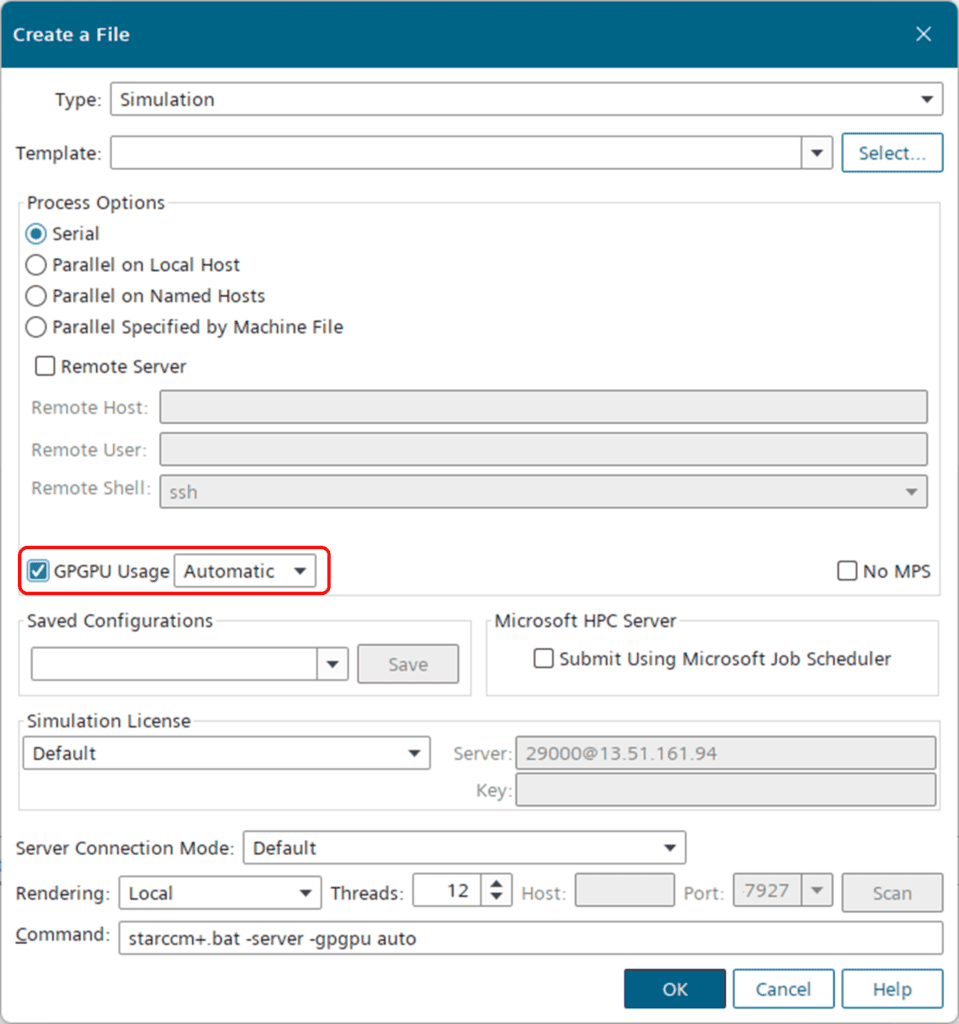
Note that it is also possible to run some configurations in hybrid mode (i.e. GPU + CPU), for models that have not yet been ported to GPGPU operation. Please also note that the enhancements presented in this article are just a sample of the added compatibilities in the 2602 release. For a thorough description of the available running configurations and a complete list of the current GPGPU capabilities, please refer to the user guide:
Simcenter STAR-CCM+ – User Guide (html)
Lastly, it is important to know that GPGPU utilization requires a Power Session Plus (or Power-on-Demand) license.
GPU-native VOF and Mixture Multiphase (MMP)
A major highlight in 2602 is the expansion of GPU‑native support for Volume of Fluid (VOF) and Mixture Multiphase (MMP) simulations. This unlocks substantial acceleration for industrial multiphase applications such as sloshing, propeller cavitation or other free-surface flows.
Siemens performance data shows that modern GPUs such as the NVIDIA A100 and RTX 6000 Ada can deliver performance equivalent to 200+ CPU cores for a range of different cases. Below are some examples showcasing the performance.
Tank Sloshing
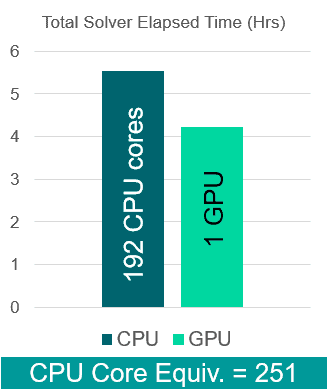
The first example is a tank sloshing case with 5.6 million cells. The case is run with a fixed time-step of 0.5 milliseconds, with dynamic sub-stepping for the free-surface CFL. The case was run for a total of 24,000 time-steps.
| CPU |
| GPU |
Performance summary:
- 1 GPU (Nvidia RTX6000 Ada): 4.23 hours
- 192 CPUs (AMD Epyc 7532): 5.54 hours
- CPU equivalence: 251
Cavitating Propeller
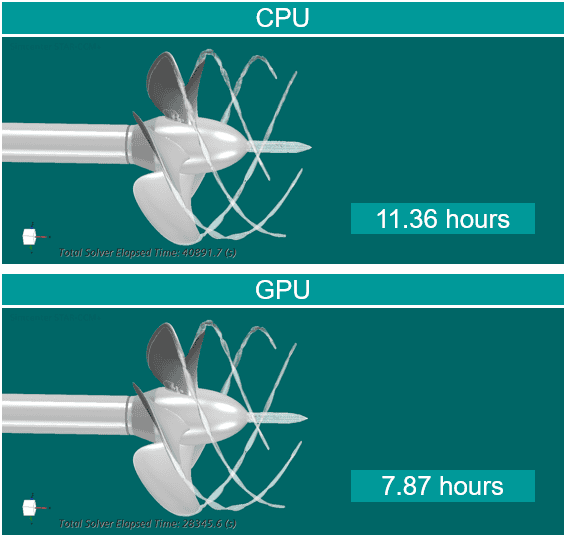
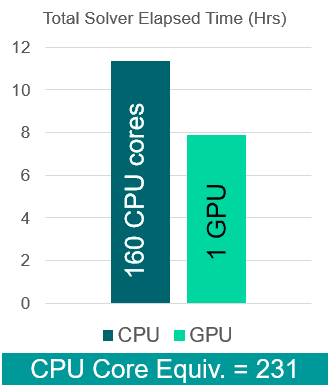
The second example is a VOF simulation of propeller cavitation (using the Schnerr-Sauer model). The case has 4.4 million cells and a time-step of 5 microseconds. The case was run for a total of 20,000 time-steps.
Performance summary:
- 1 GPU (Nvidia Tesla V100): 7.87 hours
- 160 CPUs (Intel Xeon Gold 6248): 11.36 hours
- CPU equivalence: 231
GPU support for tabular material property method
A nice addition for Conjugate Heat Transfer (CHT) simulations is the GPU-compatibility for “Table” material property method, enabling more advanced CHT simulations on GPU. Siemens presents an example for a fin and tube heat exchanger analysis with 6 million cells, where they managed to reduce the turnaround time about five times with 2 GPU cards compared to 80 CPU cores.
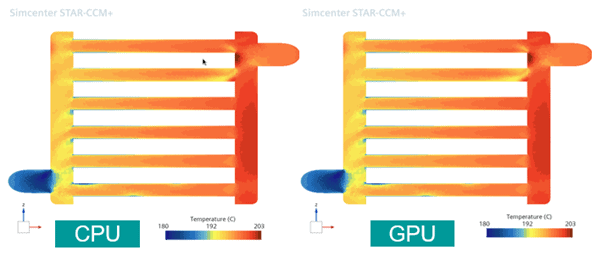
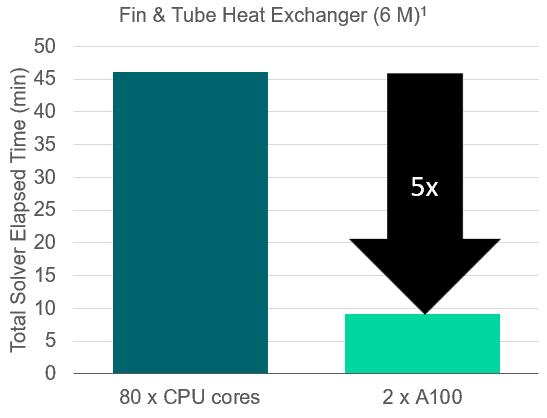
Performance summary:
- 2 GPUs (Nvidia A100): ~9 minutes
- 80 CPUs (Intel Xeon Gold 6248): ~46 minutes
- CPU equivalence: 204
GPU-native Segregated Species Solver
Multicomponent transport simulations now run significantly faster thanks to a GPU‑native segregated species solver. This enhancement broadens the range of chemistry related and species transport problems that can be efficiently executed on GPUs.
Below is a performance example, showing membrane gas separation simulation with 3 million cells:
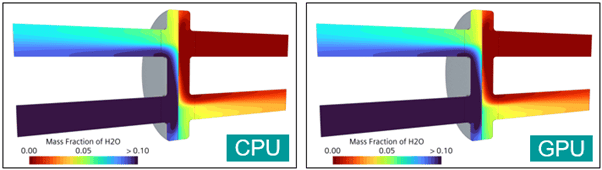
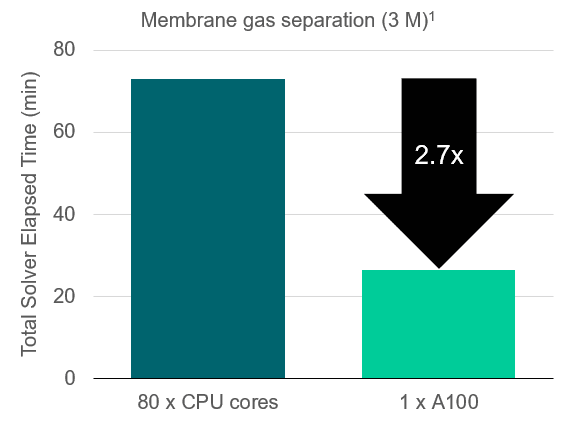
Performance summary:
- 1 GPU (Nvidia A100): ~27 minutes
- 80 CPUs (Intel Xeon Gold 6248): ~73 minutes
- CPU equivalence: 216
GPU acceleration for non-spherical DEM
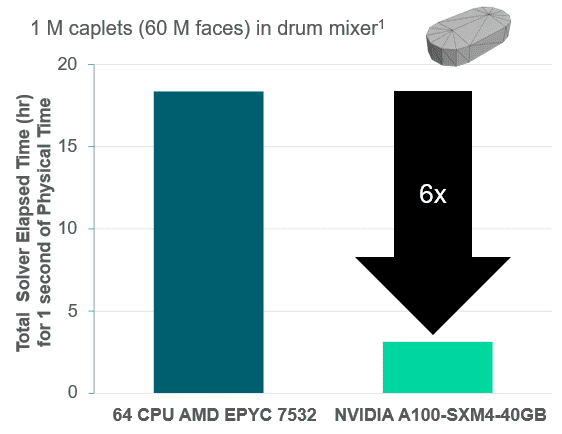
The turnaround time for non-spherical particle simulations (with DEM) can now be significantly faster through GPU utilization. This is especially relevant for pharmaceutical, chemical, and process engineering applications involving complex particle shapes. The example case below shows a drum mixer with one million caplets.
Performance summary:
- 1 GPU (Nvidia A100): ~3 hours
- 64 CPUs (AMD Epyc 7532) ~18 hours
- CPU equivalence: 384
Hardware flexibility
A nice usability improvement in 2602 is the introduction of AMD GPU support on Windows, enabling broader workstation configurations.
Performance examples:
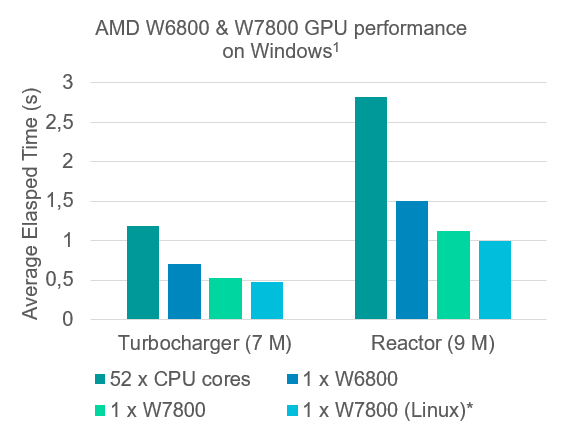
From these examples we can see that one AMD W7800 GPU performs similar to 115-130 CPU cores (Intel Xeon Gold 6230R).
The 2602 release now also officially supports the Nvidia Blackwell GPU series, enabling the latest and greatest hardware architecture. Below you can see a comparison of an external transient aerodynamics case for a BMW iX with 78 million cells. The results compare 1024 CPU cores to Nvidia GPUs with the previous Hopper architecture (H100/H200) and the most recent Blackwell architecture (B200).
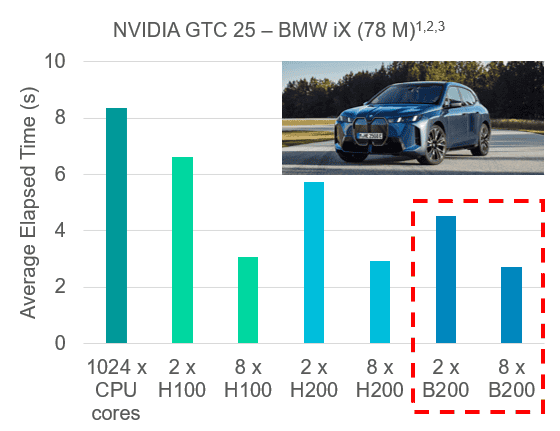
As indicated in the plot, the new Blackwell architecture show a slight improvement, mainly thanks to a higher memory capacity (especially useful for large models). The CPU equivalence for this specific case was around 384.
Scalability improvement
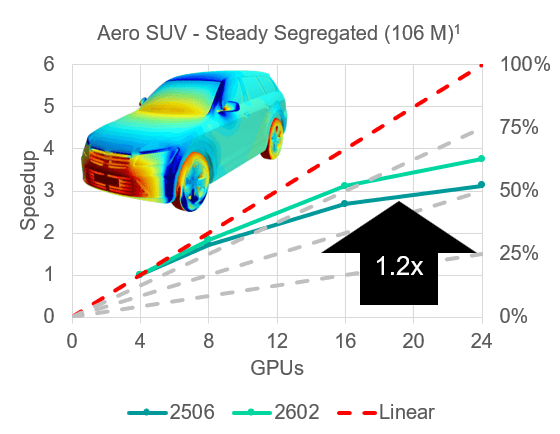
Last but not least, the 2602 release includes some optimized parallelization algorithms and communication strategies, improving multi-GPU scaling. The example below shows a comparison of an external aerodynamics simulation on an SUV in the 2506 version compared to 2602. The comparison shows that the improved parallelization can increase performance by about 20%.
Conclusion
Simcenter STARCCM+ 2602 represents a major step forward in GPU-accelerated CFD. With expanded physics coverage, new GPU-native solvers, improved scalability, and broader hardware support, this release makes high‑ fidelity multiphysics‑ simulations faster and more accessible than ever.
As always, feel free to reach out to support@volupe.com if you have any questions.
Author

Johan Bernander, M.Sc.
