CAE simulation, explained
Engineers can test a design in software before the first prototype exists, if the model behind the test can be trusted. This guide explains how a CAE simulation is set up, solved and checked against real tests, which analysis answers which question, and how to choose CAE software.
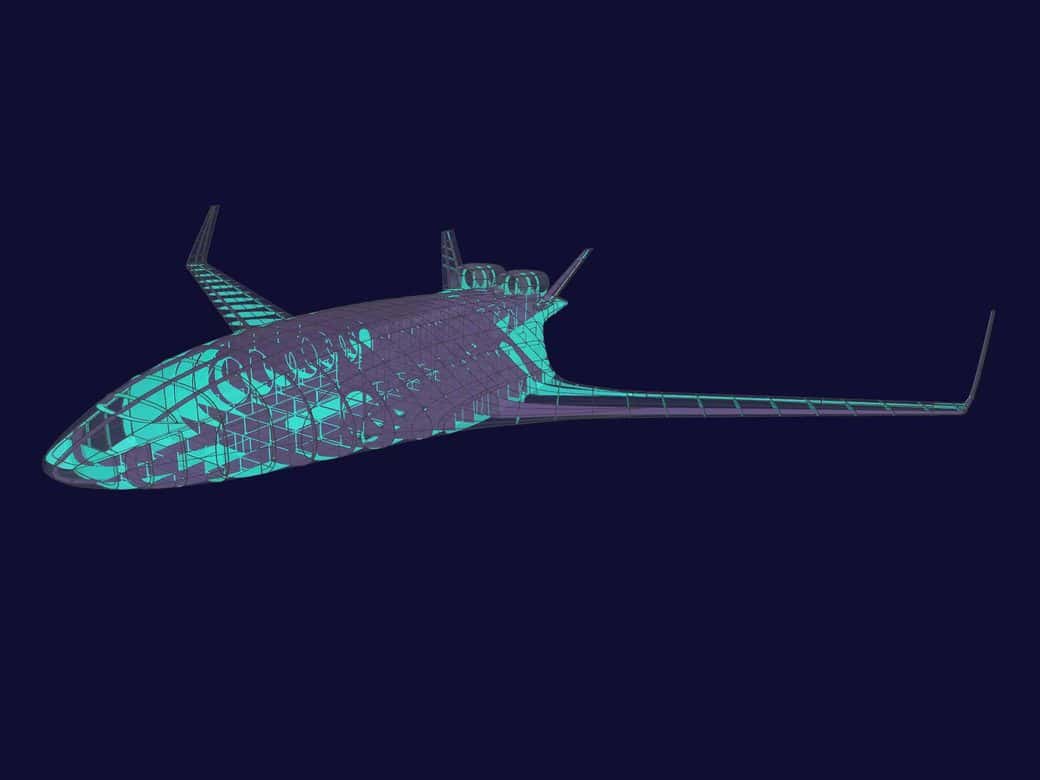
What is CAE simulation?
Types of CAE analysis
The main types of CAE simulation are structural, thermal and modal (natural frequency) analysis, noise and vibration, fluid dynamics, electronics cooling, motion, electromagnetics, system simulation, and particle and manufacturing simulation, plus design exploration and AI models that build on them. Siemens groups CAE into four sub-domains: finite element analysis, computational fluid dynamics, multibody dynamics and systems simulation. The table maps each type to the Simcenter tools Volupe licenses and supports.
| Analysis | What it predicts | Method | Simcenter tools |
|---|---|---|---|
| Structural and thermal (FEA) | Stress, deformation, stiffness, natural frequencies, temperatures and fatigue life of parts and assemblies | Finite element method (SimSolid: without a conventional mesh) | Simcenter 3D with Simcenter Nastran, Simcenter Femap, Simcenter OptiStruct, Simcenter SimSolid |
| Noise, vibration and acoustics | Noise and vibration performance and sound quality | Structural dynamics and acoustic simulation | Simcenter 3D |
| Fluid flow and heat transfer (CFD) | Flow, pressure, turbulence and heat transfer in liquids and gases | Navier–Stokes equations solved on a mesh of small cells | Simcenter STAR-CCM+, Simcenter FLOEFD |
| Electronics cooling | Temperatures from IC packages and boards to enclosures and data centres | CFD | Simcenter Flotherm |
| Motion | Forces, torques, velocities and accelerations in mechanisms | Multibody dynamics | Simcenter 3D |
| Electromagnetics | Fields, forces and losses in motors, transformers, actuators and sensors | Low-frequency electromagnetic field simulation | Simcenter MAGNET |
| System simulation (1D) | How mechanical, hydraulic, thermal and electrical components work together | System models of connected components | Simcenter Amesim, Simcenter Flomaster |
| Particles (DEM) | How bulk and granular materials behave in handling equipment | Discrete element method | Simcenter EDEM |
| Manufacturing processes | How processes and manufacturing tools perform, alongside the product | Process-specific simulation | Simcenter Inspire (manufacturing simulation) |
| Design exploration and optimisation | Which design best meets several targets | Automated design studies, optimisation, topology optimisation | Simcenter HEEDS, Simcenter OptiStruct, Simcenter Inspire |
| AI models | Near-instant predictions from earlier simulation results | Machine learning surrogates and reduced order models | Simcenter PhysicsAI |
Coupled simulation
Products rarely stay inside one discipline, and modern tools couple the physics: fluid–structure interaction, thermal-mechanical simulation, flexible bodies in multibody dynamics, and electromechanical-thermal analysis.
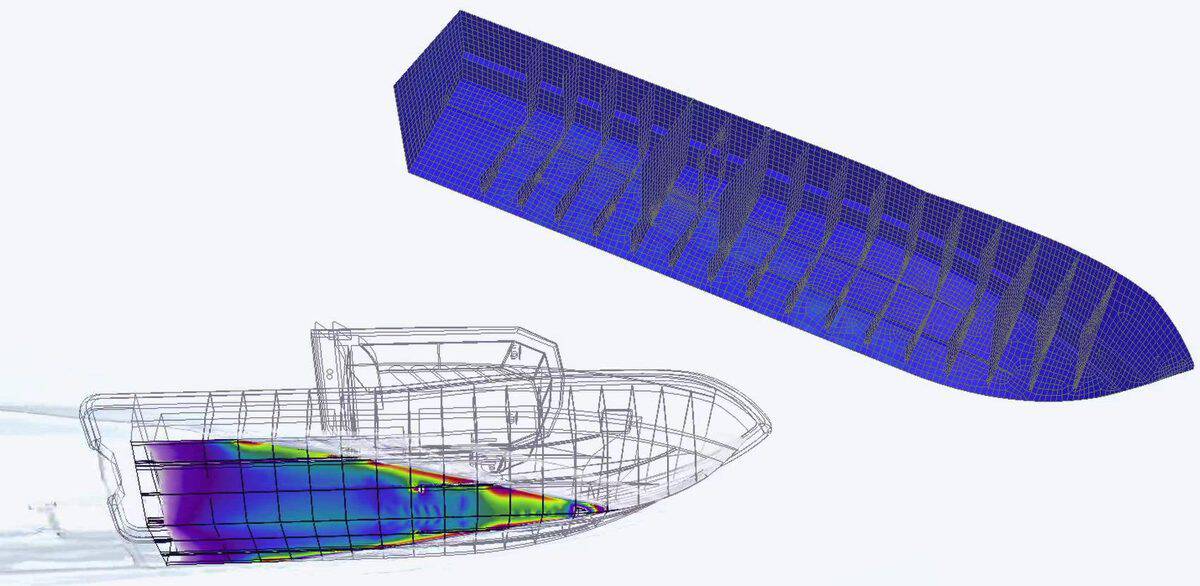
In Siemens’ planing-hull example, Simcenter STAR-CCM+ models the vessel in waves, and the wave-impact pressures are applied to the hull’s structural model in Simcenter 3D to check its structural safety. As described, that is one-way coupling: loads pass from the flow to the structure. In two-way coupling the deformation also changes the flow, and both solvers exchange data as the solution runs.
Volupe’s Christoffer Johansson walks through an FSI set-up in How to set up an FSI simulation in Simcenter STAR-CCM+.
3D, 1D and AI-based models
A 3D CFD or FE model resolves the full field in space, and its runs are the most expensive. A system model instead shows how a change to one component affects the whole system, before the first prototype exists; Siemens calls these 1D models and couples them with 3D CAE tools. Reduced order models and AI surrogates, trained on detailed CFD, FEA or DEM results, answer in real time. They are covered in our guide to digital twin simulation.
How a CAE simulation works: the workflow
A typical CAE workflow, or procedure, has three steps between a question and a decision: pre-processing, solving and post-processing. The answer then changes the design and the loop runs again, and a test checks the model.
- Question
What must it achieve, and how accurately?
- Pre‑processing
Geometry, mesh, materials, loads and boundary conditions.
- Solving
The solver computes the physics on every element or cell.
- Post‑processing
Results compared between designs, or with tests.
- Decision
Change the design, or release it.
Change the design and run again (back to step 2, pre-processing)
Verify the numerics, validate against test data GCI calculator
Pre-processing: geometry, idealisation, mesh and physics
Much of the engineering judgement sits here. A structural model first idealises the geometry: thin sheet metal becomes shell elements on a midsurface, slender parts become beams, and the rest is meshed as solids. The connections, such as bolts, welds and contact, often decide the stiffness of an assembly.
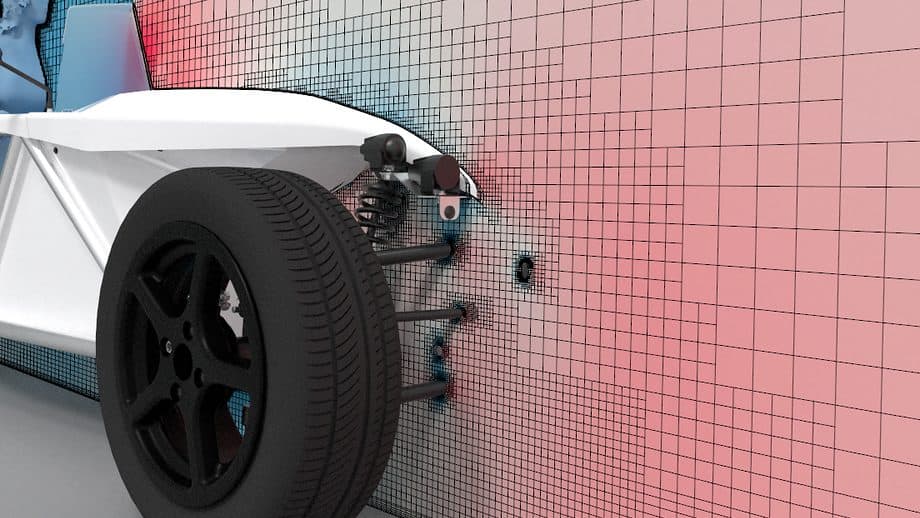
The mesh decides both accuracy and run time. Regions where stress changes fast need a finer mesh than regions where it hardly changes. In a flow model the cells next to each wall must suit the wall treatment: fine enough to resolve the boundary layer, or sized for a wall function. Siemens’ SimRod CFD mesh uses trimmed cells in the core and 8 layers of prism cells at the walls; our y+ calculator estimates the first layer’s height.
The physics set-up carries as much weight as the mesh: material data, loads, supports and contact in a structural model; fluid properties, boundary and initial conditions in a flow model. Viktor Hultgren’s midsurface article shows the idealisation step in Femap and Simcenter 3D, and the CFD basics are in our CFD Handbook.
Solving
The solver applies a mathematical formulation of the physics to every element or cell. The type of problem decides how: a linear static case solves in one step, while nonlinear cases with contact or plasticity iterate. Steady problems converge to one state; transient ones step through time, implicitly with large time steps or explicitly with very small ones for fast events such as impacts. Residuals and monitored quantities show when a solution has converged.
Solving can take significant time and computing power, which is why tools should scale from a workstation to high-performance computing or the cloud when models, transient studies or design studies grow. Accuracy is a choice too: Siemens notes that engineers choose the level of accuracy that answers the question with the least computing effort.
Post-processing
Contour plots are where the work starts, not where it ends. The useful outputs are the numbers a decision needs:
- the stress at the critical location
- a pressure drop
- a temperature margin
Each is checked against mesh refinement, then compared across design variants or with test results.
Checking CAE results: verification and validation
Verification checks that the equations are solved correctly. Validation checks that the model behaves like the real product, by comparing it with measurements it was not tuned to. A model needs both before its results can carry a design decision.
ASME, which publishes the V&V standards for solid mechanics (V&V 10) and for CFD and heat transfer (V&V 20), defines verification as establishing “the mathematical correctness of the computational model” and validation as comparing “the simulation model results to real-world observations”.
Verification: is the model solved correctly?
Compute the same case on a series of refined meshes and time steps to estimate the numerical uncertainty, check that the solution has converged, and compare simple cases with known answers. Our GCI calculator turns a mesh refinement study into an estimate of the discretisation uncertainty.
Validation and model updating
CAD
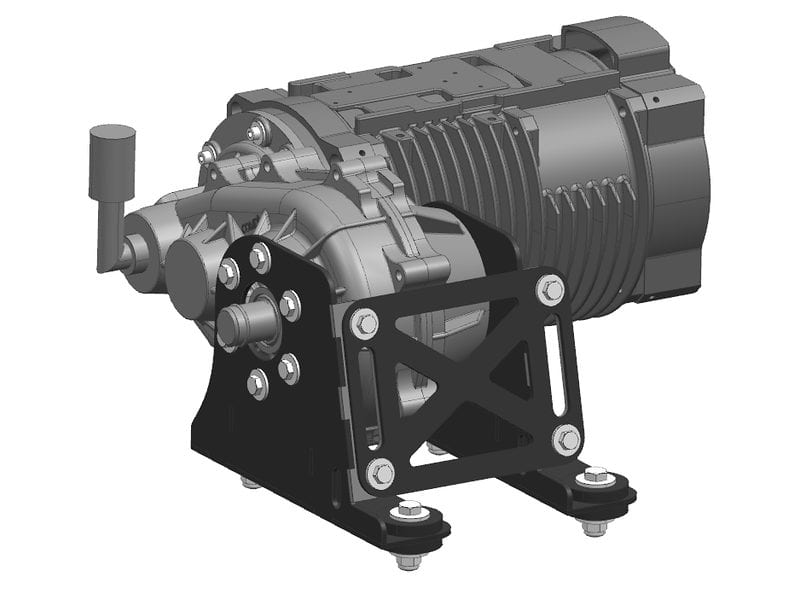
The e-motor powertrain as designed
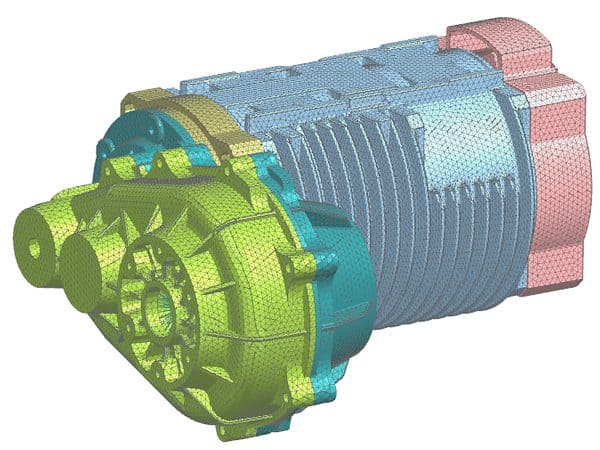
CAE model
Meshed for motion and acoustics
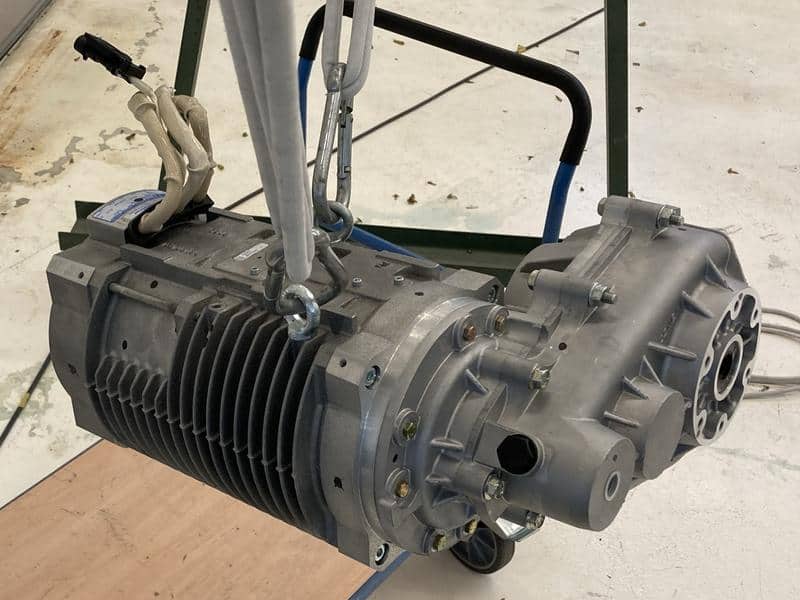
Test
The real hardware in a modal test
Natural-frequency error vs the modal test
Siemens’ SimRod e-motor shows what a test can do for a model. A CAE model of the electric powertrain was built for motion and acoustics, and the real hardware was modal-tested. The correlation showed that the model was too stiff. Design space exploration was then used to improve how the joints (bolts and contact) were represented, and the overall error in the natural frequencies fell from 58% to 3%.
Strictly, that second step is model updating, or calibration: the model was tuned to the same test it is compared with. ASME’s introduction to VVUQ lists calibration among the purposes of ordinary tests, separate from validation experiments, and calls blind predictions of a validation experiment “the most informative of predictive capability”. Siemens’ caption also does not say how many modes the error covers. So the 3% shows a good fit to this test, not yet a blind prediction.
Where CAE fits in product development
What does a CAE engineer do?
How to choose CAE software
A short history of CAE and Simcenter
Sources and changelog
Sources
Changelog
October 2026: rewritten with Siemens and published sources; the guide to choosing a CAE program, verification and validation, a worked Siemens example and a short history added; unsourced benefit lists removed.
Questions about CAE simulation
Questions about your simulation?
Volupe’s simulation engineers
Structures, CFD and system simulation
Choose “Technical question” in the form below and describe your case.
Ask a technical question →
What does CAE stand for?
Computer-aided engineering: the use of software to simulate how a product performs, to improve the design or solve an engineering problem. The word “simulation” is often used for the same thing; in Swedish it is CAE-simulering.
What is a CAE program?
Software for CAE: a pre-processor for geometry, mesh and loads, one or more solvers, and a post-processor for the results. Some programs combine them in one environment, such as Simcenter 3D; others specialise, such as Simcenter Femap for pre- and post-processing.
What is the difference between CAD and CAE?
CAD defines the geometry of a part or product. CAE is the next step: it builds a simulation model from that geometry to check whether the design will perform as required, before a prototype is built.
What is the difference between CAE, FEA and CFD?
CAE is the umbrella term. FEA predicts how solid structures respond to loads, vibration, heat and pressure; CFD simulates the flow, pressure, turbulence and heat transfer of liquids and gases. Both are types of CAE analysis; the CFD basics are in our handbook.
Can CAE simulation replace physical testing?
It reduces the number of prototypes and tests, but models still need validation through experiment. In Siemens’ e-motor example, test data showed that the first model was too stiff.
Is CAE only for large companies with simulation specialists?
No. Siemens argues that simulation belongs early in design, not only with experts, and some tools are built for designers: Simcenter FLOEFD runs inside the CAD system, and Simcenter Inspire brings simulation into a CAD-like environment. Learning still takes time and practice, which training shortens.
What are the main challenges when starting with CAE?
Choosing the right physics and boundary conditions, preparing geometry and meshes, and knowing how far to trust the results, which means checking them against tests. Learning CAE takes time and practice; integrated CAD–CAE tools and training shorten the start. How to choose CAE software lists the questions to ask.
Can I try Simcenter before buying?
Yes. Volupe arranges trials of Simcenter STAR-CCM+ and Simcenter Amesim and demos of Simcenter FLOEFD and Simcenter Flotherm. Siemens offers a 30-day online trial of Simcenter FLOEFD and a 30-day trial of Simcenter 3D. Ask us for a trial.
Do I need a powerful computer for CAE?
Not always. Many models run on an engineering workstation; large models, transient studies and design studies need more, so choose tools that scale from a workstation to HPC or the cloud.