Finite element analysis (FEA), explained
Finite element analysis helps predict how a part or structure will respond to loads, vibration and heat before physical prototypes are built. This guide explains how the finite element method turns a design into a mesh of small elements, which type of analysis answers which question, how to check that the answer can be trusted, and which Simcenter tools do the work.
What is finite element analysis?
How the finite element method works
Types of FEA
Which analysis you run depends on the question. Simcenter Nastran names its analyses by solution sequence (SOL) numbers, which the table gives where they apply.
| Analysis | The question it answers | In Simcenter |
|---|---|---|
| Linear static | Stress and deflection under steady loads, with small deformation and linear material. Results scale with the load. | Simcenter Nastran SOL 101, Simcenter OptiStruct |
| Nonlinear static | Large deformation, plasticity or contact, where doubling the load need not double the response. | Simcenter Nastran SOL 401 and 402 |
| Modal analysis (normal modes) | The natural frequencies and mode shapes of the structure. | Simcenter Nastran SOL 103 |
| Linear buckling | The load at which a slender or thin-walled part becomes unstable. | Simcenter Nastran SOL 105 |
| Frequency response and random vibration | The response to harmonic or random (PSD) excitation. | Simcenter Nastran SOL 108 and 111; Simcenter OptiStruct (the random vibration example below) |
| Transient dynamics | The response to loads that change over time. | Simcenter Nastran SOL 109 and 112 |
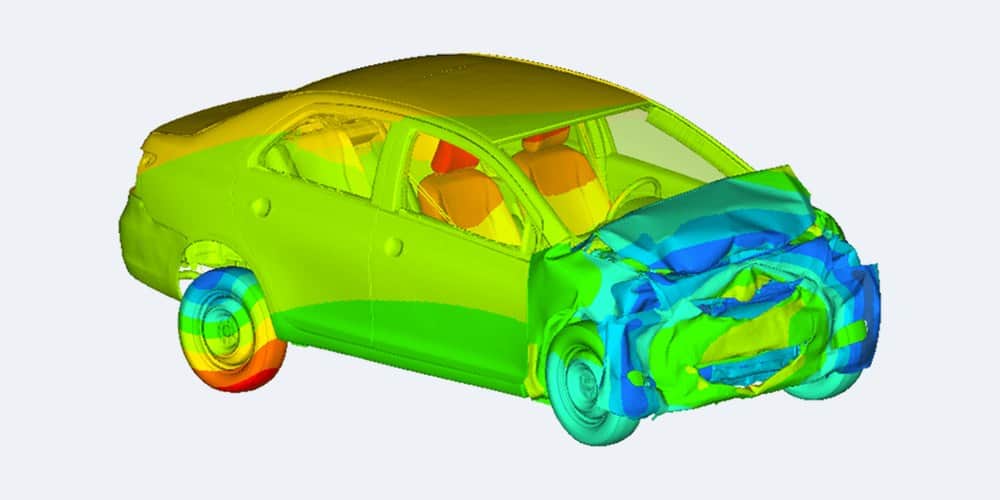
| Crash and impact (explicit dynamics) | Short, highly nonlinear events such as crashes, impacts and drop tests. | Simcenter Radioss |
| Thermal and thermo-mechanical | Temperatures in solids, and the expansion and stress they cause. | Simcenter 3D; Simcenter SimLab with Simcenter OptiStruct |
| Fatigue and durability | How long a part lasts under realistic, repeated load histories. | Simcenter 3D |
| Acoustics and NVH | Noise, vibration and harshness (NVH): noise and vibration performance, and how to reduce noise. | Simcenter 3D |
Modern FEA often couples several physics: thermal and mechanical loads together, flexible bodies in a multibody (motion) model, or a flow that loads a structure in fluid–structure interaction.
Implicit or explicit solvers
Implicit solvers suit static problems and longer, low-speed events. Explicit solvers such as Simcenter Radioss suit short, highly nonlinear events such as crashes, impacts and drop tests. Simcenter OptiStruct covers both.
Worked example · Viktor Hultgren, Volupe
When does a column buckle?
In one of our blog posts, Viktor Hultgren compares three ways to find when a 1 m tall UPE100 column under compression buckles: Euler’s hand formula and two analyses in Simcenter 3D. A linear buckling analysis (SOL 105) solves an eigenvalue problem: each eigenvalue is a load multiplier, and with a 1 kN reference load the lowest eigenvalue gave the buckling load directly. As a rule of thumb, it is valid while the loads cause no visible deformation and the stresses stay below yield.
| Method | Buckling load | What it assumes |
|---|---|---|
| Euler’s formula (hand calculation) | about 210 kN | A perfectly straight column. A design version with an effective-length factor of 2.1 allows for imperfections and gives a lower value. |
| Linear buckling, SOL 105 | about 201 kN | The meshed column as an eigenvalue problem: small deformation, elastic material |
| Nonlinear buckling with an imperfection, SOL 401 | about 191 kN, onset | Elastic material, with the first buckling mode as an initial imperfection; large displacements, and an arc-length method follows the load path through the collapse |
The linear result lies between the two Euler values in the post. With the imperfection included, the nonlinear run showed buckling starting at about 95% of the maximum load, about 191 kN, which the post finds strikingly similar to the hand calculation with an effective-length factor of 2.1, the value recommended for design. Plasticity was not switched on, so with the high stresses in the flanges the real column would probably collapse slightly earlier. Read the full buckling example.
Worked example · Johan Dahlberg, Volupe
Random vibration
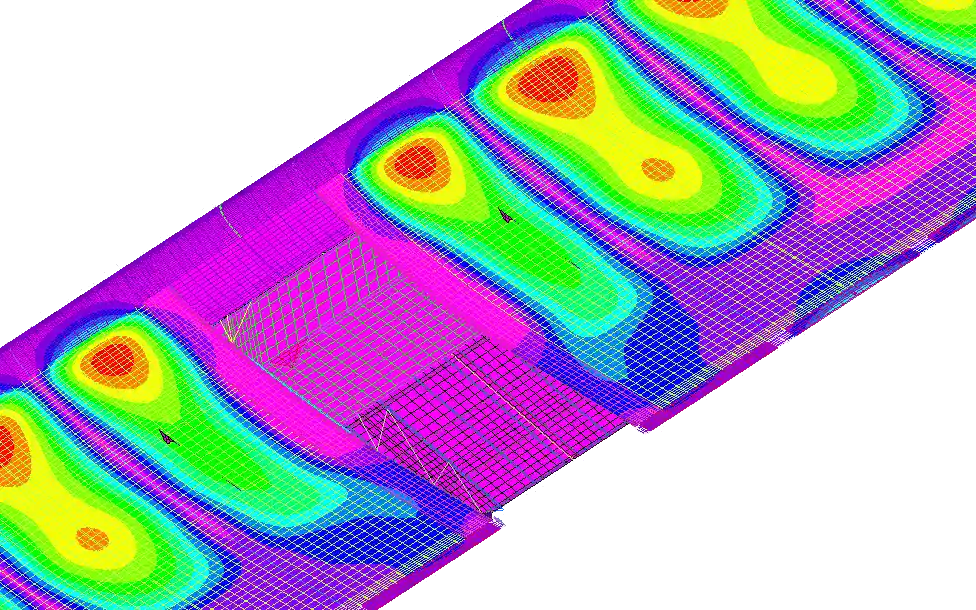
Random vibration is usually described by a power spectral density (PSD). In Johan Dahlberg’s Simcenter OptiStruct example, the analysis runs in three steps: a modal analysis with modes up to about 1.5 times the highest PSD frequency, a frequency response, often to a unit load such as a unit acceleration, and a PSD step that combines that frequency response with the input PSD curve.
The RMS (root mean square) value is the square root of the area under a PSD curve: in the post’s illustration, a PSD with an area of 184 g² (g is the acceleration due to gravity) has an RMS value of 13.6 g. The demo model is a single flexible plastic part, clamped at one end and excited in one direction with a generic PSD; the RMS displacement at its tip came out at about 46 mm. Read the random vibration example.
The FEA workflow: pre-processing, solving and post-processing
Most FEA follows three steps: pre-processing, solving and post-processing. Steps 1 to 3 below are pre-processing.
- Idealise the geometry
Remove details away from the areas you assess. A fillet removed where stress is high leaves a sharp corner.
- Mesh
Choose 1D, 2D or 3D elements and refine where stress changes fast. Thin walls get shells on a midsurface.
- Materials, loads, constraints
Assign material properties, apply loads and constraints, and choose the analysis type.
- Solve
The solver solves the equations. Large models can take significant time and computing power, and more companies run them in the cloud.
- Post-process and decide
Review contours, animations and reports, and define derived results.
Change the model and run again (back to step 2, pre-processing)
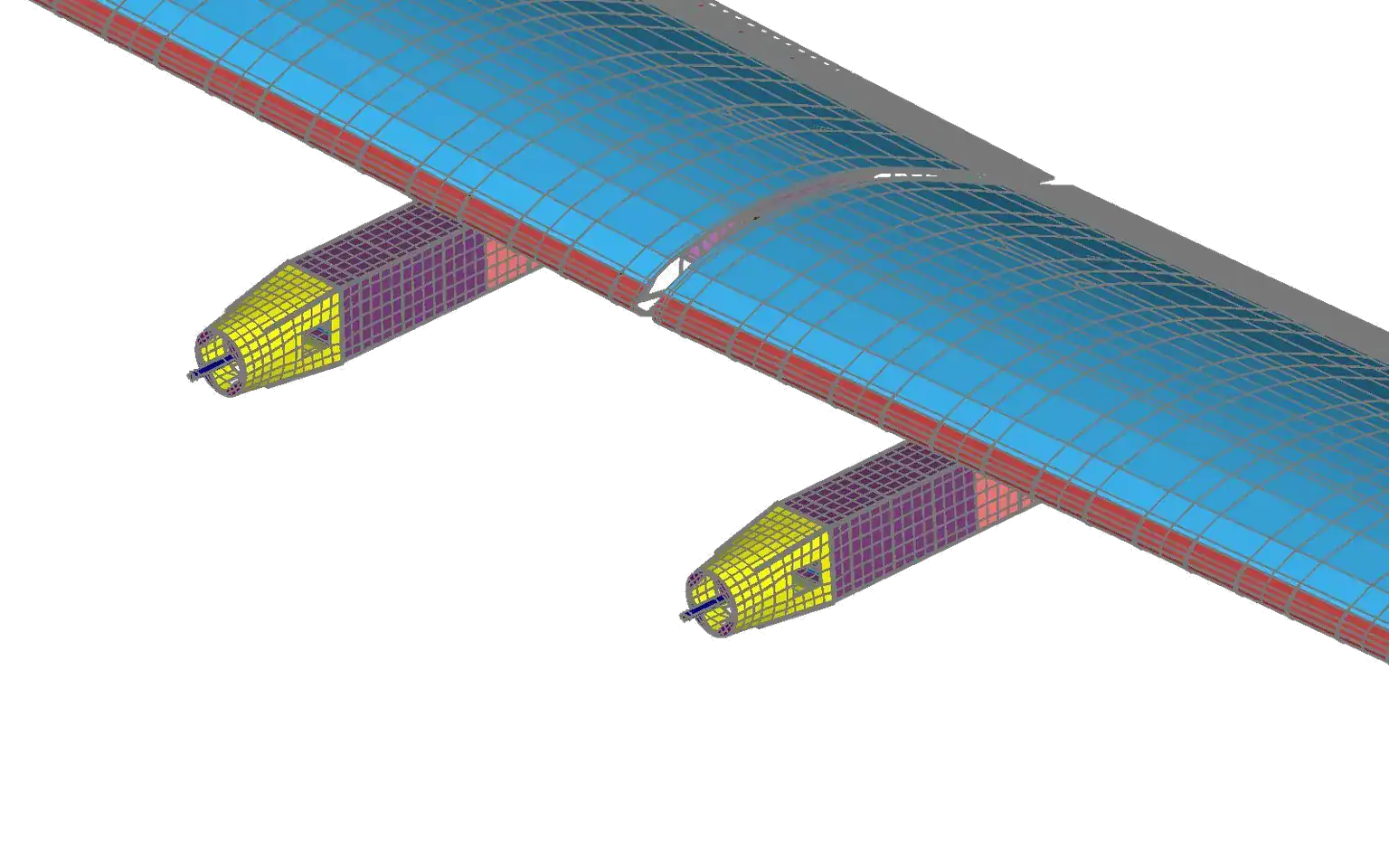
Shells on a midsurface. Thin-walled parts are usually better modelled with shell elements than with solids. A shell mesh sits on a midsurface halfway between the inner and outer faces, and the wall thickness becomes a shell property. Simcenter 3D can create midsurfaces and carry the thickness across.
Mesh density. Fillets, corners and other details with steep stress gradients usually need smaller elements than regions where stress changes little. For buckling, our buckling post cites a Simcenter Nastran recommendation of five grid points (nodes) per half-wave of the buckled shape; in the same post, a 4 m column meshed with 250 mm and with 1,250 mm elements gave a similar first buckled shape but significantly different load multipliers.
Can you trust an FEA result? Mesh convergence and validation
A finite element model gives an approximate answer to an idealised problem. Two kinds of check decide whether it can be used: verification (is the model solved correctly, for example by a mesh convergence study) and validation (is it the right model).
Mesh convergence
In a mesh convergence study the mesh is refined step by step, with smaller elements or higher-order elements, until the result of interest stops changing. The converged value approaches the exact answer to the mathematical model, which is not necessarily how the real part behaves.
A classic check is a plate with a hole under tension. For a small hole in a very large plate, theory gives a peak stress of three times the far-field stress, at the edge of the hole across the load. In a University of Cincinnati teaching example, a 10 × 10 in plate with a hole of 1 in radius under 100 psi, three element types converged to about 322 psi:
| Element type | Coarsest mesh | Finest mesh |
|---|---|---|
| Linear quadrilaterals (Q4) | 312.4 psi, 506 elements | 322.4 psi, 31,349 elements |
| Quadratic triangles (T6) | 320.2 psi, 1,518 elements | 322.2 psi, 24,516 elements |
| Quadratic quadrilaterals (Q8) | 320.6 psi, 501 elements | 322.2 psi, 14,333 elements |
The coarsest meshes were 0.5–3% low, and the quadratic elements converged faster: for 1% accuracy, 501 quadratic quadrilaterals were enough. The converged value is about 7% above 300 psi, the exact solution for an infinitely large plate; this plate is 10 in wide. Our grid convergence index (GCI) calculator applies the same idea to a study on three grids.
Check the model before the numbers
Three simple checks come before the stress values. Look at the deformed shape to make sure the boundary conditions are applied correctly, check that the model is in equilibrium (the reaction forces balance the applied loads), and check symmetry and antisymmetry where they should apply.
Sharp corners and stress singularities
At a sharp inside (re-entrant) corner, linear elasticity predicts stresses that are, in theory, unbounded. Ordinary finite elements cannot reproduce this. As the mesh is refined, the solution approaches an exact answer that is unbounded at the corner, so the peak stress there does not converge. A peak stress reported exactly at a sharp corner should therefore be treated with caution. Removing an inside fillet during idealisation creates such a corner.
Verification and validation
Verification asks whether the model is solved correctly: is the computational model mathematically right, and is the numerical error small enough? Validation asks whether it is the right model, by comparing results with measurements. Our guide to CAE simulation covers both in more detail.
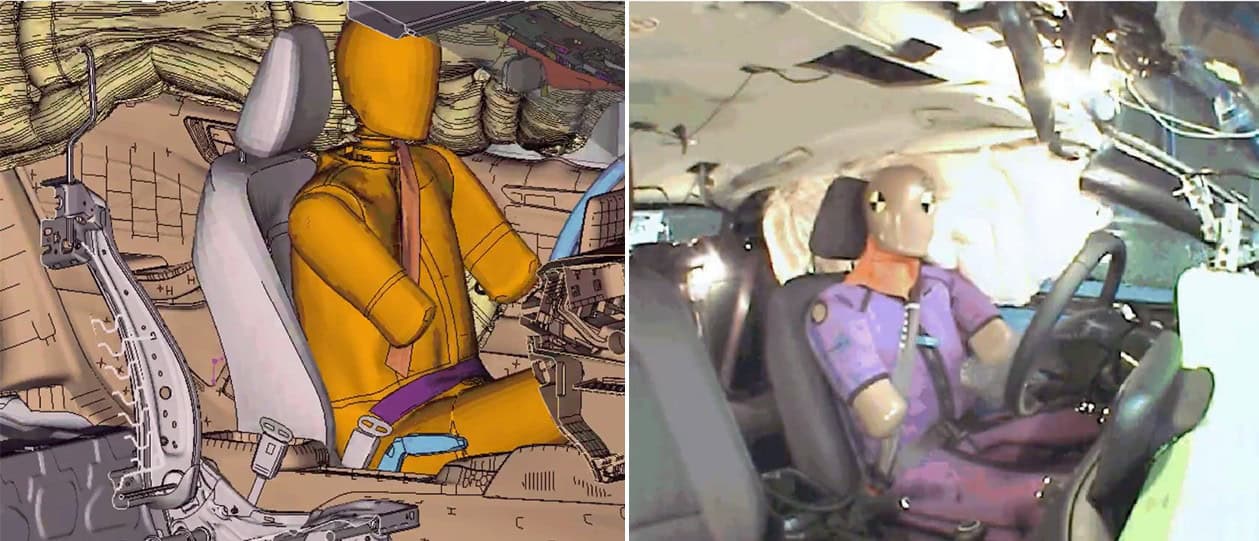
Validation compares a simulation with a real test of the same event, as in this crash model next to the physical test.
Reading FEA results: stresses and the safety factor
In a 3D solid model, the stress at a point has six components. Two derived values do most of the work in design checks.
- Principal stresses are the normal stresses on the planes where shear stress is zero: the highest and lowest normal stress at a point. A brittle material cracks along a principal plane when the largest principal stress exceeds its tensile strength, so for brittle materials that is the value to check.
- Von Mises stress (equivalent stress) combines all the components into one value, based on the energy of distortion. For ductile materials, yield is predicted when the von Mises stress reaches the yield stress from a tensile test, and most FEA codes calculate it.
Safety factor against yield = yield stress ÷ von Mises stress
Structures are usually sized so that stresses stay below yield by a suitable safety factor. In Simcenter 3D a result probe can calculate it element by element. Brittle materials such as ceramics fracture before they yield, so for them a yield check is not enough.
Read the contour plot with care
A contour plot is not the raw element result. The post-processor first extrapolates the stresses from the integration points to the nodes: in an MIT teaching example of a plate with a hole, this raised the peak from 3.26 to 3.59 times the far-field stress. It then usually averages the values at each node, which is meant to give more accurate stresses but also smooths out real jumps, so switch the averaging off at nodes between two materials or at other geometric discontinuities.
To check a single stress state by hand, use our von Mises stress calculator: it also gives the principal stresses and the safety factor against yield.
Simcenter tools for FEA
A short history of the finite element method
Sources and changelog
Sources
Changelog
October 2026: first version, written from Siemens web pages, published course notes and papers, and Volupe’s own worked examples.
Questions about finite element analysis
Questions about your analysis?
Volupe’s structures engineers
Simcenter 3D, Femap and Nastran, and Simcenter HyperMesh, OptiStruct and Radioss
Choose “Technical question” in the form below and describe your case.
Ask a technical question →
What is the difference between FEA and FEM?
FEM, the finite element method, is the mathematical method. FEA, finite element analysis, is its use on an engineering problem. The two are often used as synonyms, and engineers also call the meshed model “the FEM”.
What is FEA used for?
To predict whether a part or structure will bend, break, vibrate, overheat or fail before physical prototypes are built: stresses, displacements, natural frequencies, buckling loads, temperatures and fatigue life. It is used most in aerospace, automotive, electronics, industrial machinery, marine and consumer products.
What is the difference between FEA and CFD?
FEA simulates solids: how structures respond to loads, vibration, heat and pressure. CFD simulates liquids and gases: flow, pressure, turbulence and heat transfer. When a flow deforms a structure, the two are coupled in fluid–structure interaction.
How accurate is FEA?
It is an approximation, and its error can be estimated. A mesh convergence study shows how much the answer still depends on the mesh, and validation against tests shows whether the model represents the real part. In a classic plate-with-a-hole teaching example, the coarsest meshes were 0.5–3% below the converged peak stress, and the finest meshes of three element types agreed within 0.05%.
How fine should the mesh be?
Fine enough that refining it further no longer changes the result you care about. Use smaller or higher-order elements where stress changes quickly, such as fillets and holes. For buckling, our buckling post cites a Simcenter Nastran recommendation of five grid points per half-wave of the buckled shape.
What is modal analysis in FEA?
A modal, or normal modes, analysis calculates the natural frequencies and mode shapes of a structure. In Simcenter Nastran it is solution sequence SOL 103. In our Simcenter OptiStruct random vibration example, it is the first of three steps, before the frequency response and the PSD step.
When do I need a nonlinear analysis?
When deformation is large, when the material yields, or when parts come into contact: then the response no longer scales with the load. Linear static analysis is quick and robust when strains and displacements are small and the material stays elastic.
When do I use an implicit or an explicit solver?
Implicit solvers suit static problems and longer, low-speed events. Explicit solvers, such as Simcenter Radioss, suit short, highly nonlinear events such as crashes, impacts and drop tests. Simcenter OptiStruct covers both.
Which Simcenter tool should I use for FEA?
It depends on the job: Simcenter 3D or Simcenter Femap with the Simcenter Nastran solver for general structural work, Simcenter HyperMesh for large models, Simcenter OptiStruct for analysis with optimisation, Simcenter Radioss for crash and impact, and Simcenter SimSolid for analysis on full CAD assemblies without a mesh. Apart from the Simcenter Nastran solver, all of them are listed on our Simcenter FEA software page, and you can book a demo.