Fluid–structure interaction (FSI), explained

Fluid–structure interaction is what happens when a flow loads and deforms a structure, and the deformation can change the flow in turn. This guide explains when one‑way coupling is enough and when you need two‑way, why the coupling can go unstable, how the mesh follows a moving interface, and three ways to run FSI in Simcenter.

Guide · 20 min read · Updated October 2026

Illustration, not a Simcenter result: the Turek–Hron benchmark, an elastic bar behind a fixed cylinder, bent as it oscillates in the flow. The floor shows flow speed; the pattern is schematic and the channel shortened.

What is fluid⁠–⁠structure interaction?

Fluid–structure interaction (FSI) covers problems in which one or more solid structures interact with a fluid flowing inside or around them. The flow loads and deforms the structure, and the deformation can change the flow in turn; when the deformation changes the flow too little to matter, a one-way analysis is enough.

FSI is one of the coupled-physics analyses in CAE simulation, next to combined thermal and mechanical loads and flexible bodies in multibody models. It joins two branches: computational fluid dynamics (CFD) for the flow and structural analysis for the structure. Simcenter, for example, combines finite volume CFD with finite element solid mechanics, the method behind finite element analysis (FEA).

Where FSI matters

  • Boat hulls. A planing hull’s performance depends on how the water’s hydrodynamics interact with the hull’s structural dynamics.
  • Hydrofoils. The fluid loads on a catamaran’s lifting foil deform it, and the deformation changes how the foil performs; Volupe’s one-way FSI post calls a hydrofoil a textbook example of FSI.
  • Rotating blades. Helicopters, urban air mobility vehicles and wind turbines depend on predicting how aerodynamic forces and the blades’ structural response interact.
  • Piping and flow-induced vibration. Flow-induced vibration from high-velocity multiphase flow is a common source of vibration in process piping and can lead to fatigue failures and leaks. In a Siemens webinar, Xodus uses Simcenter CFD to predict the forcing and finite element analysis to predict the piping’s response.
  • Seals, gaskets, valves and nozzles. These are FSI problems that often also involve mechanical contact between solid parts.
  • Heart valves. A prosthetic valve leaflet displaces about its own mass of blood and is very flexible, so blood and leaflet are strongly coupled.

Siemens describes a one-way workflow for a 5.5 m boat at 5 m/s in 1 m waves. Because the hull panels deflect little compared with the boat’s rigid-body motion, Siemens assumes that the deflection has no significant effect on the flow: the fluid pressure deflects the panels, and one-way coupling is enough.
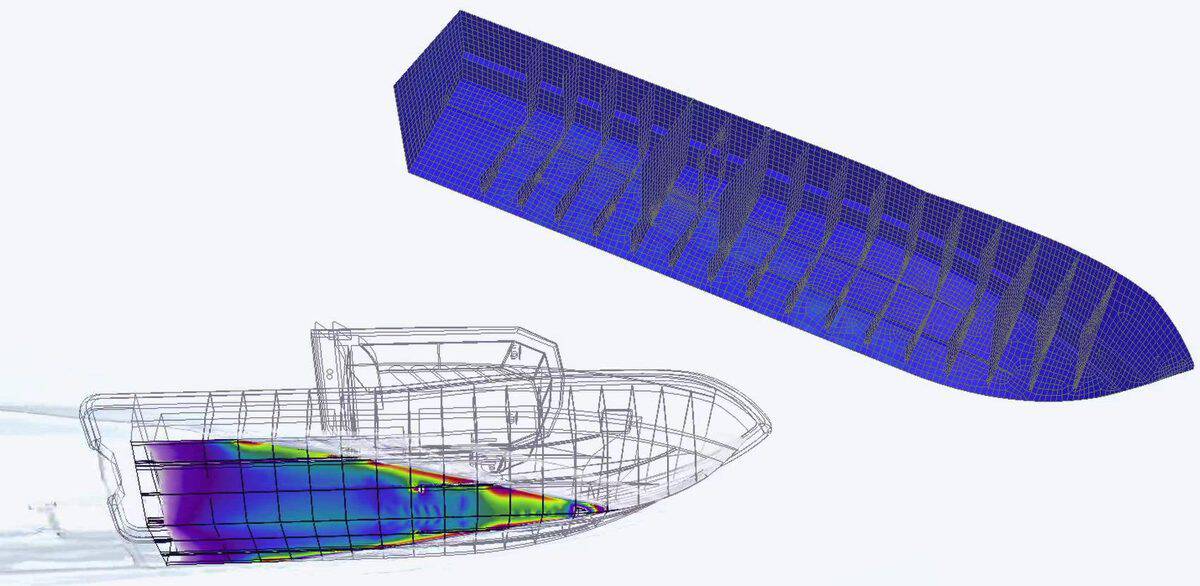
Planing hull coloured by wave pressure from a Simcenter STAR-CCM+ run, in front of its meshed structural model in Simcenter 3D
Wave pressures on a planing hull, computed in Simcenter STAR-⁠CCM+ (front), applied as loads to its structural model in Simcenter 3D (back) to check the structural safety of the vessel. Image: Siemens.

Flutter: when the coupling feeds itself

Flutter is a self-excited FSI instability: the flow excites a structural mode, feedback between the vibration and the flow makes the amplitude grow, and the structure can fail. A Siemens article gives the Tacoma Narrows Bridge (1940) as an example, and contrasts flutter with a limit-cycle oscillation (LCO), in which the amplitude stays constant instead of growing. Both are two-way coupled FSI.

This guide covers flow-driven FSI; coupled vibro-acoustics, which Simcenter 3D lists as a separate multiphysics type, is not covered here.

One‑way or two‑way FSI coupling?

The first modelling decision is which way data passes between the fluid and the structure.

One-way and two-way FSI compared
AspectOne-way couplingTwo-way coupling
What passesFluid loads go to the structure. The deformation is assumed not to change the flow.Loads go to the structure, the deformation goes back, and the flow domain is updated.
When it fitsThe deflection is too small to change the flow; in the Siemens hull example, small compared with the boat’s rigid-body motion.The deformation sets the flow passage or the flow forces, for example a rubber sleeve that acts as a valve and opens a flow path, or a flexible structure about as dense as the fluid around it.
CostThe flow can be solved once and reused: change the structure without re-running the CFD.Each solution depends on the other, so the problem is harder to solve.
ExamplesHull panels of a small boat in waves; a propeller’s stresses for three materials from one CFD run.Flutter and limit-cycle oscillations; heart valves; a rubber-sleeve valve in a nozzle.

A quick test. Does the deformation change the shape that sets the flow? In the Siemens nozzle below, the sleeve’s deformation opens the flow passage, and two-way coupling changed the answer. On the model propeller in Volupe’s Marine FSI post, the blades move about 0.04 mm, and one-way and two-way coupling differed by under 2 % in thrust coefficient and peak stress. Is the structure a thin wall in a dense fluid such as water or blood, or about as dense as the fluid around it? Then the coupling is strong and, as the next section explains, also hard to solve.

One two‑way coupling step

  1. Flow solver

    The flow solver computes the fluid traction (pressure and shear) on the interface and sends it to the structural model.

  2. Structural solver

    The structural solver computes the resulting deformation and sends it back.

  3. Move the flow mesh

    The flow mesh moves to the new shape, and the solvers go round again: once per time step, or several times within it. The diagram in the next section shows both.

At the interface two conditions must hold. The kinematic condition: fluid and solid move with the same velocity, so the fluid neither separates from nor penetrates the wall. The dynamic condition: pressures and forces balance across the interface.

What leaving out two‑way coupling can cost

  • about 10 %

    Mass flow overpredicted when the rubber sleeve was deformed first and the flow solved after

    Siemens, sensor-cleaning nozzle

  • under 2 %

    Difference in thrust coefficient and maximum von Mises stress between one‑way and two‑way FSI (6 % in displacement magnitude)

    Volupe, PPTC model propeller

Results of two single cases, not general rules. Florian Vesting notes that the propeller comparison is a demonstration and not meant as a quantified comparison.

In the Siemens sensor-cleaning nozzle, the sequential approach deformed the rubber sleeve under a fixed 1.0 bar load and then solved the flow; it gave a very different sleeve shape and flow field from two-way FSI. In a Siemens example of a prosthetic heart valve, leaving out two-way FSI overpredicted how fast the leaflets open and close, which could lead to a leaflet design that is too slow in real blood.

In some situations one-way coupling is sufficient. In Volupe’s Marine FSI post, Florian Vesting converts the Potsdam Propeller Test Case (PPTC) tutorial to two-way FSI to show the set-up; the figures above come from that one demonstration case.

In one-way FSI with file exchange he runs the flow and the stress analysis in two separate Simcenter STAR-⁠CCM+ files: the transient CFD run writes the surface pressure to CGNS files, and the finite element run maps it onto the solid mesh. One CFD run then served stress analyses of stainless steel, aluminium and naval brass propellers.
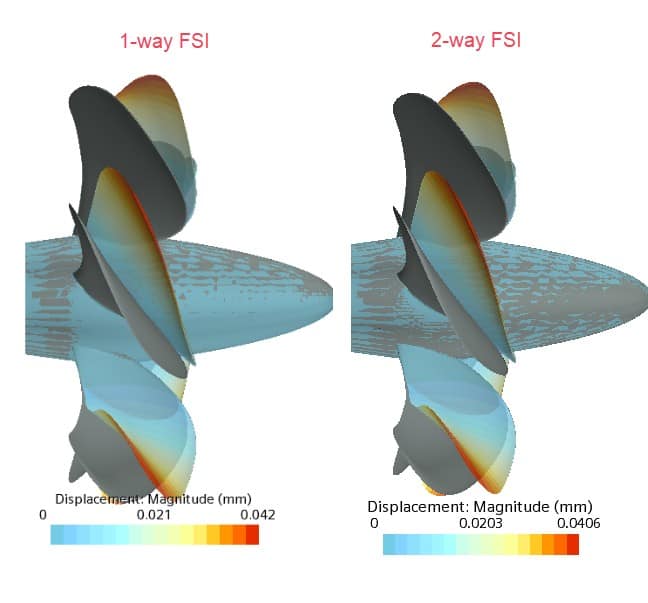
Two propellers side by side, coloured by displacement magnitude: one-way FSI on the left, two-way FSI on the right
Blade displacement magnitude of the PPTC model propeller with one-way (left) and two-way (right) FSI in Simcenter STAR-⁠CCM+; both colour scales end at about 0.04 mm. Image: Volupe, from the Marine FSI post.

Coupling schemes and stability

Two-way FSI is solved either monolithically, as one system of equations, or with a partitioned scheme, as two solvers that exchange data.

Monolithic and partitioned FSI compared
AspectMonolithicPartitioned
How it solvesFluid and structure as one system of equations, with one algorithm.Fluid and structure separately, each with its own mesh and solver.
Interface conditionsBuilt into the single system of equations.Passed as data between the two solvers.
StrengthCan be more accurate.Reuses existing, validated fluid and structural codes.
DifficultySpecialised codes need more resources and expertise to develop and maintain.The interface moves, and its new position has to be tracked.

Explicit and implicit coupling

Partitioned schemes differ in how often the solvers exchange data. An explicit (loosely or weakly coupled) scheme solves the fluid and the structure once each per time step and does not enforce an exact energy balance between them. An implicit (strongly coupled) scheme sub-iterates between the two solvers within each time step to enforce it.

  1. Flow solver

    Fluid traction (pressure and shear) on the interface

  2. Structural solver

    Deformation of the structure

  3. Move the flow mesh

    The flow domain takes the new shape

Implicit: repeat within the time step until fluid and structure balance (back to step 1, the flow solver)

Explicit, or once converged: next time step

“Strongly coupled” also describes the physics: when each side changes the other a lot, as with a flexible structure about as dense as the fluid around it, explicit schemes tend to go unstable, as the next part explains, so an implicit scheme is needed.

The added‑mass effect

A structure that moves in a fluid has to move some of the fluid with it, and that fluid acts like extra mass on the structure. This added-mass effect is a known source of numerical difficulty. Explicit schemes work in aeroelasticity, but in other applications they become unstable when the fluid and structure densities are comparable or the domain is slender, whatever the time step. Implicit schemes then struggle to converge and need many sub-iterations per time step.

  • over 6,000 ×

    Steel against air: explicit coupling usually works, as in aeroelasticity

    Density ratio

  • under 8 ×

    Steel against water: thin steel walls can run into the added‑mass instability

    Density ratio

Densities from the Turek–Hron benchmark pages (kg/m³): steel 7,800; water 1,000; blood 1,035; air 1.23. Stability from Causin and co-authors. Density alone is not the test; see the next paragraph.

In the analysis by Causin and co-authors, an explicit scheme goes unstable, whatever the time step, when the fluid the wall has to move outweighs the wall’s own mass per unit area (its density times its thickness). That fluid mass grows with the fluid density and with how slender the domain is. A thin steel shell in water can therefore be on the unstable side, while a thick, compact part may not be.

Not every coupling instability is the added-mass kind. If the structure is much denser than the fluid but very stiff, an explicit scheme can still go unstable, and then a smaller time step can stabilise it. When the sub-iterations use a relaxed fixed-point method, stronger under-relaxation is needed as the structure gets lighter or the domain gets longer. Aitken under-relaxation adjusts the relaxation factor automatically from one sub-iteration to the next, and quasi-Newton methods such as IQN-ILS (Anderson acceleration) go further; the documentation of the preCICE coupling library recommends them for most cases.

Moving meshes and data mapping

When the structure deforms, the flow solution has to follow the moving interface, and loads and displacements have to cross that interface, where the fluid and solid meshes generally do not match.

Following the moving interface

Conforming-mesh, or interface-tracking, methods keep the fluid mesh aligned with the moving interface and update it as the structure moves; they fit naturally with partitioned coupling. The Arbitrary Lagrangian–Eulerian (ALE) method is one of them: the fluid mesh moves independently of the fluid, and the flow equations account for the mesh motion. Non-conforming methods, such as immersed boundary methods, instead impose the interface as a constraint in the equations, so fluid and solid can use independent grids and no remeshing is needed.
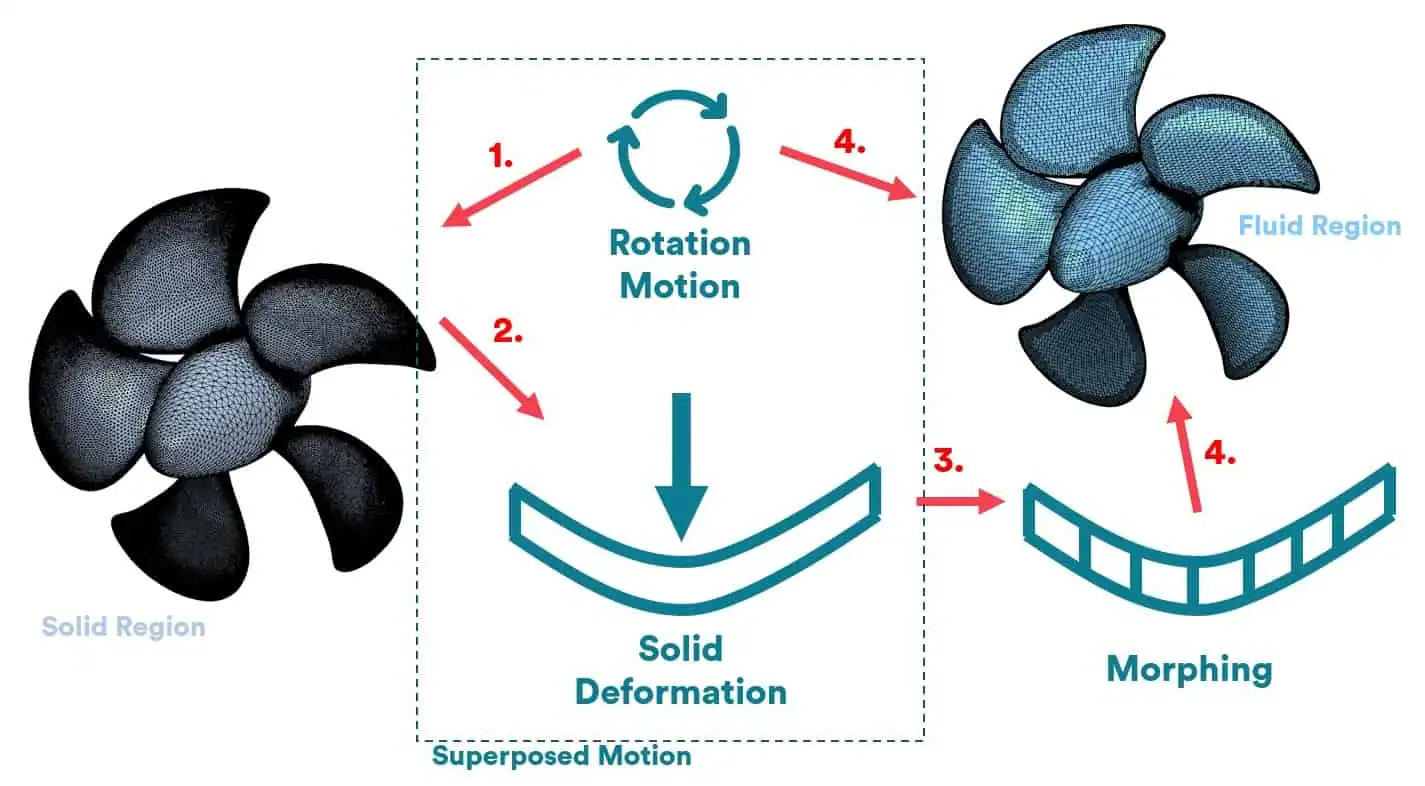
Diagram: a solid propeller region with rotation and solid deformation, and the fluid propeller region that morphs to follow it
The superposed motion in Volupe’s propeller set-up: the solid propeller rotates and deforms, and the fluid region morphs to follow it. Image: Volupe, from the Marine FSI post.

At the interface, the meshes on both sides must deform in the same way, and both regions must use the same reference frame; Volupe’s Marine FSI post calls these the consistency conditions of an FSI set-up. To follow large deformations, Simcenter STAR-⁠CCM+ uses mesh morphing, overset meshes and dynamic remeshing. For a flexible part that touches a wall, Christoffer Johansson’s step-by-step FSI set-up in Simcenter STAR-⁠CCM+ moves the solid with a zero-gap overset mesh, which deactivates the cells in a closing gap and reactivates them as it opens.

Mapping loads and displacements

Because the interface meshes on the two sides generally differ, data must be mapped. Quantities that do not add up over the surface, such as pressure or temperature (intensive quantities), are mapped consistently, that is, interpolated from one mesh to the other. Forces and other quantities that add up to a total (extensive quantities) should be mapped conservatively, so that the total force is the same on both meshes.

In Simcenter STAR-⁠CCM+ the fluid traction (the surface load from the flow) is interpolated automatically from the fluid side of the interface to the solid side and applied as a load. The interpolation handles conformal interfaces, where the fluid and solid interface meshes match, and non-conformal ones, where they do not (a different sense from the conforming-mesh methods above); similar mesh resolution on both sides is advised, to avoid losing information. In the other direction, the solid’s motion drives the fluid mesh.

With gaps between the two meshes, the interface and the mesh quality can no longer be guaranteed. Simcenter STAR-⁠CCM+ 2606 added a Surface from volume mesh operation that keeps the interface free of gaps, even for moving meshes.
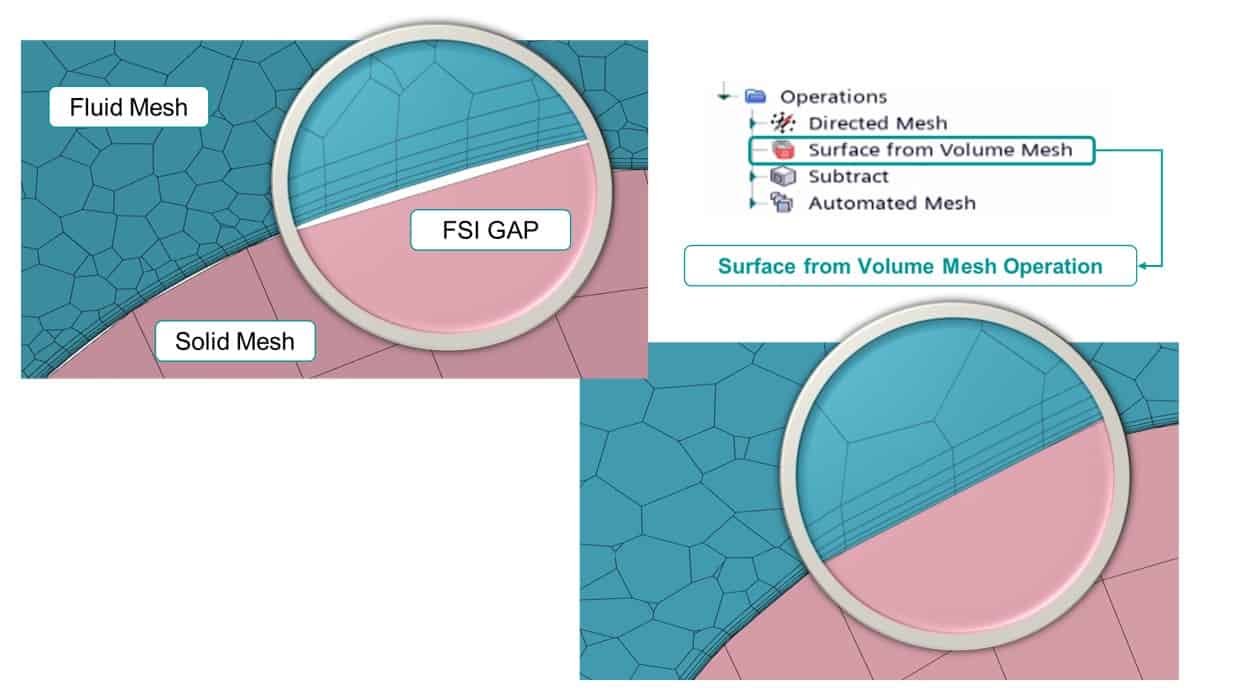
Fluid and solid meshes at an interface: first with a gap between them, then closed by the Surface from volume mesh operation
A gap between the fluid and solid meshes at an FSI interface (top left) and the interface after the Surface from volume mesh operation (bottom right). Image: Volupe, from the Simcenter STAR-⁠CCM+ 2606 post.

FSI in Simcenter: three ways to couple flow and structure

Which route fits depends on where the structural model lives and how the structure is best described: as a mesh or as a system model.

Three ways to run FSI in Simcenter: where the structure lives, how it couples, and an example
RouteWhere the structure livesHow it couplesExample
In Simcenter STAR-⁠CCM+ aloneThe integrated solid stress solver in Simcenter STAR-⁠CCM+Explicit, or iterative with several exchanges per time step; one‑way also by file exchange between two simulation files (CGNS)Badminton shuttle
Lienhart–Gomes benchmark
PPTC propeller (one‑way)
With Simcenter 3D and Simcenter NastranA structural model in Simcenter 3DOne‑way: a Simcenter Data File (from 2206)
Two‑way: co‑simulation, introduced in Simcenter STAR-⁠CCM+ 2019.3
HIRENSAD wing (Siemens)
With Simcenter AmesimA 1D system model, such as a mass on a springTwo‑way explicit co‑simulation, or FMI with co‑simulation FMUsCheck valve: rigid plate on a spring, no stresses
Electric RIB: system-level FMI

In one Simcenter STAR-⁠CCM+ simulation

Simcenter STAR-⁠CCM+ has an integrated solid stress solver, so flow and structure can be part of the same simulation, with no co-simulation needed. Siemens lists static, quasi-static and dynamic problems, nonlinear geometry, bonded and small-sliding contacts and, since 2022, mechanical contact between tessellated parts, as in the rubber-sleeve nozzle above.

One simulation does not mean a monolithic solver. The finite volume flow solver and the finite element solid stress solver stay separate and exchange interface data, fluid traction in one direction and solid motion in the other, so in the terms used above this is a partitioned scheme. Explicit coupling, with data exchanged once per set time interval, is the loosely coupled form; iterative coupling, with data exchanged several times per time step, is the implicit, strongly coupled form.

The stabilisation settings answer the problems described above:

Stabilisation settings in Simcenter STAR-⁠CCM+ and the problem each one treats
ProblemSetting in Simcenter STAR-⁠CCM+Available
The added‑mass effect (a thin wall in a dense fluid, or a structure about as dense as the fluid)Boundary Interface Added Mass: predicts the change in fluid traction as the interface movesIn 2021, transient cases only
Sub‑iterations that need stronger under‑relaxationConstant Displacement Under‑relaxation: a constant factor on the interface displacement, not Aitken’s adaptive oneIn 2021, transient cases only
Convergence very hard to achieve: a dense fluid strongly coupled to a very flexible structureDynamic FSI stabilisation, with one adjustable coefficientFrom release 2402

Volupe’s 2021 Marine FSI post recommends Boundary Interface Added Mass for two-way coupled problems.

With Simcenter 3D and Simcenter Nastran

When the structural model lives in Simcenter 3D, Simcenter STAR-⁠CCM+ (from release 2206) can export results such as wall pressure to a Simcenter Data File (.scd5). Simcenter 3D imports it and interpolates it in space and time as a load for Simcenter Nastran: a one-way workflow. For two-way cases, Simcenter STAR-⁠CCM+ 2019.3 introduced a co-simulation with Simcenter Nastran, in which the flow engineer worked in Simcenter STAR-⁠CCM+ and the structural engineer in Simcenter 3D. If your structural model is in another FE code, ask a Volupe engineer which coupling the current release supports.

With Simcenter Amesim: 1D–3D co-simulation

Sometimes the structure is better described as a system model than as a mesh. In Fabian Hasselby’s check-valve co-simulation with Simcenter Amesim, Simcenter STAR-⁠CCM+ sends the flow force on the valve plate to Simcenter Amesim, which treats the plate as a mass on a spring (the plate moves, but no stresses are computed), computes its new position and sends it back; Simcenter STAR-⁠CCM+ then moves the plate’s overset region. In the example, the built-in link runs a two-way explicit co-simulation over TCP/IP, with data exchanged every 0.005 s over a 0.05 s run.

Simcenter STAR-⁠CCM+ can also couple through the Functional Mock-up Interface (FMI), a free standard for exchanging dynamic simulation models. It imports co-simulation FMUs, which carry their own solver; at the time of Fabian’s 2023 post it did not import model-exchange FMUs, which rely on the importing tool’s solver. In that set-up, with FMI 1.0 or 2.0, only scalar values are exchanged, not spatially varying fields, so the link suits system-level quantities, such as boat speed, motor torque and propeller speed in his electric RIB case, rather than surface loads.

Flow and structure

One tool or two? Flow and structure in one Simcenter STAR-⁠CCM+ simulation need no co‑simulation; a Simcenter Data File takes the flow loads to a structural model in Simcenter 3D.

Systems and training

Mesh or system model? A valve plate on a spring can be a lumped mass–spring model in Simcenter Amesim instead of a meshed solid.

Planning an FSI study?

Tell us about the structure and the flow, and a Volupe engineer will help you choose between one‑way and two‑way coupling and a Simcenter set-up.

Ask a Volupe engineerBook a demo

Verification and validation for FSI

FSI codes are tested on benchmark cases with published data. Three examples:

  • Turek–Hron. Laminar, incompressible channel flow past a fixed cylinder with an elastic bar attached behind it (the illustration at the top of this page), which the flow sets into self-induced oscillation, a flow-induced vibration. It was designed to compare coupling approaches, from partitioned, weakly coupled schemes to monolithic ones, and it has separate CFD, CSM (structural) and FSI tests, so each solver can be checked alone first.
  • Lienhart and Gomes. A two-dimensional FSI reference experiment, published in 2006 and presented at ECCOMAS CFD 2006. Siemens ran it in Simcenter STAR-⁠CCM+ 2210 with second-order time integration (the Generalized-α scheme), and Volupe’s 2021 Marine FSI post shows it run in one Simcenter STAR-⁠CCM+ simulation.
  • HIRENSAD wing. Siemens validated its Simcenter Nastran to Simcenter STAR-⁠CCM+ co-simulation on the HIRENSAD (High Reynolds Number Aerostructural Dynamics) wing from the 1st Aeroelastic Prediction Workshop, a static case in which the flow bends the wing into aeroelastic equilibrium. Siemens reports close agreement with the wind-tunnel data.

Practical checks

  • Start one-way. Compare the one-way deflection with the gaps, clearances and other lengths that shape the flow; if it changes them, go two-way. One-way coupling also lets one flow solution serve several structural variants.
  • Match the meshes. Use similar mesh resolution on both sides of the interface, to avoid losing information in the mapping.
  • Map the right way. Map forces conservatively and pressures consistently, and check that the total force on the solid side equals the force on the fluid side.
  • Diagnose an unstable run. If an explicit coupling goes unstable, compare the structure’s mass per unit area with the fluid it has to move: a thin, light wall in a dense fluid points to the added-mass instability, which a smaller time step does not cure; switch to iterative coupling with added-mass stabilisation. A smaller time step can cure the other kind, with a structure much denser than the fluid but very stiff.
  • Use second order. For dynamic FSI, use second-order time integration where you can: first-order schemes dissipate a significant amount of energy, which can make results inaccurate (Siemens, 2210 release blog). From Simcenter STAR-⁠CCM+ 2402 the solid stress solver also has backward differentiation time integration, which keeps solid and fluid kinematically consistent when both run at second order.
  • Budget the run time. In the transient shuttle example below, Christoffer notes that FSI needs both the finest time step and the finest mesh, so the simulation will need a lot of computing power.

For verification and validation in general, see our guide to CAE simulation; for mesh convergence on three grids, the grid convergence index (GCI) calculator.

Worked example: FSI on a badminton shuttle in free flight

Christoffer Johansson, Volupe · 2025

A free-flying body that deforms

In a 2025 post, Christoffer Johansson adds FSI to a badminton-shuttle simulation in Simcenter STAR-⁠CCM+. The shuttle flies freely and deforms (Christoffer calls it a deformable DFBI body, after the Dynamic Fluid Body Interaction model in Simcenter STAR-⁠CCM+): a solid region makes it deform according to its material properties, and the fluid mesh morphs around it in every time step. The solid stresses and displacements are computed from the flow around the shuttle.

How the pieces fit together.

  • The shuttle’s rigid-body motion has all six degrees of freedom free, so it can turn and fly on its own.
  • Its solid region adds a solid displacement on top of that rigid-body motion.
  • The overset region around it morphs with the solid at the contact interface, while its outer boundary floats with the body through the background mesh.
  • The body’s centre of mass and moments of inertia are computed from the solid’s material properties.
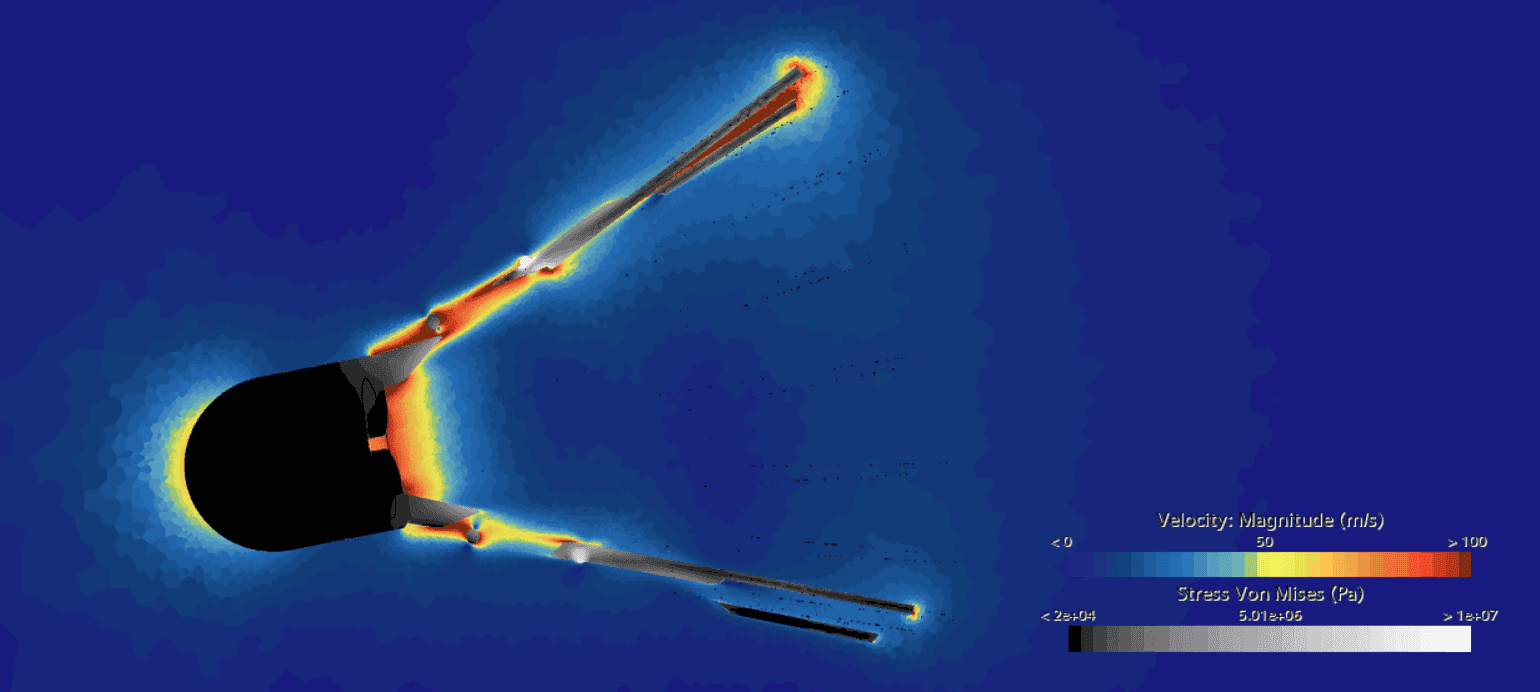
A badminton shuttle in flight with the surrounding flow coloured by velocity and the shuttle coloured by von Mises stress
A badminton shuttle early in its flight, simulated with FSI in Simcenter STAR-⁠CCM+: flow speed around the shuttle and von Mises stress in it. Image: Volupe.

In the first results, a snapshot early in the flight, the stresses are high in the rings that hold the feathers, and the flow is fast between the feathers where the gaps are small. The material is a placeholder: aluminium at a tenth of its density (270 kg/m³) but with aluminium’s stiffness (68 GPa), far stiffer than cork, so the shuttle barely bends. Christoffer notes that a lower Young’s modulus would give a more flexible shuttle and more accurate results, so the picture shows the method, not real shuttle stresses.

For a marine case with numbers, see the PPTC propeller above: one-way against two-way FSI, and one CFD run reused for three materials.

Read Christoffer’s post Turning of badminton shuttles and flexible DFBI set up in Simcenter STAR-⁠CCM+.

FSI terms in brief

  • Added mass. Fluid that moves with a moving structure and acts like extra mass on it; a known source of instability in partitioned FSI.
  • ALE (Arbitrary Lagrangian–Eulerian). A method in which the fluid mesh moves independently of the fluid to follow the structure.
  • Co-simulation. Two tools that run together and exchange data during the solution, for example Simcenter STAR-⁠CCM+ with Simcenter Amesim.
  • Conservative and consistent mapping. Transferring forces so that their total is kept, and interpolating pressures or temperatures, between non-matching meshes.
  • Explicit and implicit coupling. One data exchange per time step, or sub‑iterations within each time step until fluid and structure balance.
  • Flutter and LCO. A self-excited vibration whose amplitude grows, and a limit-cycle oscillation whose amplitude stays constant; both are two‑way coupled.
  • FMI and FMU. The Functional Mock-up Interface, a free standard, and the Functional Mock-up Unit, the packaged model it exchanges.
  • Monolithic and partitioned. One system of equations for fluid and structure, or two solvers that exchange interface data.
  • One‑way and two‑way coupling. The deformation is assumed not to change the flow, or it is passed back and changes the flow.

Sources and changelog

Sources

J. Hou, Y. Wang and C. Layton, Numerical methods for fluid–structure interaction: a review, Communications in Computational Physics 12 (2012) (open copy, PDF); P. Causin, J.-F. Gerbeau and F. Nobile, Added-mass effect in the design of partitioned algorithms for fluid–structure problems, Computer Methods in Applied Mechanics and Engineering 194 (2005) (ICES report 04-02, PDF).

S. Turek and J. Hron, Proposal for numerical benchmarking of fluid–structure interaction between an elastic object and laminar incompressible flow, and J. P. Gomes and H. Lienhart, Experimental study on a fluid–structure interaction reference test case, both in Fluid–structure interaction, Lecture Notes in Computational Science and Engineering 53 (2006); TU Dortmund, FSI benchmark pages.

preCICE documentation, data mapping and acceleration; Modelica Association, Functional Mock-up Interface.

Siemens blogs: Exciting days (flutter, co-simulation, HIRENSAD), CFD-FEA coupling in Simcenter, FSI and heart valves, FSI with mechanical contact, rotor blade aeroelasticity, multiphysics examples and the Simcenter STAR-⁠CCM+ release blogs for 2019.3, 2210 and 2402; Siemens webinar CFD for flow-induced vibration (with Xodus).

Siemens product pages: Simcenter STAR-⁠CCM+, CFD simulation, Simcenter 3D, system simulation technologies and finite element analysis.

Worked examples: Volupe blog posts by Christoffer Johansson, Florian Vesting and Fabian Hasselby, linked in the text and below.

Images: Siemens Simcenter image library (planing hull) and Volupe’s own posts. The benchmark illustration and the coupling diagram are drawn by Volupe.

Changelog

October 2026: first version, written from Siemens web pages, blogs and a webinar page, published papers, benchmark pages, coupling-library documentation and the FMI standard’s site, and Volupe’s own worked examples.

Questions about fluid⁠–⁠structure interaction

Questions about your FSI case?

Volupe’s CFD and structures engineers

Simcenter STAR-⁠CCM+, Simcenter 3D and Simcenter Amesim

Choose “Technical question” in the form below and describe your case.

Ask a technical question →

What is fluid–structure interaction (FSI)?

Fluid–structure interaction covers problems in which a solid structure interacts with a fluid flowing inside or around it. The flow loads and deforms the structure, and the deformation can change the flow in turn. Boat hulls, hydrofoils, rotor blades, valves and heart valves are typical cases.

What is the difference between one-way and two-way FSI?

In one-way FSI the fluid loads deform the structure, and the deformation is assumed not to change the flow. In two-way FSI the deformation is passed back and the flow is updated, so each solution depends on the other and the problem is harder to solve.

When is one-way coupling enough?

When the deformation is too small to change the flow, as Siemens assumes for the hull panels of a small boat in waves. If the deformation changes the flow passage, as with a rubber-sleeve valve, it is not. One-way coupling also lets you reuse one flow solution for several structural variants, such as different materials.

What is the difference between CFD and FSI?

CFD solves the flow for a given geometry. FSI couples the flow with a structural analysis, so the flow loads pass to the structure and, in two-way FSI, the deformation passes back and changes the flow. In Simcenter STAR-CCM+ the structural side is finite element solid mechanics; with Simcenter Amesim it can be a system model, such as a mass on a spring.

What is the added-mass effect in FSI?

A moving structure has to move some of the surrounding fluid, which acts like extra mass on it. When the structure’s mass is comparable to the fluid mass it moves (comparable densities, a thin wall or a slender domain), as with a heart-valve leaflet in blood, explicit coupling becomes unstable whatever the time step, and implicit coupling needs many sub-iterations.

What is the difference between partitioned and monolithic FSI?

A monolithic approach solves fluid and structure as one system of equations; it can be more accurate but needs specialised code. A partitioned approach solves them with separate solvers and meshes that exchange data at the interface, so existing, validated codes can be reused.

Can Simcenter STAR-CCM+ solve FSI on its own?

Yes. Simcenter STAR-CCM+ has an integrated solid stress solver, so the flow and the structure can be one simulation, with separate flow and solid solvers coupled explicitly or iteratively and no co-simulation. For the set-up step by step, see Christoffer Johansson’s post How to set up a FSI simulation in Simcenter STAR-CCM+.

Can Simcenter STAR-CCM+ be coupled with Simcenter 3D?

Yes. From release 2206, Simcenter STAR-CCM+ can export results such as wall pressure to a Simcenter Data File, which Simcenter 3D imports as a load for Simcenter Nastran. For two-way cases, Simcenter STAR-CCM+ 2019.3 introduced a co-simulation with Simcenter Nastran.

Can an FMU be used for FSI?

In the set-ups Volupe has described, only for system-level quantities: with FMI 1.0 and 2.0, only scalar values are exchanged, not spatially varying fields, so an FMU can carry a system model, such as a boat’s electric propulsion, while the surface loads stay in the CFD and structural models. Simcenter STAR-CCM+ imports co-simulation FMUs; Fabian Hasselby explains the standard in The functional mock-up interface and FMUs for co-simulation.

Talk to an engineer in your region

Every Volupe business developer holds an engineering degree. Find your regional contact below, or send us a message.

Denmark and Central Eastern Europe

Lukas Johansson

Sales Director, M.Sc.

Norway, Finland and the Baltics

Carl Wanngård

Business Developer, M.Sc.

DACH region

David Fabis

Business Developer, M.Sc.

DACH region

André Hau

Business Developer, M.Sc.

Sweden

Fredrik Liljedahl

Business Developer, M.Sc.

Europe

Henrik Pahlitzsch

Business Developer, M.Sc.

Iberia

Mikel Sevilla

Business Developer

Ask us about FSI (fluid–structure interaction)

Use this form for licence quotes, demos, training and technical questions.

What happens next

  1. A reply within one day.
  2. A scoping call with one of our engineers.
  3. A quote, demo or other next step that fits your enquiry.

After purchase: support from Volupe simulation engineers.

For a quote, the number of users, modules and your timeline help us answer faster.
See how we handle your details in our privacy policy.
Scroll to Top