Topology optimisation, explained
Topology optimisation is a way to let the solver find where material is needed in a part, given the loads, the supports and how much material you allow. In this guide we follow one example from a uniform grey plate to a finished layout (the classic MBB beam, which we computed ourselves). On the way we describe the density method behind the result and what is needed before it can be made.

What is topology optimisation?
A worked example: the MBB beam
To show what actually happens during a topology optimisation, we follow one run of the MBB beam. It is the classic teaching example, used as the default case both in Ole Sigmund’s 99-line code from 2001 and in its successor from 2011 (the 88-line code by Andreassen, Clausen, Schevenels, Lazarov and Sigmund). We wrote a JavaScript version of the 88-line code and ran it ourselves, so the density pictures on this page are results from those runs.
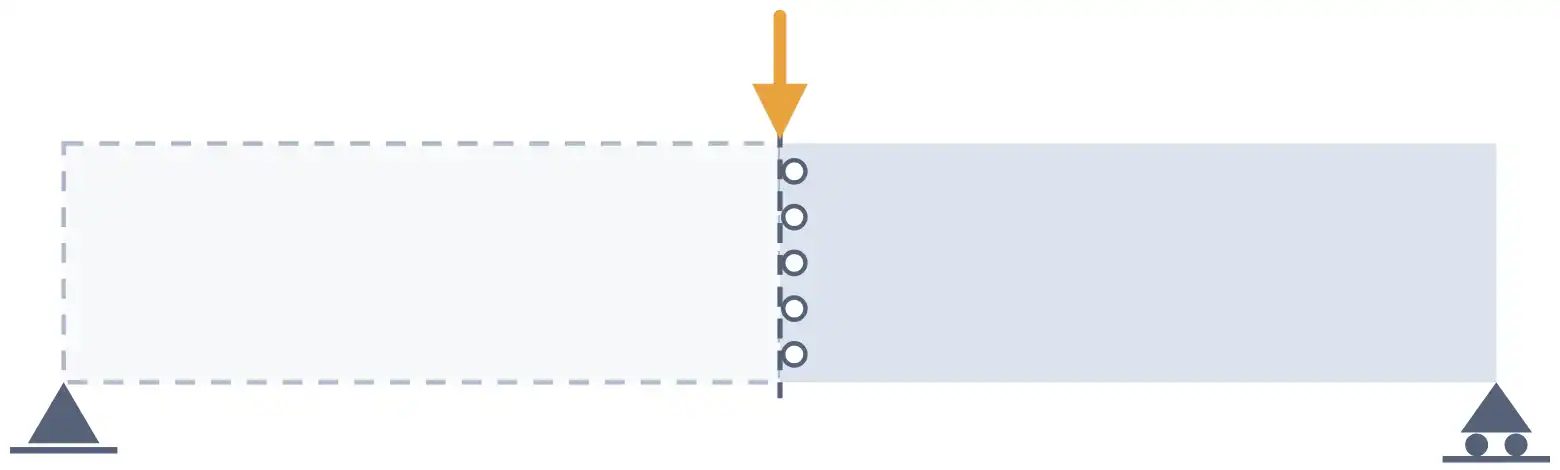
The MBB beam
Supported at both lower corners and loaded at the middle of the top edge
Since the beam is symmetric, only the right half is modelled. The load then acts at the upper left corner of that half, and its left edge gets symmetry conditions. We use the settings of Sigmund’s original 99-line example. The half beam has 60 × 20 square elements and half of the design space is filled with material (a volume fraction of 0.5), with a penalisation exponent of 3 and a filter radius of 1.5 elements. Note that this is a 2D plane-stress model with four-node elements and a Poisson’s ratio of 0.3. A real part is usually meshed in 3D, but the method is the same.
What happens during the iterations
All elements start at a density of 0.5, so the first design is a uniform grey plate. Already after the first update, material has started to move towards the top and bottom edges, although most of the beam is still grey. After ten iterations you can see a truss-like layout forming. After 94 iterations the largest change in any element density has dropped to 0.01, which is where the run stops. Around a fifth of the elements are then still grey, mostly as a thin band along the edges of the members. The whole run took about half a second on our computer (the finer 180 × 60 run needed 96 iterations and around half a minute).
In the pictures and the chart below you see the run. The chart gives the optimiser’s own value of the deflection under the load for the design it analyses in each iteration. It drops fast during the first ten iterations and is within 1% of its final value after 28 iterations. The rest of the run mostly cleans up the edges, which is expected since the stop rule in the code looks at how much the densities change and not at the deflection. The first value, 1007, belongs to the uniform grey start. There every element has only one eighth of the solid stiffness because of the penalty, and the beam therefore deflects four times as much as an even plate of half the thickness (251.8).

After iteration 1
Grey material almost everywhere

After iteration 10
A truss layout is forming

After iteration 94
Solid members with soft grey edges
Deflection during the run
The dots mark the designs analysed in iteration 1 (the grey start), 10 and 94
To put a number on the layout, we compared each result with a plate that has the same amount of material spread evenly, which for 50% material is a plate of half the thickness (all our runs are in the table below). For the first run, the plate deflects 251.8 units under the load. The optimised layout, with every element rounded to solid or empty, deflects 191.4 units with 49% of the material.
Worked example · computed by Volupe
| Run (half beam) | Iterations | Optimiser’s value | Re-analysed design | Even plate | Less deflection |
|---|---|---|---|---|---|
| 60 × 20, p = 3, filter 1.5 elements | 94 | 203.2 | 191.449% material | 251.8 | around 24% |
| 120 × 40, filter 1.5 elements | 238 | 193.0 | 186.749% material | 256.7 | around 27% |
| 120 × 40, filter 3 elements | 100 | 207.0 | 190.150% material | 256.7 | around 26% |
| 180 × 60, filter 4.5 elements | 96 | 208.4 | 190.250% material | 259.5 | around 26% |
| 60 × 20, 30% material | 134 | 343.3 | 314.728% material | 419.6 | around 25% |
| 60 × 20, no penalty (p = 1) | 12 | 164.8 | falls apart | 251.8 | none |
This means around 24% less deflection with slightly less material, from placing the material differently.
As you can see in the table, the even plate deflects a little more on each finer mesh (251.8, 256.7 and 259.5 units). The deflection right under a point load depends on the mesh, and this holds for the layout too. Re-analysed on the two finer meshes, our first layout deflects 197.7 and 200.3 units. Each design is therefore compared with the plate on its own mesh, and the percentages are not a trend towards finer meshes.
The even plate is also the simplest possible reference. On the same model, an I-profile with the same material (three element rows in each flange and a web of 29% thickness) deflects even less, 184.9 units. In a 2D model a thin web is the same thing as grey material without the penalty, which the optimiser is pushed away from. In a 3D part a thin web is itself a solid-or-empty layout, and the fair 2D comparison is a truss. Against the best truss we drew by hand on the same mesh (solid or empty, 50% material, 221.7 units), the optimised layout deflects around 14% less.
Note that the optimiser itself reported 203.2 for the design from the first run, not 191.4. Inside the optimisation, elements of intermediate density count with a penalised stiffness. The value at the end of a run is therefore an estimate, and it can be off in either direction (here the rounded design came out around 6% stiffer).
One more thing worth checking is that the layout is only optimal for the load the optimiser saw. We mirrored the rounded design to the full beam and moved the unit load to a quarter of the span. The optimised layout then deflected around 10% more than the even plate (87.3 against 79.7 units). With the design load on the same model it deflected around 25% less (95.7 against 127.8), and with the load at the middle of the bottom edge there was practically no gain at all. This is why all load cases the part will meet have to be included, or the optimiser removes the material that would have carried them.
How the density method works
In principle every element should be either solid or empty. Optimising thousands of on/off variables directly is far too expensive, and the problem is therefore written with continuous variables instead. Each element gets a density between 0 (void) and 1 (solid), which is known as the density method. The values in between stand for a fictitious material that will not exist in the finished part.
Penalisation and SIMP
Left alone, the optimum contains large grey zones, which cannot be built. The common remedy is SIMP (solid isotropic material with penalisation, also called the power-law approach). Here the stiffness of each element is its density raised to a power, times the stiffness of solid material. In the 88-line code it reads
E(x) = Emin + xp (E0 − Emin)
where x is the element density, E0 the stiffness of the solid material and Emin a very small stiffness for empty elements (so that the stiffness matrix does not become singular). The exponent p is typically 3. With p = 3, an element at density 0.5 holds half the material but has one eighth of the stiffness. Intermediate densities are therefore a poor deal, and the optimiser pushes elements towards 0 or 1. Simcenter OptiStruct uses the same idea. Its documentation lists SIMP with two other schemes, says SIMP is used for the vast majority of set-ups and gives a usual exponent of 2 to 4.
Checkerboards and filters
Even with penalisation, density-based topology optimisation has three well-known numerical problems. These are checkerboard patterns, mesh dependence (a finer mesh gives a different design instead of a sharper one) and local minima. Sigmund and Petersson surveyed the remedies already in 1998. In the pictures below you see the effect of the penalty and of the filter in our beam.

p = 1, with filter
No penalty: 71% of the elements stay grey

p = 3, no filter
Black and white, but the members break up into single solid and empty elements

p = 3, with filter
Solid members, grey only at the edges
With p = 1, 71% of the elements end up between 0.1 and 0.9 in density. On paper this grey design is even stiffer (164.8 against 203.2), since grey material counts at its full value (in 2D, grey material is simply a thinner plate). But if you round it to solid or empty at 0.5, the top and bottom chords are no longer connected and the beam cannot carry the load at all. With p = 3 but no filter, parts of the members break up into a checkerboard of single solid and empty elements (the middle picture).
The usual remedy is a filter that averages each element with its neighbours within a radius, applied either to the sensitivities (as in the 99-line code) or to the densities. In the 88-line paper, both filters suppressed the checkerboards and gave mesh-independent designs, where a finer mesh refined the result instead of changing the topology.
We tried this with our code, first keeping the filter radius at 1.5 elements on a mesh of 120 × 40. The filter then covers half the distance, and more and thinner members appeared. That layout was even a little stiffer (186.7 against 190.1 in the table). With the radius doubled to 3 elements, the finer mesh gave the same layout as the coarse one, with smoother edges. The filter radius therefore works roughly as a minimum length scale, which is something you choose. Since the code gives the radius in elements, it has to grow with the mesh if you want the same layout.

60 × 20, filter 1.5 elements
The run from the example

120 × 40, filter 1.5 elements
The filter covers half the distance, more and thinner members

120 × 40, filter 3 elements
Same distance as on the coarse mesh, same layout
The optimisation loop
- Finite element analysis
The current design is analysed with the loads and boundary conditions.
- Convergence check
If the design has stopped changing, the run ends here.
- Sensitivity analysis
The derivatives of the responses, such as compliance or mass, are calculated with respect to every density.
- Filter and update
The sensitivities (or densities) are filtered and all densities are updated in one step, with optimality criteria in both educational codes or with an optimiser such as MMA, published by Krister Svanberg in 1987. According to its documentation, Simcenter OptiStruct uses a dual optimiser by default.
One thing worth mentioning is that density methods are not the only approach. In level-set methods the boundary moves as in shape optimisation (Simcenter OptiStruct offers this too), and there are also evolutionary methods associated with Xie and Steven. Sigmund and Maute review the main approaches in a 2013 paper.
Setting up a topology optimisation
On a real part, the first job is to split the model into design space and non-design space. The design space is the volume the optimiser may fill or empty. The non-design space is what has to stay as it is, for example the attachment points where the loads and constraints are applied in the control-arm example in the OptiStruct documentation.
Next you add the loads and supports, which are always needed, and choose the objective. The common objectives are to maximise stiffness, maximise a natural frequency or minimise mass. When stiffness is maximised (the textbook problem of minimum compliance, as in our beam), a volume fraction or mass target says how much material to keep. With 30% of the design space instead of 50%, our beam keeps a similar layout with thinner members, and the optimiser’s value of the deflection rises from 203 to 343 units (314.7 for the re-analysed design).

30% material
Thinner members, a similar layout

50% material
The run from the example
The volume fraction is something you choose before the run, since the optimiser does not find it for you.
Several load cases, frequencies and stresses
A real part usually has to handle more than one load case. As our quarter-span test showed, a load that is left out can make the result worse than a plain design. The OptiStruct documentation describes a car engine bracket optimised for six load cases, from starting, reversing and driving into and out of a pothole to loads from an attaching part and loads during engine transport. The usual objective is then a weighted sum of the compliances at a fixed volume fraction.
Frequency objectives and constraints are used to move a part’s natural frequencies, for example away from a resonance with other parts of the product. Stress is harder to handle. Every element has its own stress, and solvers therefore combine them into a global measure (typically used as a constraint when mass is minimised). Buckling of slender members in compression is another risk (Simcenter 3D can include buckling as an objective or constraint), so the final design should always be checked with a detailed analysis.
Constraints for casting, extrusion and printing
Without manufacturing constraints the result is often not possible to make. A casting, for example, cannot have closed cavities or cavities that do not line up with the direction in which the die slides. The OptiStruct documentation shows a beam twisted at one end that becomes a tube without constraints (the optimal shape for torsion, but not castable with its die direction). With a draw direction constraint, it becomes a repeating X pattern.
| Constraint | What it does | Typical use |
|---|---|---|
| Minimum member size | Penalises members thinner than a set size, recommended at 3 to 12 times the average element size | Simpler designs, less mesh dependence |
| Maximum member size | Penalises large lumps of material; at least twice the minimum size | Rib thickness in castings |
| Draw direction | Leaves no cavity that the die cannot slide out of, with a single or split draw | Casting and moulding |
| Extrusion | Keeps a constant cross-section along one direction | Extruded profiles, ribs through the full depth |
| Symmetry and pattern repetition | Forces symmetric or repeating results | Parts with repeated features |
| Overhang | Makes the part more self-supporting, so fewer supports are printed | Additive manufacturing |
| Stamping | Grows a shell-like structure of uniform thickness from a 3D design space | Stamped sheet metal |
Siemens says its topology optimisation tools follow manufacturing rules such as symmetry patterns, draw direction, cavity avoidance and overhang angles. The table above lists the constraints as the OptiStruct and Inspire documentation describes them.
Adding constraints costs some performance, as a curved-rail example in the OptiStruct documentation shows. After re-analysis the design with an extrusion constraint had a compliance of 37.4 against 29.9 for the unconstrained one (about 20% loss in performance, in the documentation’s words). On the other hand, it was a clean proposal that needed little rework. For Polish speakers, our webinar library lists a recording on topology optimisation with manufacturing constraints in Simcenter Inspire.
From density result to a part you can make
What you get back from the optimiser is a field of element densities, and it is never perfectly black and white. In the filtered runs in our table, between 16% and 23% of the elements are still grey. A thin transition zone between solid and void is acceptable, but large areas of medium density should be avoided. The result therefore has to be interpreted, for example by drawing a surface of constant density through the field and smoothing it. OSSmooth, which is embedded in Simcenter HyperMesh, does this and recovers geometry for re-analysis or export.
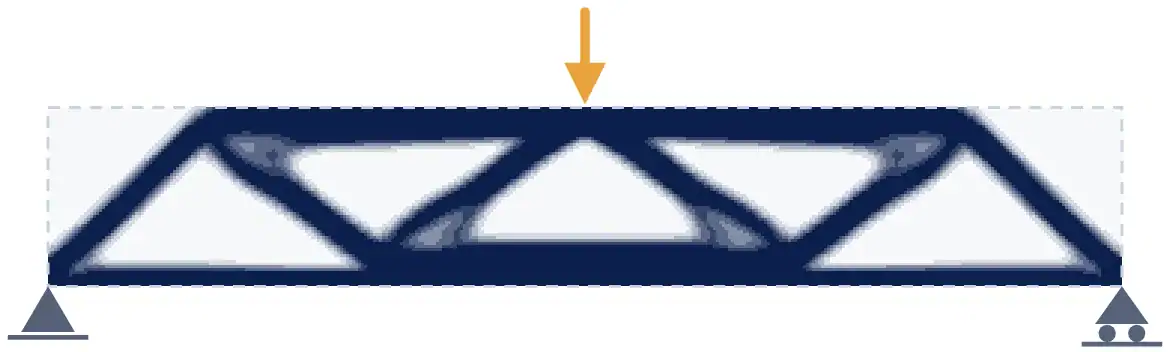
Element densities
The optimiser’s output, in navy
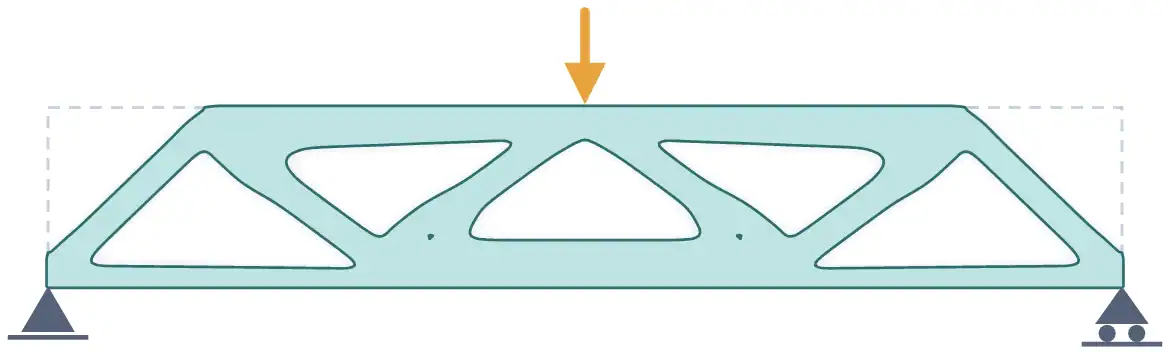
Interpreted part
Traced where the density is 0.5, in mint
In the close-up of one joint below you can see the difference. The element densities give a staircase edge with a band of grey elements along it, but the interpreted outline is smooth. Our numbers in the table are for the design rounded element by element (190.2 units for this run, against the optimiser’s 208.4). We have not re-analysed the smooth outline, but according to the OptiStruct documentation that is the only reliable way to verify how the structure performs.
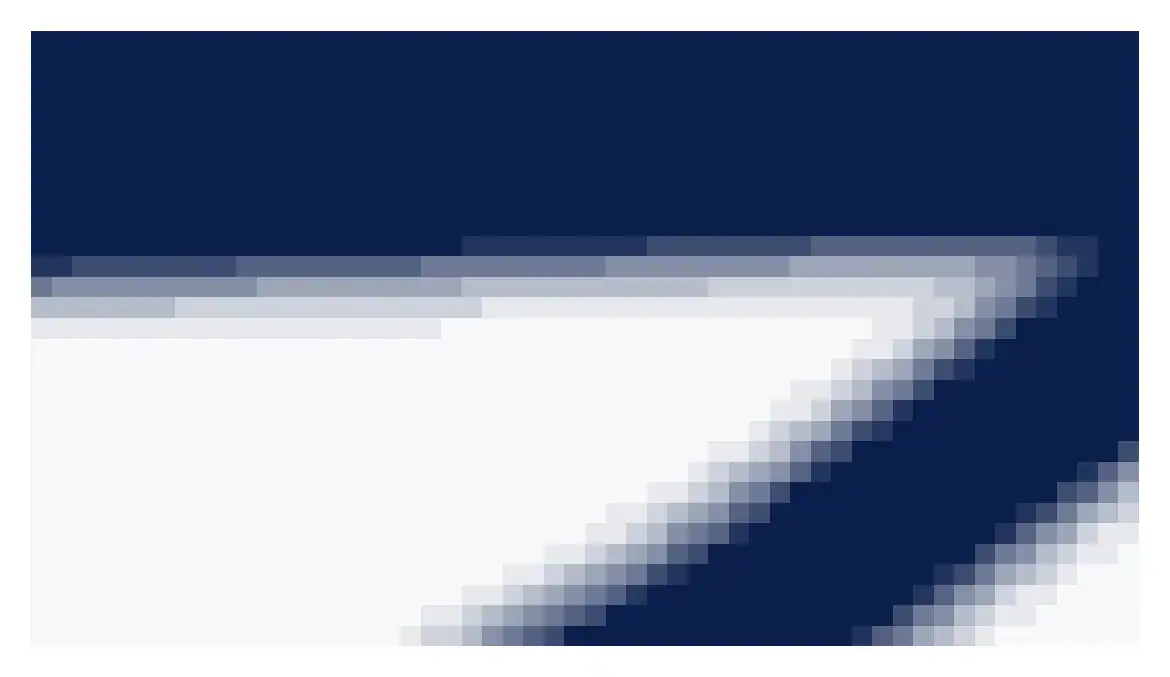
Element densities
A staircase edge with a grey band
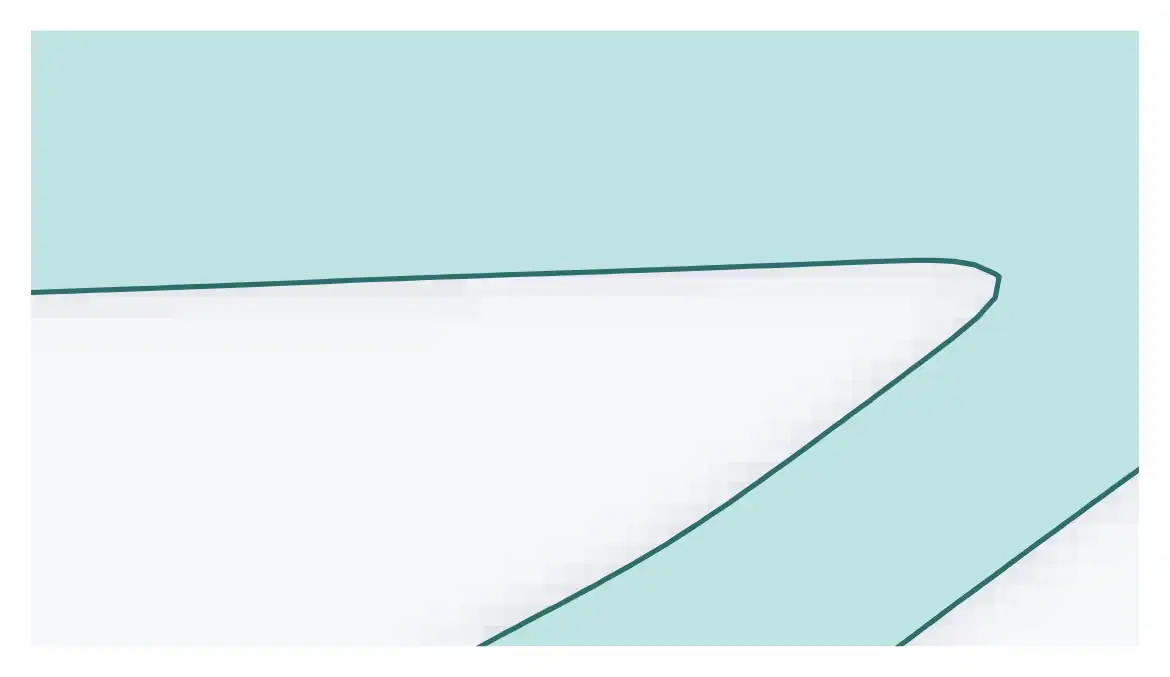
Interpreted outline
Smooth, traced at density 0.5
In Simcenter Inspire, the generated shape can be smoothed and saved as an STL file, or you can fit a PolyNURBS surface to it (one smooth body over the design and non-design spaces). Inspire can then re-run the analysis on the result. In the control-arm example in the OptiStruct documentation, the elements below 60% density are hidden to show the load paths. A new finite element model is then built with that layout as a guide and checked with the same loads, and finally size and shape optimisation minimise the mass.
Additive manufacturing and lattices
Topology optimisation often leads to organic shapes that are hard to make by traditional methods, and Siemens calls additive manufacturing an ideal way to produce them. For casting, machining or sheet metal, you use the constraints in the table above instead.
Simcenter OptiStruct can also optimise lattice structures, in two phases. First comes a topology optimisation with a reduced penalty, which allows porous zones of intermediate density. Those zones are then turned into an explicit lattice whose members are sized, usually against stress and displacement limits. The method was developed with additive manufacturing in mind. A lattice does not give stiffness for free, though, since a periodic lattice usually has lower stiffness per unit volume than solid material.
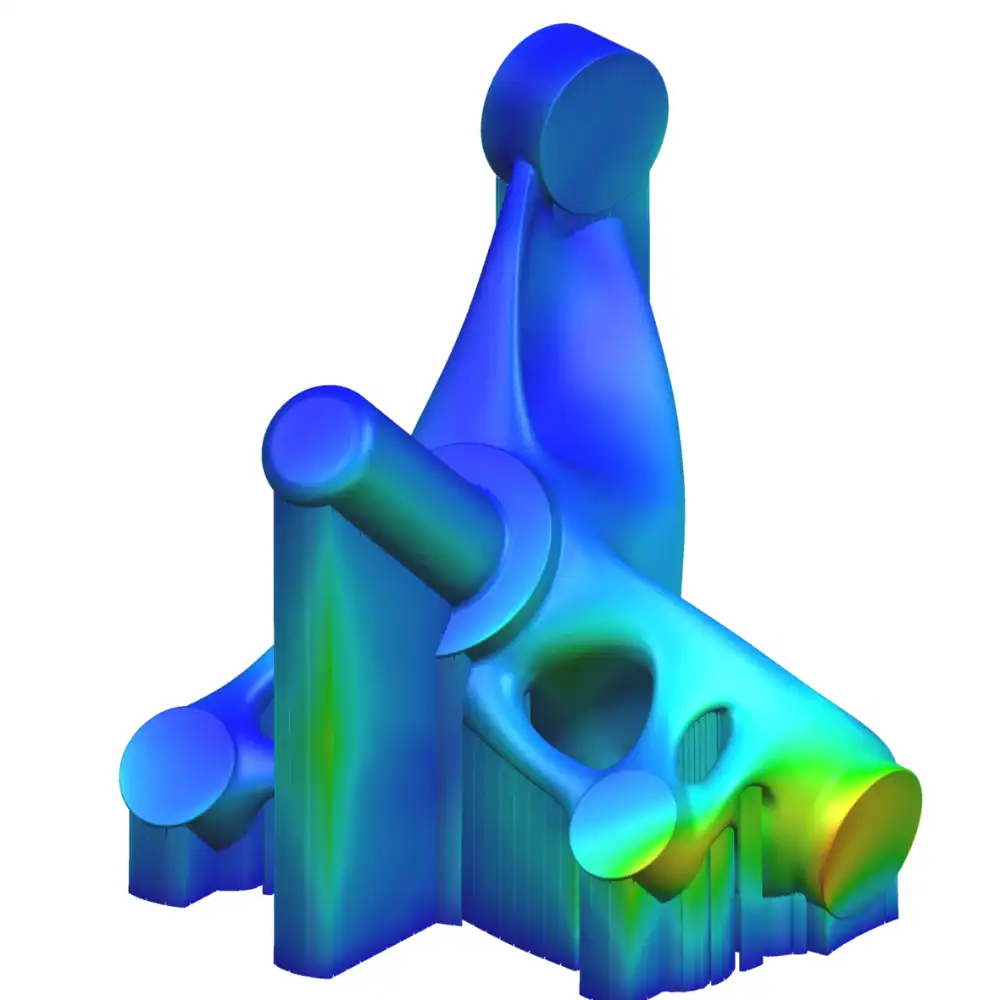
Image: Siemens.
Topology optimisation and generative design
A short history of topology optimisation
Simcenter software for topology optimisation
Topology optimisation is available in several Simcenter tools. Two of them, Simcenter OptiStruct and Simcenter Inspire, came to Siemens from Altair. Which one to use depends mostly on who will run it and which software the model is already in (for flow problems it is Simcenter STAR-CCM+).
Structural optimisation
- Simcenter 3DIf your models and CAD are in NX and you solve with Simcenter Nastran (set up as SOL200, as in our course)
- Simcenter OptiStructIf your FE process runs in Simcenter HyperMesh, or you need lattice optimisation (the optimisation is built into the solver)
- Simcenter InspireIf designers should explore concepts directly on the geometry (can be used together with OptiStruct)
Around the optimisation
- Simcenter HyperMeshPre-processing for OptiStruct, with OSSmooth to interpret results
- Simcenter STAR-CCM+If it is a flow path: adjoint topology optimisation for flow and thermal problems
- Simcenter HEEDSParametric design exploration across many runs, not topology optimisation
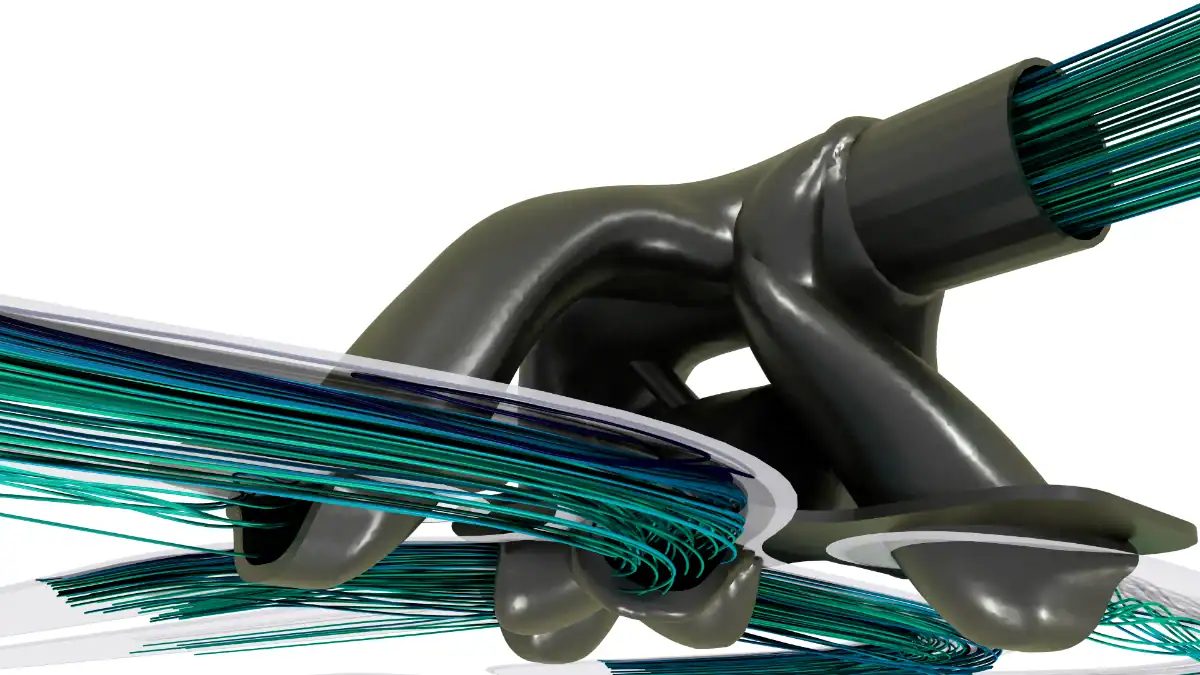
Topology optimisation is also used for flow problems. In CFD, the adjoint method gives the sensitivities of a cost function such as pressure drop, and those sensitivities drive changes to the flow path. Simcenter STAR-CCM+ has had integrated fluid and thermal adjoint topology optimisation since version 2020.3. In a 2020 Siemens example on an aircraft-engine fuel injector component, it cut the pressure drop from 24,900 Pa to 2,564 Pa. Our Simcenter STAR-CCM+ course on design exploration and adjoint optimisation includes a topology optimisation part.
Results from industry
66%
lighter, 3D-printed
Etteplan redesigned a cast steel boom end for a tree harvester with Simcenter Inspire and Simcenter OptiStruct. A cast version, cheaper to produce in volume, was still 53% lighter.
87%
lighter components
Würth Industrie Service used Simcenter Inspire on a robot’s light-panel bracket, with loads from a multibody simulation and the milling and printing limits included from the start. Siemens reports the final components 87% lighter.
Up to 18%
lighter than earlier profiles, 5% stiffer
Faraone optimised an aluminium glass-balustrade profile in Simcenter Inspire and validated it in Simcenter SimSolid.
Results as Siemens reports them in its case studies. According to Siemens, Etteplan reused the same optimisation runs for the cast boom end and changed only the manufacturing constraints.
For structures, our half-day online topology optimisation course in Simcenter 3D goes through the set-up with Simcenter Nastran SOL200. It starts with preparing and meshing the geometry and ends with post-processing the density results and refining the faceted geometry in Simcenter 3D and NX (dates and prices are on our training page).
Planning a topology optimisation?
Tell us about the part, the loads and how it will be made, and a Volupe engineer will suggest where to start.
We at Volupe hope this has given a feel for what happens inside a topology optimisation, and why the result needs a second look before it becomes a part. If you have questions about the set-up, please reach out to us at support@volupe.com.
Sources and changelog
Sources
Changelog
October 2026: first version, written from Siemens pages and product documentation, published papers and our own runs of the 88-line code.
Questions about topology optimisation
Simcenter 3D
Viktor Hultgren
Application Specialist, M.Sc.
Former Altair tools
Johan Dahlberg
Application Support Specialist, Ph.D.
Choose “Technical question” in the form below and describe your case.
Ask a technical question →
What is topology optimisation?
A method that finds where the material in a part should be. You define the design space, the loads and supports and a target, such as how much material to use, and the software moves material to where it carries load until the layout converges. In American spelling it is called topology optimization.
What is the difference between topology, shape and size optimisation?
Size optimisation changes properties such as shell thickness or beam cross-sections. Shape optimisation moves the boundary of an existing design. Topology optimisation decides where material should be at all, and Siemens places it at the concept stage, with size and shape optimisation refining the design afterwards.
What does SIMP mean?
Solid isotropic material with penalisation. The stiffness of each element is its density raised to a power, typically 3, times the stiffness of solid material. That makes intermediate densities inefficient, so the result ends up close to solid or empty.
Why does my result have grey areas or a checkerboard pattern?
Grey areas are elements of intermediate density. A thin band along the edges is normal, but large grey areas suggest too little penalisation, and a larger filter radius also leaves more grey (23% against 16% in our 120 × 40 runs). Checkerboards, patches of single solid and empty elements as in our run without a filter, are a numerical problem of the density method, and a filter on the sensitivities or densities removes them.
What are the limitations of topology optimisation?
The result is only optimal for the loads you give it (in our beam, a load moved to a quarter of the span gave around 10% more deflection than an even plate). Without manufacturing constraints the shapes are often hard to make, and constraints cost performance. Stress is hard to control, and the value at the end of a run is an estimate that needs a re-analysis.
Is topology optimisation the same as generative design?
No. Generative design is the wider approach, in which algorithms generate and compare many design alternatives from goals and constraints, and topology optimisation is one of the capabilities it builds on. Siemens positions Simcenter Inspire for generative design.
Can a topology optimised part be cast or machined, or only 3D printed?
It can be cast, machined or stamped if the optimisation includes the right manufacturing constraints, such as a draw direction for casting or extrusion for profiles. Siemens reports that Etteplan’s cast version of a harvester boom end was 53% lighter, against 66% for the 3D-printed version.
Do I need to check the design after the optimisation?
Yes. The value at the end of a run is an estimate, because elements of intermediate density count with a penalised stiffness, and rounding them to solid or empty changes both the stiffness and the amount of material. In our MBB beam the rounded design was around 6% stiffer than the optimiser said, but after smoothing and rebuilding in CAD it can also come out less stiff. Re-analyse the interpreted design with the same loads and boundary conditions, and check the stresses in detail (our von Mises stress calculator helps with a single stress state).
Which Simcenter software does topology optimisation?
Simcenter 3D with the Simcenter Nastran solver, Simcenter OptiStruct, and Simcenter Inspire for designers, while Simcenter STAR-CCM+ does adjoint topology optimisation of flow paths. We run a half-day online course for Simcenter 3D, and you can book a demo.