Finite volume method (FVM), explained

The finite volume method is the method Simcenter STAR-CCM+, Simcenter FLOEFD and Simcenter Flotherm use to turn the flow equations into equations a computer can solve. In this guide we describe what happens inside one cell, how the values on the cell faces are calculated and which mesh types are used, and we follow a small example from 5 to 320 cells.
Guide · 20 min read · Reviewed by Christoffer Johansson · Updated October 2026

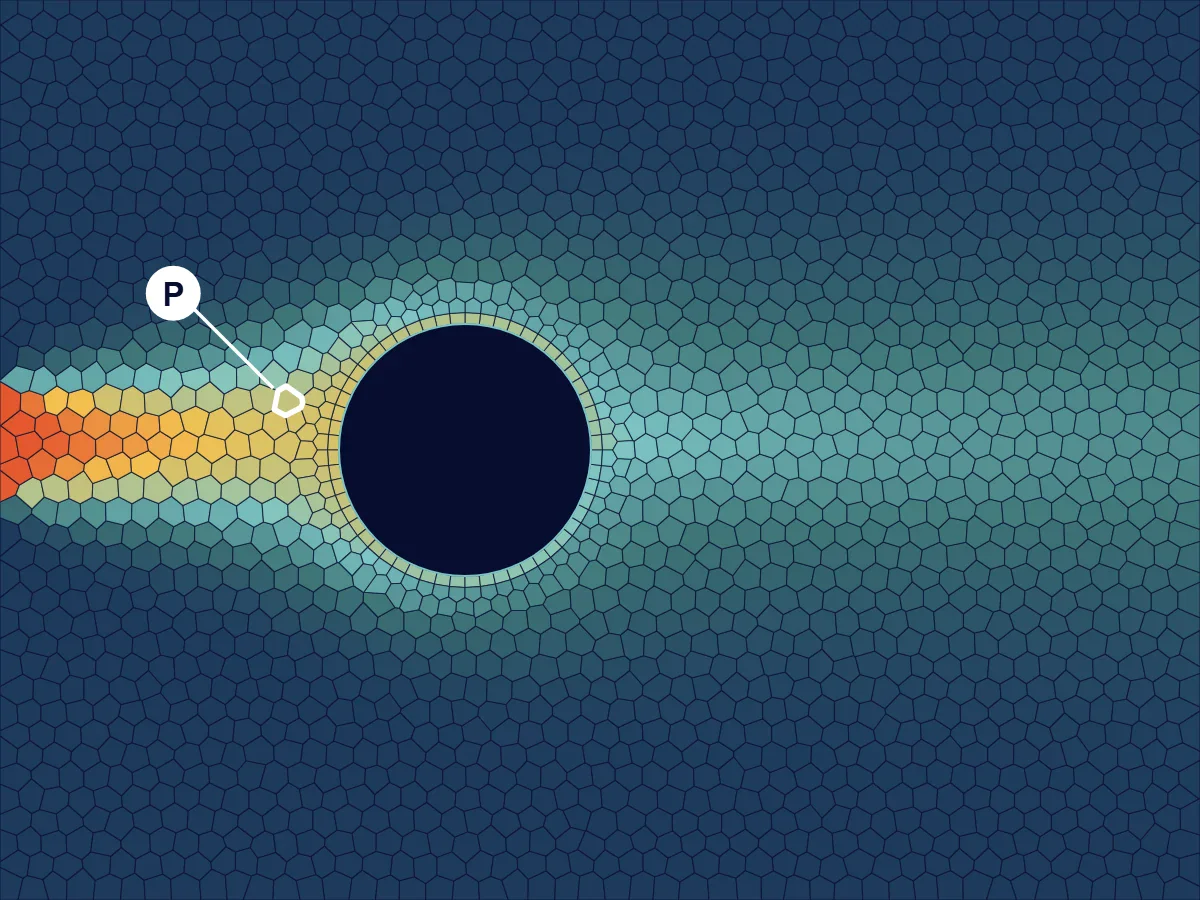
A scalar carried round a cylinder on a mesh of 1,940 polygonal cells, with one cell labelled P, computed by Volupe
A scalar carried round a cylinder on 1,940 polygonal cells, computed with our own finite volume code (not a Simcenter result).

What is the finite volume method?

The finite volume method (FVM) is a numerical method that splits the flow domain into small cells, called control volumes, and writes the flow equations as a balance for each cell: what flows in through the faces, minus what flows out, plus what is produced inside, equals the change in the cell.

Since it works directly with the conservation laws of mass, momentum and energy, it suits fluid flow well. CFD Direct, the developers of OpenFOAM, call it the chosen method for many decades in the most popular general-purpose CFD codes, and Simcenter STAR-CCM+, Simcenter FLOEFD and Simcenter Flotherm all use it. If you are new to the subject, our guide to computational fluid dynamics covers what a simulation does from start to finish.

The picture at the top of the page is a small run we made for this guide. Note that we do not solve the flow itself. It is a textbook potential flow round the cylinder that we prescribe (adjusted so that the top and bottom edges are streamlines), so there is no viscosity and no wake. Our code solves how a scalar, which you can think of as dye or heat, is carried by that flow and spread by diffusion. The mesh has 1,940 polygonal cells and each cell holds one value of the scalar, which is why the colour changes in steps.

Conservation in every cell

The flow through a face is computed once and used by both cells that share it, with opposite signs. What leaves one cell therefore enters its neighbour, and nothing is lost or created between cells. If you add up all the cells, the inner faces cancel and the whole domain is in balance too, on a coarse mesh as well as on a fine one.

Cell P from the top picture is shown enlarged below, with the flow through each of its seven faces.

Pin 0.0186out 0.0031in 0.0374out 0.0056out 0.0123out 0.0383in 0.0033In 0.0593 · out 0.0593 · difference below 10−15
Cell P from the picture at the top. Each arrow is the flow through one face. The flows in add up to 0.0593 and so do the flows out, and the difference is a rounding error below 10−15. Computed by Volupe.

Conservation is not the same as accuracy, though. A coarse mesh conserves the scalar exactly as well as a fine one, but the scalar can end up in the wrong place. In the picture at the top the streak should stay about as narrow as it enters. By the right-hand edge it is about 4 times as wide and its peak has dropped from 1 to 0.37. Almost all of that comes from the first-order scheme we used. If we switch off the physical diffusion, the picture hardly changes (the peak is 0.38 instead of 0.37). Why this happens is described in the section on convection schemes below.

From the transport equation to one equation per cell

Every quantity a CFD solver transports, such as a velocity component, temperature, a species concentration or a turbulence quantity, can be written in the same general form. Terms that do not fit the pattern, such as the pressure gradient in the momentum equations, are put into the source. For a variable φ the equation reads

∂(ρφ)/∂t + ∇·(ρuφ) = ∇·(Γ∇φ) + Sφ

Change over timeConvectionDiffusionSource

Convection is φ carried by the flow, diffusion is φ spreading from high to low values with the diffusion coefficient Γ, and the source covers everything else. Finite volume discretisation integrates this equation over each cell, and the divergence theorem turns the convection and diffusion terms, exactly, into integrals over the faces of the cell. The approximation is made in the next step, where each face integral is replaced by the value at the face centre times the face area. This assumes that the variable changes linearly across the face and the cell. It caps a standard finite volume code at second order, whatever convection scheme you pick. For a second-order discretisation, Jasak calls this assumption the major source of numerical errors.

Σfaces Ff φf − Σfaces Γf Af (∂φ/∂n)f = Sφ VP

Here Ff = ρ (u·n) A is the mass flow through face f, A is the face area and VP the volume of cell P (this is the steady form, and time stepping is described further down). A cell-centred solver stores the values at the cell centres, as we describe for Simcenter FLOEFD in meshing in Simcenter FLOEFD. The face value φf and the gradient at the face therefore have to be estimated from the cells on either side, and how the face value is estimated is called the convection scheme.

The diffusion term is more straightforward. Between two cell centres P and N a distance d apart, the gradient at the face is close to (φN − φP)/d. This is accurate when the line between the centres crosses the face at right angles. On a non-orthogonal mesh the solver adds a correction, and large angles reduce the accuracy, which is one reason why mesh quality matters. Gradients inside each cell, which the higher-order schemes need, are calculated from the neighbours, either as a Gauss sum over the faces or as a least-squares fit.

Once every face is written in terms of cell values, each cell gives one linear equation that links its own value to the values of its neighbours

aP φP = Σ anb φnb + b

A mesh with 10 million cells gives 10 million such equations, each with only a handful of neighbours. Since the coefficients depend on the flow, the solver does not solve them in one go. Instead it improves the solution in iterations. In the segregated approach it solves the equations for one variable at a time and then updates the coefficients before the next loop.

  1. Split the domain into cells

    Cell volumes and centroids, face areas, normals and centres, and which two cells share each face.

  2. Integrate over each cell

    The divergence theorem turns convection and diffusion into integrals over the faces.

  3. Estimate the face values

    A scheme (upwind, central or a higher-order one) gives them from the cell values.

  4. Assemble one equation per cell

    Each cell is linked only to the cells it shares a face with.

  5. Iterate until converged

    Until the residuals have fallen, the boundaries balance and the quantities you care about have stopped changing.

Convection schemes: upwind, central and higher order

The convection term needs the value of φ on each face, but the solver only knows the values in the cell centres. The two simplest schemes are upwind and central differencing. The upwind scheme takes the value of the cell the flow comes from. The central differencing scheme takes the average of the two cells (on an even mesh) and is formally more accurate.

Both schemes have drawbacks. Upwind is first-order accurate and smears out sharp changes. This is called numerical diffusion, which means that the scheme behaves as if the fluid had a larger diffusion coefficient than it has. The advantage is that upwind never gives values outside the range of its neighbours. Central differencing is second-order accurate, but when convection is strong compared with diffusion it produces wiggles, values that overshoot and undershoot from cell to cell.

The cell Péclet number

Whether central differencing works depends on the cell Péclet number, PeΔ = ρ u Δx / Γ, which compares convection with diffusion across one cell. On an even 1D mesh, central differencing stays free of wiggles as long as PeΔ is below 2. In the widget below you can change the number of cells and the flow speed. The orange dots are central differencing and the teal squares are upwind.

00.51.01.52.02.5x = 0x = 15 cells (ticks are the cell faces)

Cell Péclet number 5.00 · largest error: central 1.546, upwind 0.204 · central differencing goes outside 0 to 1

Steady convection and diffusion of a scalar from φ = 1 at the left to φ = 0 at the right, Γ = 0.1, solved with the finite volume method in your browser. Dots and squares are the cell values and the line is the exact solution. Computed by Volupe.

With 5 cells and u = 2.5 the cell Péclet number is 5. Central differencing then gives 1.26 in the middle cell and 2.46 in the last one, although the exact solution never leaves the range from 0 to 1. Upwind stays inside that range, but it spreads the steep drop at the outlet over two cells. With 20 cells the cell Péclet number is 1.25 and the wiggles are gone.

On this mesh the numerical diffusion of upwind can be put in a number. Upwind gives the same cell values, to within 0.0001, as central differencing would with the diffusion coefficient raised by ρuΔx/2 (the small difference comes from the inlet boundary face). With 5 cells and u = 2.5 that adds 0.25 to Γ = 0.1, so upwind solves a problem with 3.5 times the real diffusion. This also brings the effective cell Péclet number down from 5 to 1.4, and with that coefficient it stays below 2 however coarse the mesh is, which is why upwind never wiggles.

Higher-order and bounded schemes

Production codes use schemes that sit between the two. Second-order upwind starts from the value in the upwind cell and adds the gradient in that cell times the distance to the face, which makes it second order with an upwind bias. Close to steep changes a limiter scales the gradient down, so that the face value stays within, or very close to, the range of the neighbouring cells. A strict limiter keeps it exactly in range, but in our runs it stopped the iteration from converging, so for the figure below we used a smoother one that allows small overshoots. The idea goes back to van Leer’s papers of the 1970s and to the total variation diminishing (TVD) schemes that followed. A scheme that is both bounded and better than first order has to depend on the solution itself, and that is what the limiter does.

The figure below repeats the run from the top of the page and adds the same run with a limited second-order upwind scheme, where the streak stays narrow behind the cylinder.

The streak behind the cylinder with first-order upwind (wide, peak 0.37) and second-order upwind (narrow, peak 0.75), computed by Volupe
The same mesh and flow with first-order upwind and with limited second-order upwind (least-squares gradients and the Venkatakrishnan limiter, which keeps the values between −0.0013 and 1.0010 in this run). At the right-hand edge the streak peaks at 0.37 with first-order upwind and at 0.75 with the second-order scheme, where it is also half as wide. How high the second-order peak gets depends on the limiter. Computed by Volupe.

The QUICK scheme

QUICK comes from Leonard’s 1979 paper on quadratic upstream interpolation. It takes the face value from a quadratic curve through two upstream cells and one downstream cell. Like linear upwinding it is biased in the flow direction and gives less numerical diffusion than first-order upwind, but it is not bounded, so it can overshoot next to steep changes.

In scale-resolving simulations such as LES, numerical diffusion would damp the eddies you are trying to resolve. Siemens points to the higher-order, less dissipative schemes in Simcenter STAR-CCM+ for LES of combustion. When we compared SIMPLE and SIMPLEC in a qDNS case, we used its bounded second-order central-differencing scheme together with second-order implicit time stepping. For the free surface in VOF simulations, special interface-capturing schemes keep the interface sharp, and two of them are compared in our post HRIC vs MHRIC.

First-order upwind is often used to get a difficult case started. Switch to a second-order scheme before you take numbers from the result.

If you want to go through this hands-on, ask us about our training courses.

A worked example in 1D

Worked example · recomputed and extended by Volupe

The widget above solves a case many engineers know from Versteeg and Malalasekera’s textbook An Introduction to Computational Fluid Dynamics, where convection and diffusion act against each other. A bar of length 1 has φ = 1 at the left end and φ = 0 at the right end, a constant flow speed u from left to right, density 1 and diffusion coefficient Γ = 0.1. The cells are of equal size, and the boundary values sit on the outer faces, half a cell from the first and last cell centres. We recomputed it with our own code and then added two things, a refinement study from 10 to 320 cells and the widget that runs the same solver in your browser.

5 cells, u = 2.5 (cell Péclet number 5), φ at the cell centres. Values outside 0 to 1 in orange.
xExactCentralUpwind
0.11.0001.0361.000
0.31.0000.8690.999
0.51.0001.2570.992
0.70.9990.3520.952
0.90.9182.4640.714

Then we refined the mesh, doubling the number of cells from 10 to 320 at the same flow speed, and recorded the largest error at the cell centres in each run.

0.0010.010.1110204080160320Number of cellsLargest errorslope 1slope 2Upwindorder 0.93Central differencingorder 1.980.0010.010.1110204080160320Number of cellsLargest errorUpwind, order 0.93Central differencing, order 1.98
Largest error at the cell centres against the number of cells for u = 2.5, both axes logarithmic, with dotted lines for slopes of 1 and 2. Computed by Volupe with the same code as the widget.

Each time the cells are doubled, the central differencing error falls by a factor that approaches 4 (3.35 for the first doubling, 3.95 for the last) and the upwind error by a factor that approaches 2. Between the last two meshes the observed order is 1.98 for central differencing and 0.93 for upwind, close to the theoretical 2 and 1.

One thing worth mentioning is that with 20 cells upwind still has the smaller largest error (0.120 against 0.160), and central differencing only pulls ahead from 40 cells. This means that the order only tells you how fast the error falls when you refine the mesh. On a coarse mesh a first-order scheme can still be closer to the exact solution, as it is here with 20 cells.

The same procedure is used to check a real simulation. You run it on three meshes and estimate the observed order and the remaining error, which our grid convergence index calculator does from three results. A real study has no exact solution, only results, so we tried that here as well. Taking the mean value of φ from 10, 20 and 40 cells gives an observed order of 2.00 for central differencing but only 0.22 for upwind, and the upwind order only reaches 0.85 with 80, 160 and 320 cells. There the estimate holds, with a GCI of 0.23% against a true error of 0.16%. An observed order far below the theoretical one usually means that the meshes are not yet fine enough, and the error estimate from them should not be trusted. The reverse is not guaranteed. The 2.00 for central differencing includes the 10-cell run, whose cell values still wiggle above 1, so check the quantity you need and look at the field as well.

Meshes for finite volumes

The finite volume method does not depend much on the shape of a cell. It needs the volume and centroid of each cell, the area, normal and centre of each face, and which two cells share each face. This is why the method works on unstructured meshes of arbitrary polyhedral cells, and why the mesh types in a modern CFD code look so different from each other.

Trimmed hexahedron7 faces (cut face in orange)Tetrahedron4 facesPolyhedron14 facesTrimmed7 facesTetrahedron4 facesPolyhedron14 faces
Three cell shapes. The trimmed hexahedron is a cube with one corner cut off where it meets a surface, and the polyhedron drawn here has 14 faces. Illustration.

Polyhedral mesh

Siemens describes the polyhedral mesher in Simcenter STAR-CCM+ as the unstructured, general-purpose mesher for complex geometry, and points out that it keeps the mesh conformal between parts, which helps conjugate heat transfer cases where heat crosses from fluid to solid. Siemens, and CD-adapco before it, also describes polyhedral meshes as fast to converge, easy to generate and more efficient than tetrahedral meshes. We have not seen public numbers behind that, so read it as Siemens’ own description.

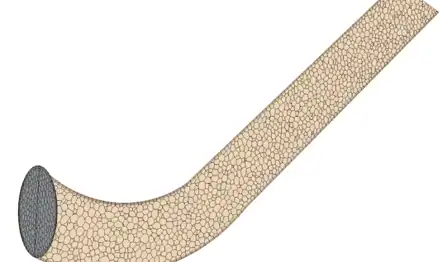
Here is the same bent pipe meshed with both meshers.
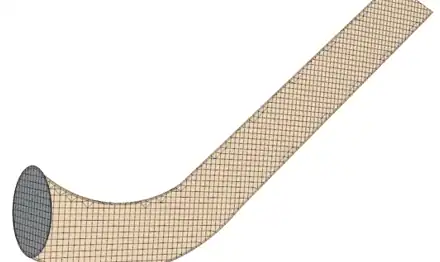
  • A bent pipe in Simcenter STAR-CCM+ meshed with the trimmed cell mesher, with hexahedral cells cut at the wall

    Trimmed cell mesher

  • The same bent pipe meshed with the polyhedral mesher

    Polyhedral mesher

The same pipe meshed twice in Simcenter STAR-CCM+, from our post meshing a cylinder in Simcenter STAR-CCM+.

Trimmed cells

The trimmed cell mesher builds a predominantly hexahedral mesh and cuts the cells where they meet the geometry. Numerical diffusion is smallest when the flow runs along the cell faces. With mesh alignment you can move the reference point of the trimmed mesh, so that the cells line up with a corner or with the neighbouring part, as we show in mesh alignment for the trimmed cell mesher. For geometry that a mesh can be swept through, such as a pipe, there is also the directed mesher.

Prism layers near walls

Next to walls the velocity changes fast over a short distance. Both meshers therefore add prism layers, thin cells stacked along the wall, to resolve the boundary layer. How thin the first one should be depends on the wall treatment and the y+ you aim for, which our y+ calculator works out. For thin solids such as sheet metal there is also a thin mesher, described in our post on thin structures.

Simcenter FLOEFD and Simcenter Flotherm use Cartesian meshes instead. Simcenter FLOEFD cuts its Cartesian cells with the CAD geometry (an immersed-boundary, cut-cell grid) and handles the boundary layer in the cut cells with its own two-scale wall treatment, so you do not have to build a body-fitted mesh.

Boundary conditions, pressure and convergence

Boundary conditions

A cell next to the edge of the domain has one or more boundary faces, and the boundary condition decides the flux through them. At an inlet you usually give a velocity or a flow rate, at an outlet a pressure, and a symmetry plane has no flux through it. At a wall there is no flow through the wall and no slip along it, and the energy equation gets a temperature or a heat flux. In our 1D example the value at each end sits on the outer face, half a cell from the first cell centre, and the diffusion through that face is computed over that half cell.

Pressure and velocity

In incompressible flow there is no equation of its own for pressure, and the pressure is whatever makes the velocity field satisfy continuity. The SIMPLE algorithm of Patankar and Spalding from 1972 handles this by starting from a pressure, solving the momentum equations and then correcting pressure and velocity until mass is conserved in every cell, with under-relaxation to keep the corrections stable. Storing pressure and velocity at the same cell centres, as unstructured codes do, needs a special interpolation of the face mass flux, usually named after Rhie and Chow (1983).

  1. Start from a pressure field

    The pressure from the last iteration, or a first guess.

  2. Solve the momentum equations

    This gives velocities that do not yet conserve mass.

  3. Compute the face mass fluxes

    With the Rhie–Chow interpolation.

  4. Solve a pressure-correction equation

    It is built from continuity, so that the corrected fluxes conserve mass in every cell.

  5. Correct pressure, velocities and fluxes

    The pressure correction is under-relaxed. Then solve the other equations and repeat.

Simcenter STAR-CCM+ has two flow solvers. The segregated solver is the pressure-correction method described above. It also offers SIMPLEC for implicit unsteady runs, which Siemens describes as needing no under-relaxation of the pressure correction and fewer inner iterations per time step, and we compare the two in our post SIMPLE vs SIMPLEC. The coupled solver solves continuity, momentum and energy as one system. Siemens describes it as density-based, as best practice for applications such as external aerodynamics and turbomachinery, and as reaching deeper residual convergence for steady flows.

Time-accurate runs

For unsteady flow the change-over-time term is integrated as well, usually with an implicit scheme of first or second order in time, and the solver iterates within each time step before it moves on. How far the flow moves in one time step, measured in cells by the Courant number, matters especially for LES and for VOF, where interface-capturing schemes such as HRIC use it directly. For a conjugate heat transfer case we went through time-step selection step by step.

Convergence

Residuals show how far the current solution is from satisfying the discrete equations, and they should fall by several orders of magnitude, but how far is enough depends on the case (see residuals in Simcenter STAR-CCM+). A low residual is not enough on its own, though. Watch the quantities you care about until they stop changing, and check that what flows in through the boundaries flows out again. Before convergence the face fluxes still cancel between cells, but the cell balances are not yet zero, so mass is not yet conserved. At convergence the whole domain is in balance.

The figure below shows what the residual and a monitored value do when the equations of the run at the top are solved with a very simple iterative method.

110−210−410−610−810−10Scaled residual00.050.10Mean value at the outletfinal 0.1240102030405060708090100110Iteration110−210−410−610−810−10Scaled residual00.050.10Mean value at the outletfinal 0.124020406080100Iteration
The equations of the run at the top, solved again from zero with the simplest iterative method (Jacobi), which passes information on by about one cell per iteration. The residual stays high and the outlet value stays at zero for about 60 iterations, until the solution has worked its way across the roughly 50 cells of the domain, and then both settle. A Gauss–Seidel sweep in the flow direction solves the same equations in 18 sweeps without the plateau, so the flat start is a property of this solver. Computed by Volupe.

A converged run still has to pass the mesh check, as in the three-mesh study above, and then be compared with measurements.

Finite volume vs finite element and finite difference

The finite volume method balances fluxes through the faces of each cell and stores one value per cell. The finite element method writes the equation in weak form and interpolates between nodes with shape functions. The finite difference method writes the differential equations as relations between values at grid points.

Finite differencesvalues at pointsrelations between neighbouring pointsFinite elementsnodes and shape functionsone shape functionequations in weak (integral) form over each elementFinite volumescells and face fluxeswhat leaves one cell through a face enters the nextFinite differencesvalues at grid pointsFinite elementsnodes, shape functions, weak formone shape functionFinite volumescells and face fluxes, in balance cell by cellwhat leaves one cell enters the next
The same bar seen by the three methods. Illustration.
Finite difference vs finite element vs finite volume method
Finite differences (FDM)Finite elements (FEM)Finite volumes (FVM)
What is storedValues at grid pointsValues at nodes, with shape functions in betweenOne value per cell (in the cell-centred form)
Starting pointRelations between values at neighbouring grid pointsThe equation in weak (integral) form, weighted with test functions, conservative only in an average senseThe conservation law integrated over each cell, so every cell is in balance
Element or cell shapesA grid of pointsStandard shapes (triangles, quadrilaterals, tetrahedra, hexahedra)Any polyhedron
Typical useCodes on simple, regular grids (on such grids simple finite volume schemes reduce to finite differences)Structures, vibration, heat conductionFluid flow and heat transfer (CFD)

In practice the finite element method is the de facto standard in structural analysis, and the finite volume method is the established method in CFD. One reason is that a flow solver has to conserve mass, momentum and energy through every face, and the finite volume method does that by construction. In solid mechanics, where the two have been compared on the same problems, most authors found similar answers, so the choice between them is more about the formulation and conservation than about accuracy. Our guide to finite element analysis covers the structural side.

Simcenter STAR-CCM+ itself also solves solid stress with finite elements next to its finite volume flow solver, which is useful for fluid–structure interaction.

Simcenter tools that use the finite volume method

History of the method

  1. 1969

    The method is usually dated to the early 1970s, but Akshai Runchal’s PhD thesis, under Brian Spalding, already describes a method that is clearly finite volume. Runchal credits the idea to Spalding’s 1967 picture of tanks connected by tubes.

  2. 1972

    Patankar and Spalding publish the SIMPLE procedure for coupling pressure and velocity.

  3. 1981

    Patankar’s book Numerical Heat Transfer and Fluid Flow sets out the method for engineers.

  4. 1983

    Rhie and Chow publish the interpolation that lets all variables share the same cell centres. David Gosman’s unstructured methods were later inspired by it.

  5. 1987

    Gosman and Raad Issa of Imperial College found Computational Dynamics to develop STAR-CD, later part of CD-adapco.

  6. 2016

    Siemens announces the acquisition of CD-adapco, whose flagship product STAR-CCM+ is now Simcenter STAR-CCM+.

Three of the Simcenter tools we work with use the finite volume method.

Sources and changelog

Sources

All 40 sources

Siemens: Simcenter STAR-CCM+, STAR-CCM+ meshing solutions fact sheet (PDF), Simcenter FLOEFD, Simcenter Flotherm, CFD simulation, FEA vs CFD; Simcenter blog: SIMPLEC, coupled solver, reacting flows, STAR-CCM+ 2022.1, Simcenter FLOEFD for design engineers; Simulating the Real World blog: the art of modelling using CFD: grid (2010); NIAR case study; press release on CD-adapco (2016, PDF); former CD-adapco pages on polyhedral mesh generation and David Gosman (Internet Archive copies).

Open texts: C. J. Greenshields and H. G. Weller, Notes on CFD: general principles (CFD Direct), in particular the finite volume concept, advection discretisation, upwind scheme, linear upwind, TVD schemes, gradients, pressure–velocity coupling, walls; H. Jasak, Error analysis and estimation for the finite volume method (PhD thesis, Imperial College, 1996); NIST FiPy documentation on the finite volume method and numerical schemes; P. Cardiff and I. Demirdžić, Thirty years of the finite volume method for solid mechanics; NASA NPARC, Examining spatial (grid) convergence.

Papers and books: S. V. Patankar and D. B. Spalding, SIMPLE (1972); B. P. Leonard, QUICK (1979); B. van Leer (1974, 1979); C. M. Rhie and W. L. Chow (1983); P. K. Sweby (1984); P. J. Roache, GCI (1994); S. V. Patankar, Numerical Heat Transfer and Fluid Flow; J. H. Ferziger, M. Perić and R. L. Street, Computational Methods for Fluid Dynamics; F. Moukalled, L. Mangani and M. Darwish, The Finite Volume Method in Computational Fluid Dynamics; H. K. Versteeg and W. Malalasekera, An Introduction to Computational Fluid Dynamics: The Finite Volume Method (2nd ed., Pearson, 2007), the textbook our 1D case is taken from.

Our computations: the 1D example, its refinement study and the widget use one finite volume code (upwind and central differencing, boundary values on the outer faces); the 2D runs solve the transport of a scalar in a prescribed potential flow on a 1,940-cell Voronoi mesh, with first-order and limited second-order upwind (least-squares gradients, Venkatakrishnan limiter), plus a Jacobi iteration for the residual figure. Image of the pipe meshes: Volupe.

Changelog

October 2026: first version, written from Siemens pages and fact sheets, the open texts listed above (CFD Direct’s Notes on CFD, Jasak’s thesis, the NIST FiPy documentation, the Cardiff and Demirdžić review and the NASA grid convergence pages), the Volupe posts linked on the page, and our own runs of a 1D and a 2D finite volume code. The papers and books are listed for reference.

Questions about the finite volume method

Simcenter STAR-CCM+ and Simcenter FLOEFD

Christoffer Johansson

Senior Application Specialist, M.Sc.

Choose “Technical question” in the form below and describe your case.

Ask a technical question →

What is the finite volume method in simple terms?

A numerical method that splits the domain into small cells and keeps a balance for each one. What flows in through the faces, minus what flows out, plus any source inside, equals the change in the cell. The solution is one value per cell for each quantity.

Why is the finite volume method used in CFD?

Because, once converged, it conserves mass, momentum and energy exactly in every cell, whatever the mesh, and because it works on unstructured meshes of any cell shape, which suits complex geometry.

What is the difference between the finite volume and the finite element method?

The finite volume method integrates the conservation law over each cell and balances fluxes through the faces. The finite element method writes the equation in weak form and approximates the solution with shape functions between nodes. FEM is the de facto standard in structural analysis, and FVM is the established method in CFD.

What is the difference between the finite difference and the finite volume method?

The finite difference method writes the equations as relations between values at grid points. The finite volume method balances fluxes through the faces of cells, which keeps it conservative and lets it work on unstructured meshes.

What is a control volume?

A small region of the flow, in practice one mesh cell, over which the conservation laws are applied. Its faces are where the fluxes are computed.

Should I use upwind or central differencing?

Usually neither on its own. First-order upwind is stable but smears the solution, and central differencing can oscillate when the cell Péclet number is above 2. A limited second-order upwind scheme is a common choice for steady runs, and in a quasi-DNS case we have used the bounded central-differencing scheme in Simcenter STAR-CCM+.

What is numerical diffusion?

Smearing of sharp gradients caused by the discretisation itself, most of all by first-order upwind on a coarse mesh or on cells that are not aligned with the flow. It acts like extra diffusion that the real fluid does not have, and finer cells and higher-order schemes reduce it.

What is the QUICK scheme?

A convection scheme from Leonard’s 1979 paper on quadratic upstream interpolation. It takes the face value from a quadratic through two upstream cells and one downstream cell. It gives less numerical diffusion than first-order upwind, but it is not bounded and can overshoot next to steep gradients.

Which Simcenter software uses the finite volume method?

Simcenter STAR-CCM+, Simcenter FLOEFD and Simcenter Flotherm. Simcenter STAR-CCM+ adds polyhedral and trimmed meshers and a finite element solver for solid stress. You can book a demo with one of our engineers.

Talk to an engineer in your region

Every Volupe business developer holds an engineering degree. Find your regional contact below, or send us a message.

Denmark and Central Eastern Europe

Lukas Johansson

Sales Director, M.Sc.

Norway, Finland and the Baltics

Carl Wanngård

Business Developer, M.Sc.

DACH region

David Fabis

Business Developer, M.Sc.

DACH region

André Hau

Business Developer, M.Sc.

Sweden

Fredrik Liljedahl

Business Developer, M.Sc.

Europe

Henrik Pahlitzsch

Business Developer, M.Sc.

Iberia

Mikel Sevilla

Business Developer

Ask us about FVM (finite volume method)

Use this form for licence quotes, demos, training and technical questions.

What happens next

  1. A reply within one day.
  2. A scoping call with one of our engineers.
  3. A quote, demo or other next step that fits your enquiry.

After purchase: support from Volupe simulation engineers.

For a quote, the number of users, modules and your timeline help us answer faster.
See how we handle your details in our privacy policy.
Scroll to Top