New Features in Simcenter Amesim 2511
Simcenter Amesim 2511: Model Comparison, data relationships, Fluid Storage and battery pack thermal updates.

Fabian HasselbySenior Application Specialist
In short
Simcenter Amesim 2511 brings an adaptive-tolerance solver for speed, a browser-based help, an AI chat for Simcenter X subscribers and Simcenter X Systems licensing. This post looks at Model Comparison between model versions, data relationships, fluid storage updates and thermal modelling in the battery designer.
The development team at Siemens has been busy these past six months finalizing the latest features and improvements now shipped with the latest release of Simcenter Amesim version 2511. The new version was released a week ago and comes packed with solver performance updates, platform improvements, such as a brand-new help browser with a more modern touch and feel, enhanced software interfaces for tool coupling, as well as the upgrades made to Simcenter Amesim’s numerous libraries.

Solver improvements gaining computational speed by using an adaptive tolerance algorithm (default option for 2511 and onwards). A new AI Chat for Amesim related questions assists you with finding answers and hopefully spares you from lengthy reading sessions throughout the help sections (available for Simcenter X subscribers). A new browser-based help session and user guide, conveniently bookmark pages, keep multiple tabs open, and keep track of search history in your web browser of choice. Simcenter X Systems, a flexible license offering and deployment approach.
In this week’s blog we will look closer at a few new features and improvements part of version 2511:
- Model Comparison
- Data relationships
- Fluid Storage Updates
- Battery designer thermal
Across all engineering disciplines, there are many scenarios which require the use of comparison and dedicated merging tools to observe changes between model versions or to resolve any potential model conflicts. It could be a single user wanting to compare differences in input parameters or changes made throughout several model iterations, or a collaborative team with multiple users who need to ensure that the work they are doing is transparent to all team members and that simulation results are completely traceable. The latter group typically relying on a version handling and repository tool such as Simcenter’s own Client for Git.

Within the Simcenter Amesim GUI, users are able to quickly compare simulation models in a visual and intuitive way. You launch the Model Comparison tool from the Simcenter Amesim Tools menu, then drag models for comparison from your model folder or by navigating to the models you would like to compare.

With the comparison tool any changes made are clearly shown with color, whereas everything not changed is grayed out to allow for better visibility. Other updates in 2511 also include the option to divide the sketch view and comparison list into separate windows, allowing for an easier overview as well as the possibility to move one window to another monitor.
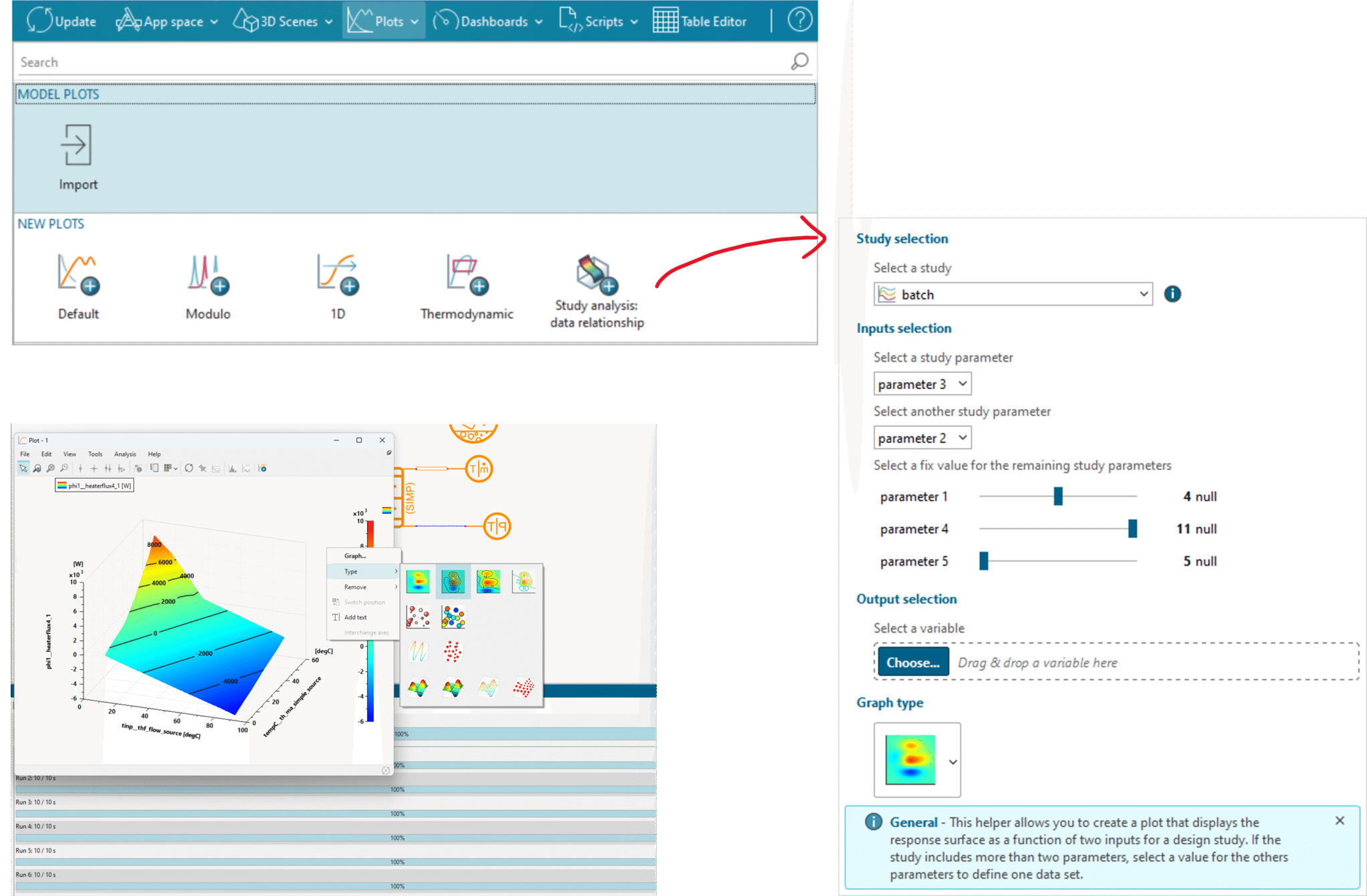
Data Relationships Plots. Although not a completely new feature, the Study analysis: data relationship offers the possibility to quickly and conveniently configure and create contour, 2D bubble views and 3D plots from your batch runs, DoEs and Monte Carlo studies. With a few clicks you select your output response and create your new plot. New in 2511 is the capability select any study for plotting.
Fluid Storage Updates. In 2511 the Fluid Storage library has received some appreciated updates.

The Fluid Storage library provides a set of components suitable for the modeling of fluid storage systems at various conditions, e.g. cryogenic states, and its components are compatible with the Gas library.
New in this version is the possibility to define Two Phase Mixtures to be used within the components. Allowing for higher accuracy when modelling storage vessels containing, for example, cryogenic mixtures. The Fluid Storage tank now supports condensation of a single species thereby being able to predict the mixture’s evolution over time. A new compressor has also been added to the library for the use in both gaseous or liquid phase, as well as, a new option to set mass as an input the liquid setting type within the storage vessel.
Battery Pack Assistant – Thermal Discretization. Designing something as complex as a battery thermal management system requires strong engineering skills, but having access to the proper tools is crucial for effective execution and optimal results. The Battery Pack Assistant is a tool specifically designed for the modelling of battery thermal management systems and guides users through the necessary steps for configuring electrical properties of the cells, the internal cooling, and model creation. The tool is launched from the App Space under Electrical Systems or by searching for Battery Pack Assistant among the components.

New for release 2511 is the possibility for users to directly import cell characteristics from Amesim’s library of cell data, thereby quickly being able to investigate the impact of various configurations and cell chemistry, or to import pre-defined data from an existing model. Under Electrical definitions the pattern and assembly of battery pack is also entered.

In the subsequent Thermal Management step, settings for the internal cooling system are defined and may involve phase change or simply pure liquids. The overall cooling architecture is also configured.

Also new in 2511 is the possibility to now discretize pattern groupings in any direction. Offering the capability to further increase the thermal resolution where needed and capture the thermal gradients where they are most relevant to the analysis.

A relevant workflow outlining more of the details surrounding the Battery Pack Assistant is found among Simcenter Amesim’s abundant Demo section. By searching for Battery with Direct Cooling a workflow is presented covering Architecture selection & Cascade requirements, Defining and Designing the Thermodynamic Cycle, Validation of Subsystems, and Model Integration.

We hope you have found this article interesting. If you have any questions or comments, please feel free to reach out to us at support@volupe.com.
