Simcenter 3D or Simcenter Femap: which one do you need?
Simcenter 3D vs Femap: Femap for mesh-first structural work, Simcenter 3D for more physics and CAD-linked models, and where NX fits in.
In short
Choose Simcenter Femap for mesh-first structural and thermal work, including inherited Nastran decks. Choose Simcenter 3D for acoustics, electromagnetics or multibody motion in one environment, or for models that follow CAD changes. Both write Simcenter Nastran input; Simcenter 3D is built on the NX platform.
Simcenter 3D and Simcenter Femap both come from Siemens, and both prepare finite element models for the same solver, Simcenter Nastran (formerly NX Nastran). We sell and support both, so the question for us is which one fits your work. Below we go through what each tool does well and where NX fits in, then what survives when you move a model from one to the other, and finally how we would choose.
For most teams the choice comes down to two questions: do you work on the mesh or on the geometry, and do you need more than structural and thermal analysis? If you work mesh-first, start with Simcenter Femap. Simcenter 3D is the place to start when you need acoustics, electromagnetics or multibody motion in the same environment, or an analysis model that updates when the CAD changes.
Simcenter 3D vs Femap at a glance
| Simcenter Femap | Simcenter 3D |
|---|---|
| What it is | |
| A mesh-centric pre- and post-processor for finite element models | An integrated CAE environment built on the NX platform, successor to NX CAE |
| Way of working | |
| You work on nodes and elements directly, with or without geometry; meshes follow edits to Femap’s own geometry, an imported copy with no link back to the CAD file | The FE model is linked to the design and follows it when it changes; a mesh without geometry can be edited too |
| Physics | |
| Structures with Simcenter Nastran: statics, buckling, dynamics, nonlinear, rotor dynamics and laminates, depending on the bundle or add-on; thermal and flow with Femap’s own solvers | Structures, dynamics and NVH, acoustics, durability, composites, thermal, flow, multibody motion and low-frequency electromagnetics |
| CAD data | |
| Parasolid directly, plus interfaces for NX, Solid Edge, Creo, SolidWorks and other formats | NX geometry directly; other CAD as STEP, IGES, JT or Parasolid, with direct CATIA and Pro/E transfer as an add-on |
| Solvers | |
| Simcenter Nastran, MSC Nastran, Abaqus, Ansys, LS-DYNA, Marc and others | Simcenter Nastran and its own solvers for thermal, flow, acoustics, motion and electromagnetics, licensed as modules or with tokens; add-on environments for Abaqus, Ansys, LS-DYNA, MSC Nastran and ADINA |
| Automation | |
| Femap API (VBA, Python) | NX Open (Python, C#, VB.NET, C++ or Java) |
| Operating system | |
| Windows | Windows 11 and Linux (SUSE, Red Hat) |
| Licensing | |
| On its own or bundled with Simcenter Nastran, or through Simcenter X Advanced | Simcenter 3D Engineering Desktop, plus modules or value-based tokens, or through Simcenter X Advanced |
| Best for | |
| Mesh-first structural and thermal work, and inherited Nastran decks | Acoustics, electromagnetics, motion and coupled physics, models that follow design changes, large assemblies |
Each works with geometry from any CAD system and writes input for third-party solvers. The real differences are in how you work and in how much physics you can cover without leaving the program.
What Simcenter Femap is good at
Simcenter Femap is a Windows-native pre- and post-processor with a mesh-centric approach. In practice the finite element model itself is what you work on. You can read in a Nastran input file with no geometry behind it, change elements, properties and loads directly, and write it out again. Old Nastran decks left by a colleague who has moved on, or sent over by a customer or supplier, are where Femap is strongest. Simcenter 3D can import and edit such a mesh too, but its workflow is built around the geometry.
Femap also does the geometry side well. It cleans up and idealises imported CAD, extracts midsurfaces for shell models, and meshes with beams, shells and solids. We compared the midsurface tools of both programs in an earlier post, Midsurface geometry swiftly in Femap and Simcenter 3D, and the screenshots here come from the videos we recorded for it: the same welded box beam, built in both tools.
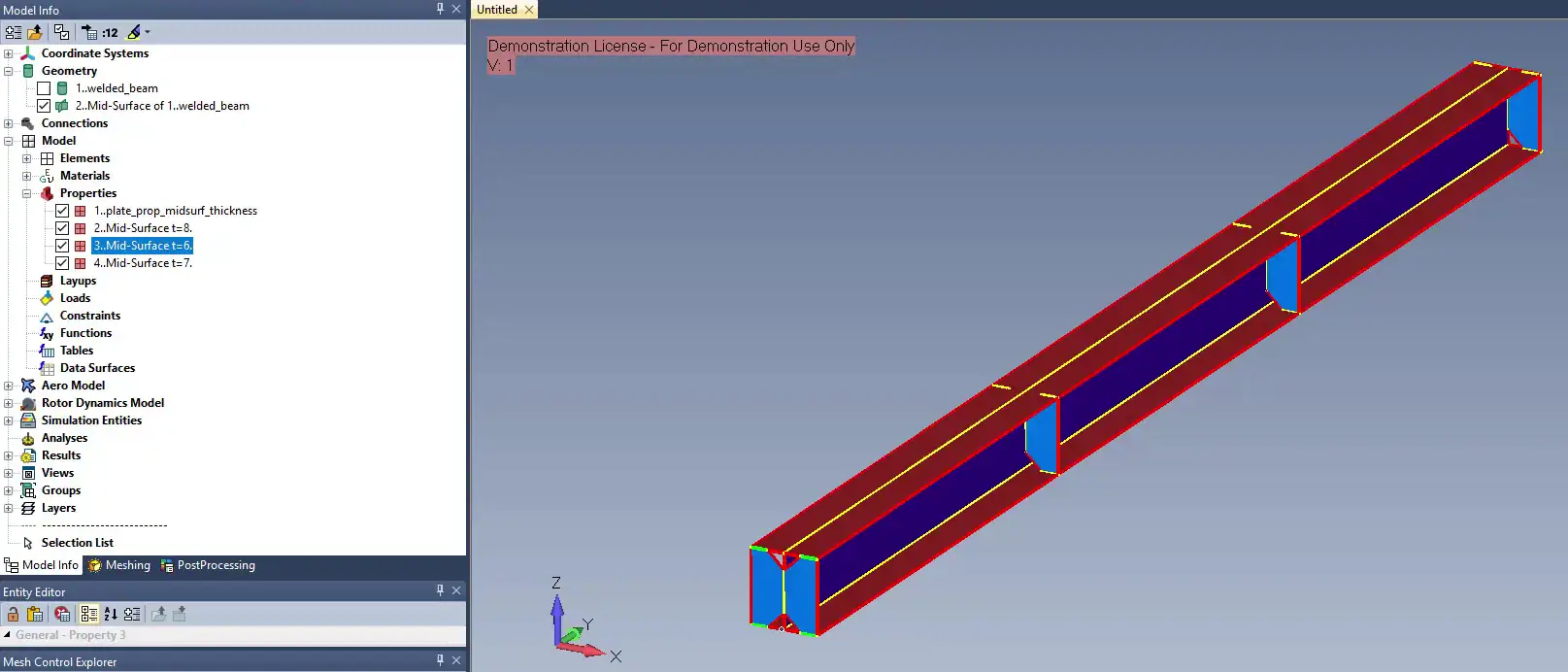
Figure 1: A welded box beam in Simcenter Femap. The walls are midsurfaces, coloured by shell property, one property per wall thickness.
Solver choice is the other strength. Femap sets up models for Simcenter Nastran, MSC Nastran, Abaqus, Ansys, LS-DYNA and Marc, and Siemens also sells Femap’s own thermal and flow solvers with it (Femap Thermal, Advanced Thermal and Flow). (Simcenter 3D gets there as well, with add-on environments.) For repeated work, you can automate steps through the Femap API, in VBA or Python.
Siemens sells Femap on its own or bundled with Simcenter Nastran; the Nastran in a bundle is the same solver as standalone Simcenter Nastran. Femap with Simcenter Nastran covers linear statics, buckling, normal modes and basic nonlinear analysis, and the Dynamic Response bundle adds transient and frequency response, response spectrum and random vibration.
What Simcenter 3D is good at
Simcenter 3D covers several kinds of physics in one environment, from structures and NVH to acoustics, durability, composites, thermal, flow, multibody motion and low-frequency electromagnetics, with coupling between them. Femap has no acoustics or electromagnetics, and it handles mechanisms only through Simcenter Nastran’s kinematic joints, not a multibody solver. So if noise or mechanism dynamics are part of the job, Simcenter 3D is the one to look at.
The second difference is associativity. In Simcenter 3D the FE model is built on the design geometry, usually through an idealised part where you simplify that geometry for analysis. When the CAD changes, the mesh, loads and boundary conditions follow. If a change removes or splits faces that loads or mesh controls sit on, you check those again, but you do not rebuild the analysis model for each design version. Synchronous technology edits the faces of imported geometry directly, without a feature history, and the idealisation tools remove holes and fillets and extract midsurfaces of constant or variable thickness.
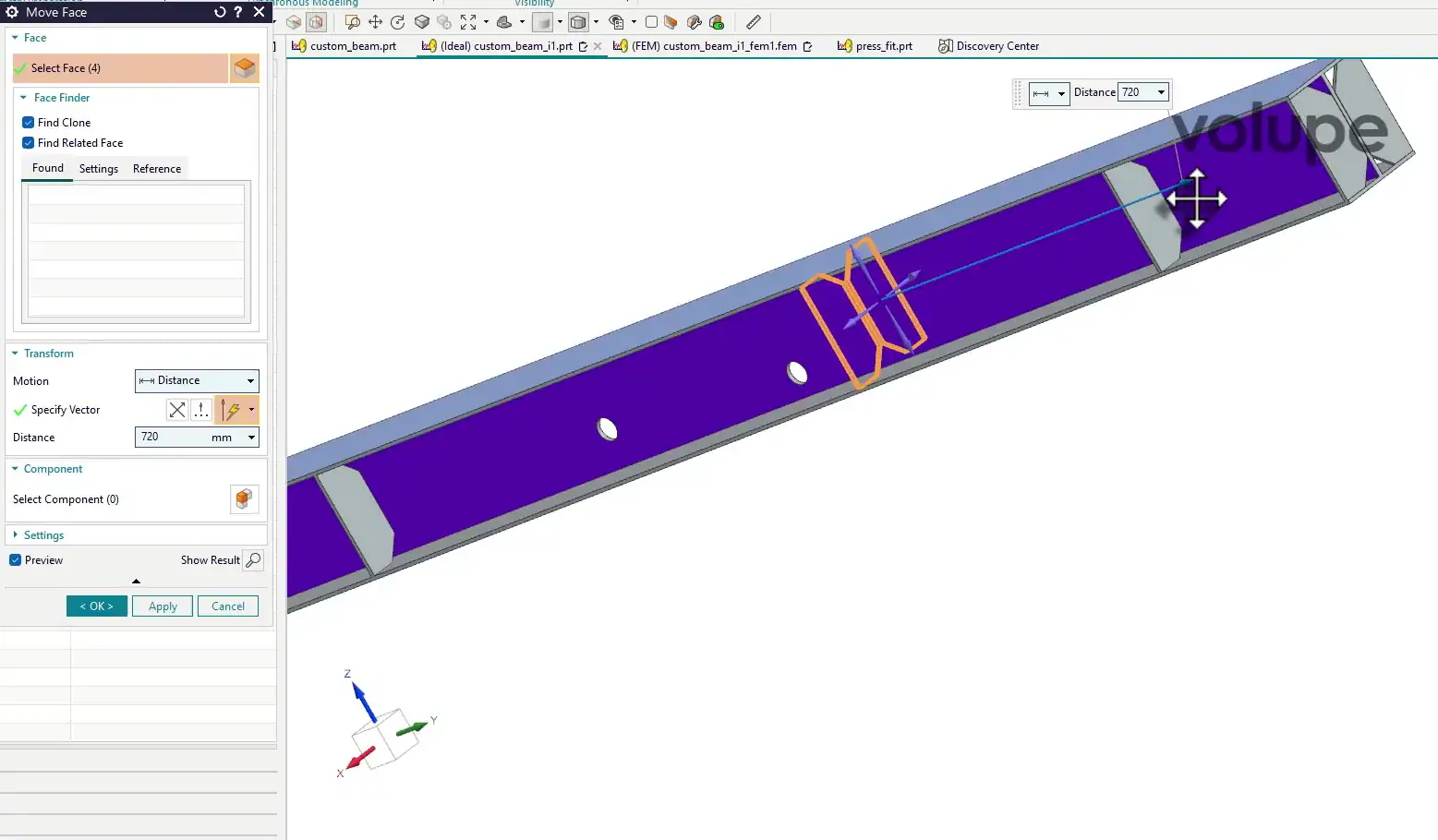
Figure 2: The same beam in the Simcenter 3D idealised part, here with holes added. Move Face shifts a stiffener 720 mm along the beam: the orange outline marks where it was, the preview where it goes. The midsurface and the FEM update with it.
For large assemblies, Simcenter 3D uses assembly FEMs: each component gets its own FE model, a repeated part is meshed once, and you can swap a solid version of a component for a shell version without touching the rest. We showed this in Leverage assembly FEMs in Simcenter 3D to simplify modelling. Femap also handles assemblies, joining parts in one model with glued contact, connections or superelements, but it has no component-by-component FE assembly that updates like a CAD assembly.
Licensing starts with Simcenter 3D Engineering Desktop. You add modules such as Motion, Laminate Composites, Additive Manufacturing and Design Space Explorer for specific applications, or use value-based tokens on top of Engineering Desktop, which give a team access to most modules without buying each one.
Simcenter 3D and NX: what is the difference?
Simcenter 3D is the successor to NX CAE, which is why the two names still turn up side by side. It is built on the same platform as NX CAD, and it runs standalone, with geometry from any CAD system, or inside NX.
That does not make Simcenter 3D a CAD system. Its geometry tools are there to prepare a model for analysis: cleaning up and simplifying CAD geometry from any source, with the analysis model staying linked to that geometry. If your designers work in NX, Simcenter 3D opens the same parts in a familiar environment.
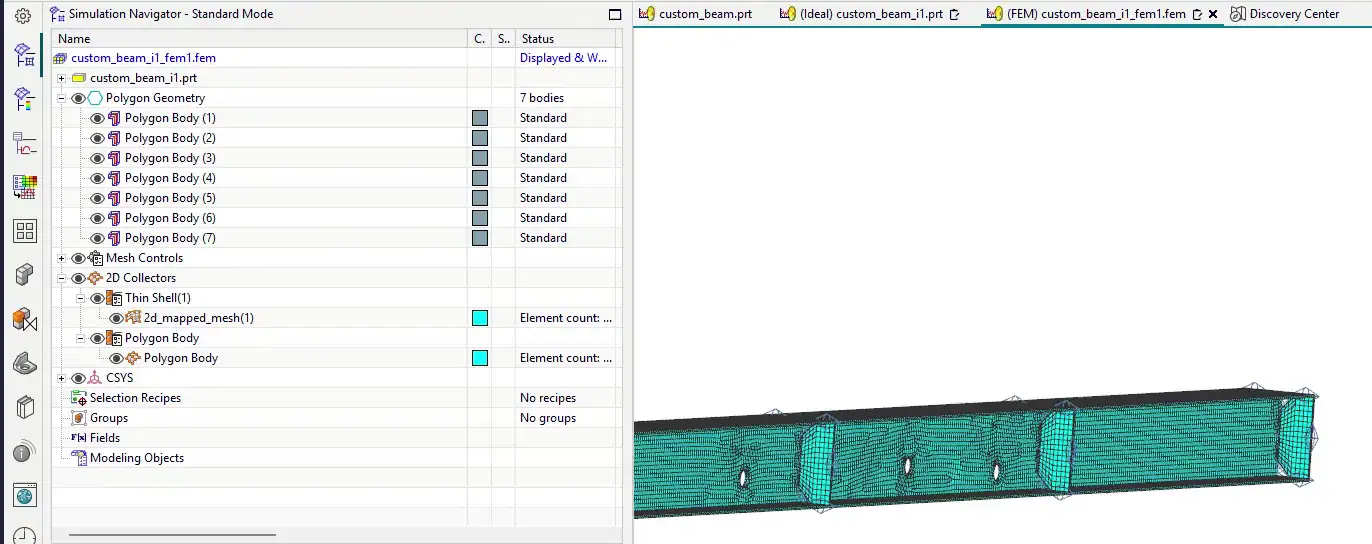
Figure 3: The FEM of the beam in Simcenter 3D. The part, the idealised part and the FEM are separate files, each open in its own tab above the model.
The solver got its new name later, with the 2019.1 release: NX Nastran became Simcenter Nastran, and in the same release Femap became Simcenter Femap. So “Femap with NX Nastran” is today’s Femap with Simcenter Nastran.
Same solver: can you move models between Femap and Simcenter 3D?
Partly. Both tools read and write Simcenter Nastran input, so the Nastran bulk data file is the common format. Write the deck from one program and read it into the other, and the nodes, elements, properties, materials, loads and constraints come across.
What does not come across is everything a Nastran deck has no entry for. Geometry and the link to the CAD are lost, and so is each tool’s own organisation of the model: Femap’s groups, layers and views, and Simcenter 3D’s FEM and simulation files. Contact and glue definitions come across as Nastran entries; check them after the transfer. If you plan to move results across as well, keep the node and element numbering unchanged.
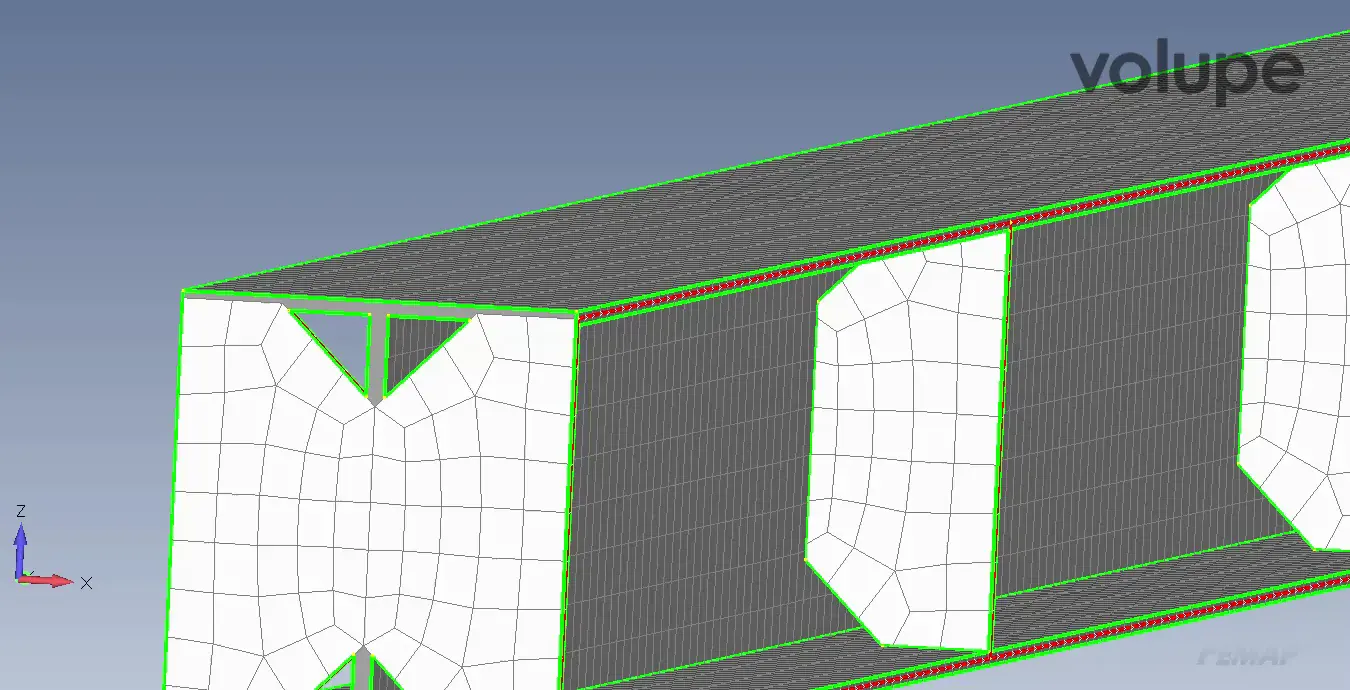
Figure 4: The shell mesh of the beam in Simcenter Femap. A Nastran deck carries a mesh like this, with its properties and loads, from one tool to the other; the geometry stays behind.
Watch the units as well. Femap does not store units, so you keep them consistent yourself. Simcenter 3D stores values with units: when it writes a deck it converts everything to the unit system set for the export, and when it reads one you tell it which system the deck uses. The classic slip is a deck in millimetres, newtons and tonnes read in as SI. The model looks right on screen, but lengths, densities or stresses are out by a factor of a thousand or more.
Results are easier. Since Femap 2022.1, when the Results Destination writes an .op2 file, the Nastran Output Requests let you choose its format: Femap or Simcenter. Choose Simcenter, and Simcenter Nastran writes an .op2 that Simcenter 3D and other Siemens CAE tools can read. Femap reads both formats, but Simcenter 3D cannot read the Femap one.
How to choose between Femap and Simcenter 3D
Here is where we would start in a few common situations:
- You inherit Nastran decks without CAD. Femap. Working directly on the mesh is its home ground.
- You redesign often, and the design lives in NX. Simcenter 3D, run inside NX, so the analysis model follows each design change.
- You need acoustics, electromagnetics or a multibody motion solver. Simcenter 3D. Structural vibration alone does not need it; Femap’s Dynamic Response bundle covers that.
- You only run linear statics, modes and buckling. Either tool does the job. The Femap with Simcenter Nastran bundle covers exactly that.
- You model large assemblies with repeated parts and both solid and shell variants. Simcenter 3D, with assembly FEMs.
- Your team works on Linux workstations. Simcenter 3D. Femap runs on Windows only.
- You already have Femap and now need acoustics. Keep Femap for the structural models and add Simcenter 3D for the acoustics, or move everything across to Simcenter 3D if you would rather work in one tool. Nastran decks and .op2 results move between them as described above.
If you end up with both, as in the last case, a Simcenter X Advanced licence is one way to get them. It is a named-user licence with one pool of tokens that covers Simcenter Femap, Simcenter 3D and other Simcenter tools.
We do not publish fixed prices for either tool. What a quote comes to depends on whether you take Femap alone or with Simcenter Nastran (and which analyses), which modules you add to Simcenter 3D Engineering Desktop, and how many engineers need access. We can quote both side by side.
We hope this makes the choice between the two a little clearer. If you are still unsure, send us a short description of your models and solvers through the Simcenter 3D or Simcenter Femap page, and we will tell you where we would start.
Questions about Simcenter 3D and Femap
Does Simcenter 3D include NX?
Not as a design tool. Simcenter 3D is built on the same platform as NX CAD and includes the geometry tools needed to prepare models for analysis, but it is a simulation product, not a CAD system. It runs standalone or inside NX.
Are Nastran and Femap the same?
No. Femap is a pre- and post-processor: you build the model and review the results in it. Nastran is the solver that runs the analysis. Siemens sells Femap on its own or bundled with Simcenter Nastran, and Femap also works with MSC Nastran and other solvers.
Is Simcenter Nastran the same as NX Nastran?
Yes, it is the same solver line under a new name. NX Nastran was renamed Simcenter Nastran with the 2019.1 release, and the Nastran in a Femap bundle is the same as standalone Simcenter Nastran.
Can Femap and Simcenter 3D share models?
Partly. Both read and write Nastran decks, so the mesh, properties, materials, loads and constraints move across, but not the geometry or the link to the CAD. For results, choose the Simcenter op2 format in Femap’s output requests, which Simcenter 3D can read.
Can I try both?
Yes. Get in touch and we will help you arrange a trial of either tool. If you would rather see them on a case like yours, our engineers can show both in a demo.