The frequency solver in Simcenter STAR-CCM+ in version 2606

Christoffer JohanssonSenior Application Specialist
In short
There is now a frequency solver, based on the Finite element method, in Simcenter STAR-CCM+ and this blog post will describe the equations and needed setup behind your acoustic simulations.
A huge update for acoustic simulations in Simcenter STAR-CCM+ was introduced in version 2606: the Frequency solver. Previously, solving for acoustics in the time-domain has been the way forward, but now you can use the software to obtain faster results via calculations in the frequency domain.
In this week’s blog post, we are looking into the frequency solver’s capabilities and features. For now, the frequency solver can be used for turbulence induced noise, and we of course hope for more focus areas in up-coming versions.
Next release of Simcenter STAR-CCM+ being 2612, in December, not in October as usual since the release schedule has been changed to be aligned over all Simcenter products.
Benefits of using a frequency-based solver
When solving for acoustic properties using a time-based solver you must resolve all pressure fluctuations in both time and space. This means that you need small time steps to capture how the pressure waves propagate in your fluid. Additionally, the mesh needs LES resolution to capture the pressure gradients. After the results are obtained, a Fast Fourier Transform (FFT) needs to be performed in order to visualize the sound pressure levels. Acoustic properties are easiest to alayzed when described per frequency.
Using a frequency-based solver will give you sound pressure levels for each frequency without the need for a FFT, since you solve for a solution per frequency. The highest frequencies are most expensive to solve for in time-dependent analysis, so when you specify which frequencies to solve for you can easily exclude these frequencies if you are using a frequency-based solver. With a time-based solver this is not possible, where you instead would have to excluded higher frequencies by creating a coarser mesh – which is a blunter tool to decide which frequencies to solve for. The mesh resolution used are often less fine in frequency-based simulation and the element type to use is tetrahedral elements. Tetrahedral elements are what Simcenter 3D uses for acoustic simulations, and for turbulence induced noise – like HVAC duct flow simulations – you can now use Simcenter STAR-CCM+ instead.
For vibro-acoustics you still need to export pressure data and solve for it in Simcenter 3D though, since Simcenter STAR-CCM+ cannot solve for noise propagation in solids at this moment.
Theory for acoustic simulations with the frequency solver
In frequency-domain acoustics, acoustic wave propagation in a quiescent fluid is governed by the Helmholtz equation using a finite‑element approach.
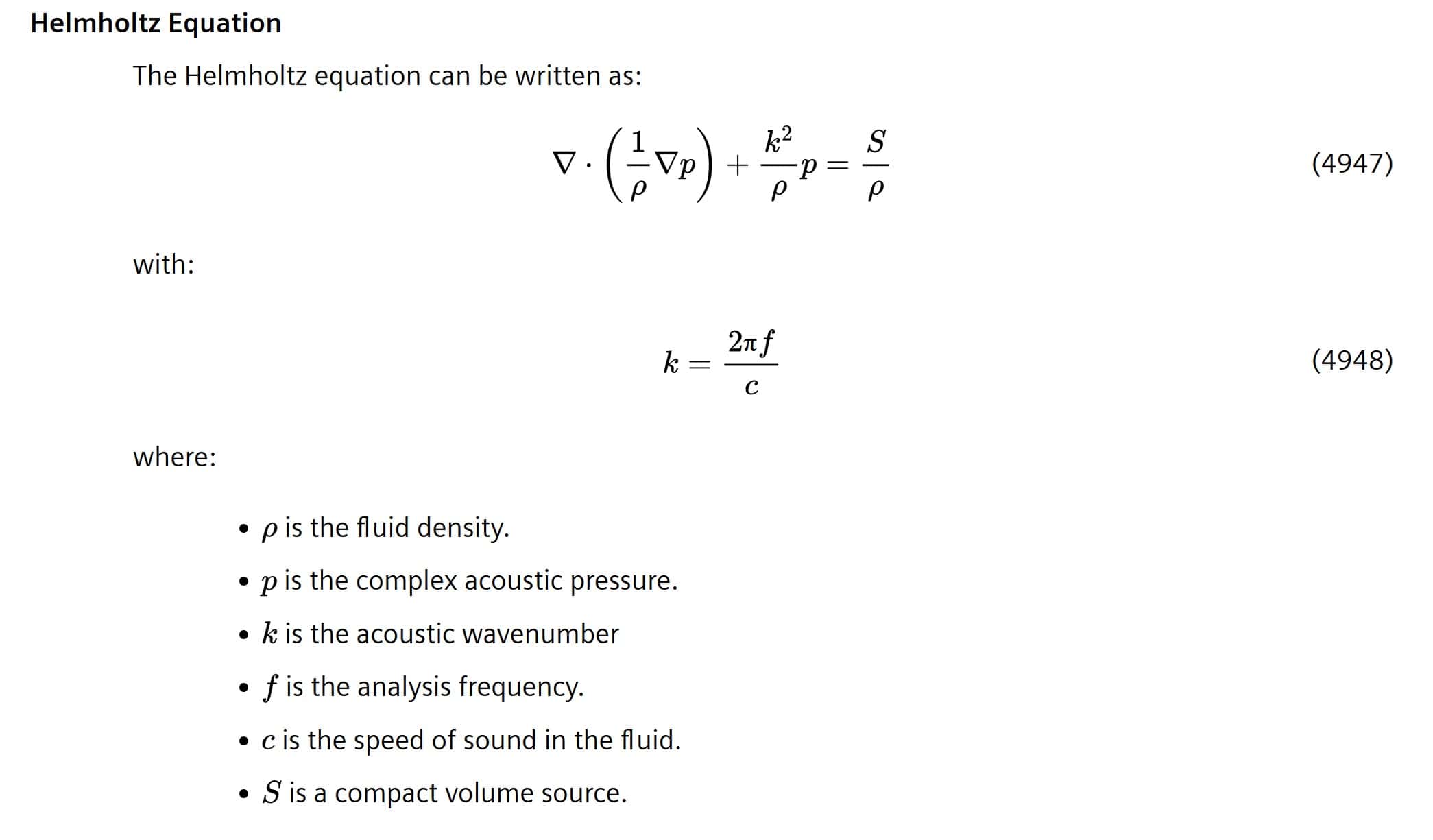
Finite Element Method with Adaptive Order (FEMAO) is a high‑order finite element method that automatically adjusts the polynomial order of the finite element shape functions, guided by a‑priori error indicators, to efficiently solve the Helmholtz equation over wide frequency ranges.
Theory for acoustic simulations using a time-frequency coupling model
There is also the possibility to couple the frequency solver to results from an upstream time-dependent solution. Then you will need an immersed source to divide the time-dependent domain and the frequency-domain. Time–Frequency coupling is modelled based on the principle of Welch’s method.
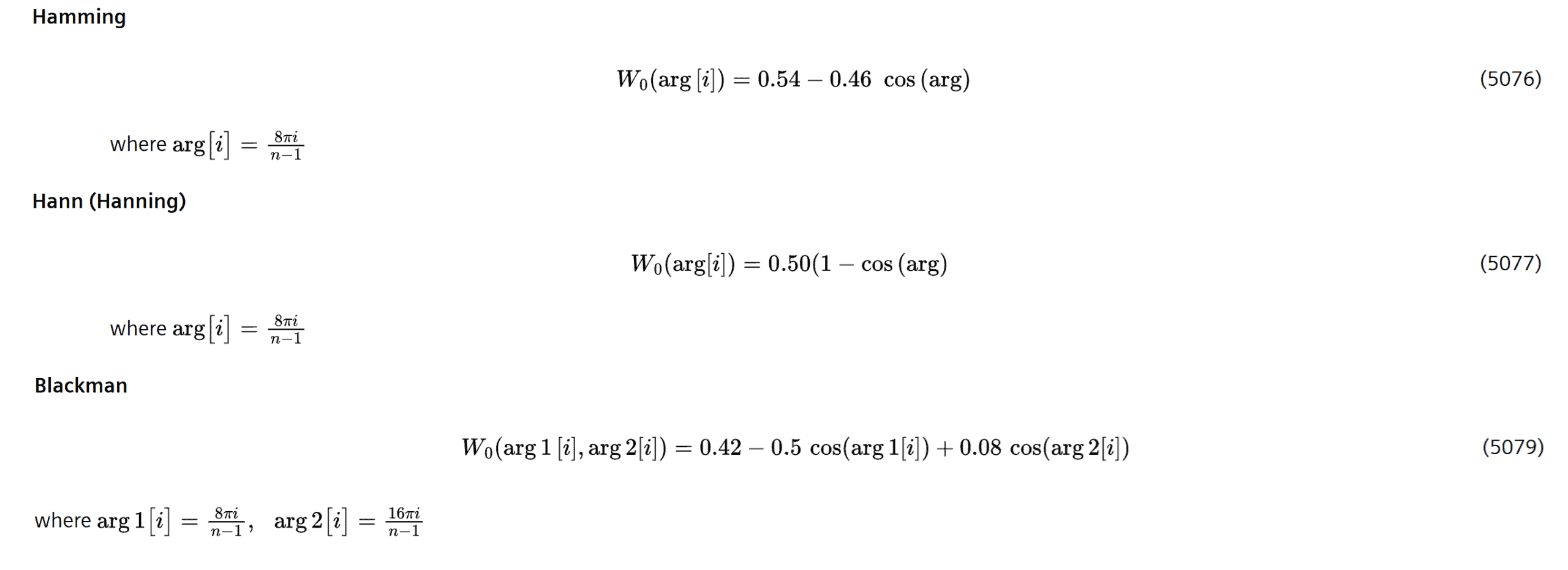
Welch’s method is a statistical technique for estimating the Power spectral density (PSD) of turbulent signals. It is based on dividing the signal into multiple, partially overlapping segments, applying a window function to each segment (wrapping so the angle is described correctly in the time to frequency domain coupling), and computing a Fourier transform for each segment individually. The resulting spectra are then averaged to obtain the final PSD estimate.
Window functions that are implemented in Simcenter STAR-CCM+ for the acoustic solver are Hann, Hamming and Blackman. You can also choose to use no window function.
How to set up a simulation using the acoustic frequency solver
Two tutorials were released along with the frequency solver in version 2606 to exemplify the workflow for acoustic simulations using the finite element method.
- Simplified muffler: focusing on setting up the mesh, model selection for simulations only using FEM, defining acoustic sources and absorption, calculating and analysing transmission losses, and setting up and analysing sound pressure levels. (https://docs.sw.siemens.com/documentation/external/PL20260405388167672/en-US/userManual/starccmp_userguide_html/STARCCMP/GUID-4F66A828-F1C2-4E70-8AC7-B9C0B6052885.html)
- Time-frequency coupled HVAC noise analysis: focusing on how to set up an acoustic finite element simulation with a turbulent noise source in a FVM (finite volume method) LES domain with coupling between the domains using a immersed shell region source, using simulation operations, implementing absorption effects, and setting up and analysing spectrum-averaged sound pressure levels. (https://docs.sw.siemens.com/documentation/external/PL20260405388167672/en-US/userManual/starccmp_userguide_html/STARCCMP/GUID-7B7DDA91-46BB-4618-8CDB-9EA68C36DBE2.html)
Mesh: for the FEM domain a tetrahedral mesh without prism layers is recommended. This mesh does not need to be refined to very fine cells, compared to the resolution a FVM mesh would need to. A surface extruder can be used for the absorbing outlet. If a time-dependent source of noise is calculated in a separate domain, it would require LES resolution and use a Shell mesh for the immersed shell region with triangular cells to connect to the FEM domain.
Physics models: For the FEM region there are only a few models needed to be selected; Three-dimensional space, gas and frequency (as time solver). When Finite element acoustics time frequency coupling (optional solver) is selected together with Immersed sources (time frequency coupling solver) you can couple the FEM domain to the immersed source towards a FVM domain as well.
Boundary conditions: Inlet and outlet specifications, region acoustic sources, propagation types and immersed sources are set up. Absorbers specified with impedance and propagation types (for example Perfectly matching layers, PML) can be selected.
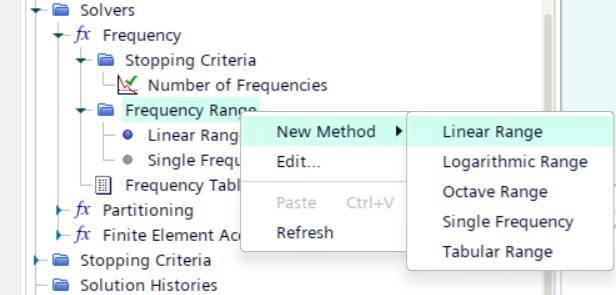
Solver settings: In the Frequency solver you select which frequency range you want to solver for, see picture below. The solver will solve for one frequency at the time using this range and increment you specify. You also select your window function here in the Solvers folder.
Reporting physical features: By setting up reports for all acoustic properties (intensity, pressure, velocity etc.), plots and can be created in logarithmic scales to visualize the results in the best possible way.
Analysis of results: No dataset function needed for the acoustic plots, so investigating the results can be done immediately after one frequency is solved for. Below you find a video created by exporting scene results for acoustic pressure in dB for the muffler in the first tutorial.
Thank you for reading this blog, we at Volupe hope that you will have great use of the new frequency solver in Simcenter STAR-CCM+ for acoustic simulations. If you have any questions, feel free to reach out to us at support@volupe.com.
